
Wifi Guard - Security Scan
ThunderCraft Tools
Find devices on your WiFi, detect risks, test speed and improve signal.
- Downloads
- 135+
- on Google Play
- Price
- Free
- No in-app purchases
- Updated
- Sep 25
- 2026 · v2.14.1
Screenshots


About Wifi Guard - Security Scan
Know what is connected to your WiFi — and what needs your attention.
Wifi Guard helps you understand and secure the Wi‑Fi you use every day — at home, at work, or on public hotspots. See who is on your network, spot risky Wi‑Fi setups, and get clear tips before signing in to sensitive accounts.
KEY FEATURES
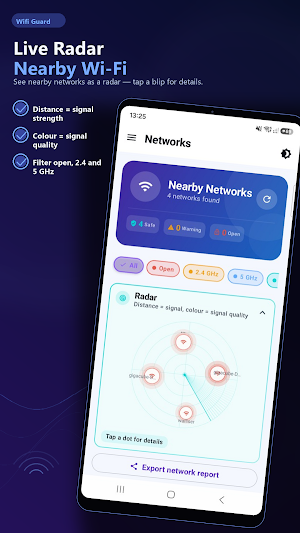
• Nearby Wi‑Fi scanner
Check encryption (Open / WEP / WPA / WPA2 / WPA3), channel, band, signal strength, and vendor info.
• Threat scan
Look for common risks such as evil-twin lookalikes, weak or open Wi‑Fi, captive portals, WPS exposure, DNS concerns, and more. Scans focus on your current network. Export reports as text, CSV, JSON, or PDF.
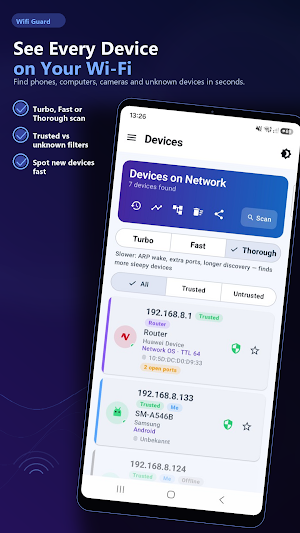
• Devices on your LAN
Discover phones, computers, TVs, cameras, and IoT devices. See open ports with plain-language tips, mark favorites, and get alerts for new devices.
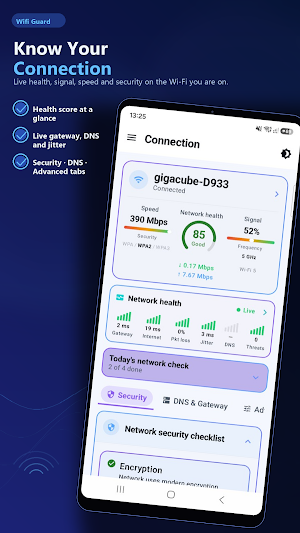
• Network health & security checklist
Security score, combined signal & channel advice, and a practical checklist for every network profile (home, work, guest, and more).
• Speed test
Measure download, upload, ping, and jitter. Keep history and compare Wi‑Fi vs mobile data.
• Signal tools
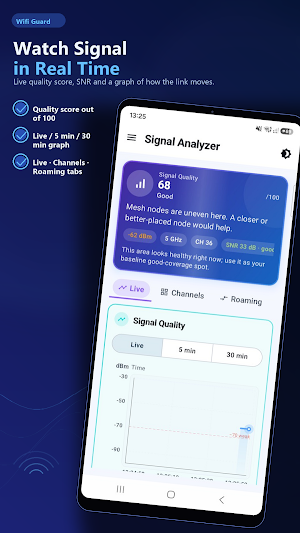
Live signal analyzer, channel recommendations, coverage / dead-zone testing, and signal heatmap.
• Extra tools
Network topology map, ping tool, Deauth Alert, WPS audit (advisory), DNS / Private DNS helpers, notification rules, and a compact home-screen widget that follows your in-app language.
• Made for many languages
English, Turkish, German, Spanish, Portuguese (Brazil), French, Russian, Arabic, Hindi, Indonesian, Vietnamese, Chinese, Japanese, Korean, Italian, Polish, Bengali, Urdu, Thai, Malay, and more.
WHO IT’S FOR
Home users who want to know who’s on their Wi‑Fi, travelers on hotel or café networks, and anyone who wants a clearer view of network security — without a networking degree.
PRIVACY
Network analysis runs on your device. Wifi Guard does not upload your device inventory and does not collect or share personal data. No account is required. See the in-app privacy policy for details.
IMPORTANT
Wifi Guard does not hack networks or crack passwords. It analyzes information available to your phone to help you make safer choices. Results can vary by Android version and router settings.
Download Wifi Guard and take a clearer look at your Wi‑Fi.
Wifi Guard helps you understand and secure the Wi‑Fi you use every day — at home, at work, or on public hotspots. See who is on your network, spot risky Wi‑Fi setups, and get clear tips before signing in to sensitive accounts.
KEY FEATURES
• Nearby Wi‑Fi scanner
Check encryption (Open / WEP / WPA / WPA2 / WPA3), channel, band, signal strength, and vendor info.
• Threat scan
Look for common risks such as evil-twin lookalikes, weak or open Wi‑Fi, captive portals, WPS exposure, DNS concerns, and more. Scans focus on your current network. Export reports as text, CSV, JSON, or PDF.
• Devices on your LAN
Discover phones, computers, TVs, cameras, and IoT devices. See open ports with plain-language tips, mark favorites, and get alerts for new devices.
• Network health & security checklist
Security score, combined signal & channel advice, and a practical checklist for every network profile (home, work, guest, and more).
• Speed test
Measure download, upload, ping, and jitter. Keep history and compare Wi‑Fi vs mobile data.
• Signal tools
Live signal analyzer, channel recommendations, coverage / dead-zone testing, and signal heatmap.
• Extra tools
Network topology map, ping tool, Deauth Alert, WPS audit (advisory), DNS / Private DNS helpers, notification rules, and a compact home-screen widget that follows your in-app language.
• Made for many languages
English, Turkish, German, Spanish, Portuguese (Brazil), French, Russian, Arabic, Hindi, Indonesian, Vietnamese, Chinese, Japanese, Korean, Italian, Polish, Bengali, Urdu, Thai, Malay, and more.
WHO IT’S FOR
Home users who want to know who’s on their Wi‑Fi, travelers on hotel or café networks, and anyone who wants a clearer view of network security — without a networking degree.
PRIVACY
Network analysis runs on your device. Wifi Guard does not upload your device inventory and does not collect or share personal data. No account is required. See the in-app privacy policy for details.
IMPORTANT
Wifi Guard does not hack networks or crack passwords. It analyzes information available to your phone to help you make safer choices. Results can vary by Android version and router settings.
Download Wifi Guard and take a clearer look at your Wi‑Fi.
What’s new
Version 2.14.1 · Updated September 25, 2026
What's new in 2.14.1: • Fixed a crash that could close the app when Android restarted protection mode on its own after freeing memory • Protection mode now comes back on the next app launch instead, and stays switched on until you turn it off
Alternatives to Wifi Guard - Security Scan
Looking for apps like Wifi Guard - Security Scan? Here are 6 similar Android apps on Google Play. The highest rated is EMEET STUDIO (3.8/5), and all 6 are free to download.
-
EMEET STUDIO 3.8
-
TrueVibeDate – Chat & Meet
-
NatureWalls – 4K Wallpapers
-
BioStar X Mobile
-
Bowel: Gut Health Tracker
-
Bangla Hero Keyboard
| App | Rating | Price | Installs | Last updated | Compare |
|---|---|---|---|---|---|
| Wifi Guard - Security Scan | – | Free | 100+ | Sep 25, 2026 | |
| EMEET STUDIO | 3.8 / 5 | Free | 10,000+ | Oct 29, 2026 | Compare |
| TrueVibeDate – Chat & Meet | – | Free | 50+ | – | Compare |
| NatureWalls – 4K Wallpapers | – | Free | 100+ | Aug 23, 2026 | Compare |
| BioStar X Mobile | – | Free | 1,000+ | Oct 5, 2026 | Compare |
| Bowel: Gut Health Tracker | – | Free | 1,000+ | Oct 14, 2026 | Compare |
| Bangla Hero Keyboard | – | Free | 50+ | – | Compare |
Similar apps on Google Play
- EMEET STUDIO
- TrueVibeDate – Chat & Meet
- NatureWalls – 4K Wallpapers
- BioStar X Mobile
- Bowel: Gut Health Tracker
- Bangla Hero Keyboard
- InboxAudioAI
- Void Cleaner
- DSPMobileApp
- SeifGuard
- Mi Coro - LLDM
- Graph Paper Maker: Print PDF
- Mi Expediente Digital
- Panel Gpscontrol Chile
- Time Calculator – Duration
- AskFahd
- True Position GD&T Calculator
- File Sender
- Apex Secure & Fast VPN
- Jengu
- OBD2 Car Scanner - ELM Torque
- Furitina — Image Creator
- GPS Location Tracker & Phone
- AuraWall – 4K Live Wallpapers
- MultiApp Pro