

Pen to Type
Pen to Type: Handwriting to Text Productivity In-app purchases Contains ads
Scan and convert handwritten docs to text, sign and share them in PDF.
- Downloads
- 50+
- on Google Play
- Price
- Free
- In-app purchases
- Updated
- May 4
- 2023 · v1.49
Screenshots




About Pen to Type
📚 Introducing Pen to Type, your all-in-one solution for ultimate document management and handwriting conversion! 📚
Tired of switching between multiple apps for your document needs? Look no further! Pen to Type brings you an extensive list of powerful features, including our innovative handwriting conversion tool, designed to simplify your life and help you stay organized. With our user-friendly interface, you'll find managing documents has never been easier!
Key features you'll love:
📝 Handwriting to text: Effortlessly transform your handwritten notes into digital text. You’re your written text, convert and share it easily. Great for students, professionals, and everyone in between!
📷 Scan Document: Capture high-quality scans of your documents, receipts, and more with our advanced scanning technology.
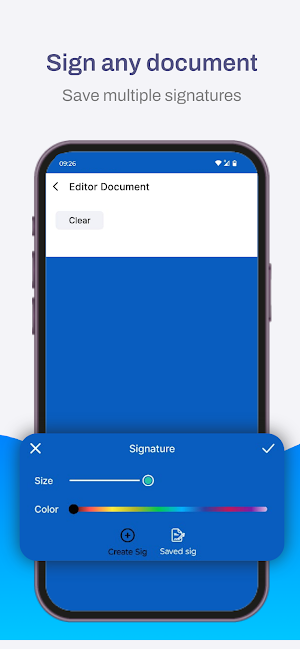
🖋️ Sign Document & Save Signatures: Securely sign and save your documents with custom signatures.
🌐 Share Document: Seamlessly share your documents with friends, colleagues, or clients via email, WhatsApp or social media.
📸 Convert Photos to PDF: Instantly turn your images into professional-looking PDF files.
📘 Merge Multiple Photos in a Single PDF: Combine multiple images into one organized PDF document with just a few taps.
🔒 Make Password-Protected PDFs: Safeguard your sensitive information with password encryption.
📸 4 Camera Views: Customize your camera settings for optimal capture of books, IDs, documents, or general photography.
🔖 Add Watermarks to Documents: Protect your work by adding custom watermarks to your documents.
✍️ Add Text to Documents: Easily insert text into your PDFs to make annotations, add comments, or fill out forms.
🎨 Edit Document Appearance: Adjust brightness, saturation, and exposure to enhance your documents for a polished, professional look.
Why wait? Download Pen to Type now and revolutionize the way you handle documents! Experience the convenience and efficiency of having all your document management tools, including our powerful handwriting conversion feature, in one powerful app.
Start your journey to a more organized life with Pen to Type! 🚀
Tired of switching between multiple apps for your document needs? Look no further! Pen to Type brings you an extensive list of powerful features, including our innovative handwriting conversion tool, designed to simplify your life and help you stay organized. With our user-friendly interface, you'll find managing documents has never been easier!
Key features you'll love:
📝 Handwriting to text: Effortlessly transform your handwritten notes into digital text. You’re your written text, convert and share it easily. Great for students, professionals, and everyone in between!
📷 Scan Document: Capture high-quality scans of your documents, receipts, and more with our advanced scanning technology.
🖋️ Sign Document & Save Signatures: Securely sign and save your documents with custom signatures.
🌐 Share Document: Seamlessly share your documents with friends, colleagues, or clients via email, WhatsApp or social media.
📸 Convert Photos to PDF: Instantly turn your images into professional-looking PDF files.
📘 Merge Multiple Photos in a Single PDF: Combine multiple images into one organized PDF document with just a few taps.
🔒 Make Password-Protected PDFs: Safeguard your sensitive information with password encryption.
📸 4 Camera Views: Customize your camera settings for optimal capture of books, IDs, documents, or general photography.
🔖 Add Watermarks to Documents: Protect your work by adding custom watermarks to your documents.
✍️ Add Text to Documents: Easily insert text into your PDFs to make annotations, add comments, or fill out forms.
🎨 Edit Document Appearance: Adjust brightness, saturation, and exposure to enhance your documents for a polished, professional look.
Why wait? Download Pen to Type now and revolutionize the way you handle documents! Experience the convenience and efficiency of having all your document management tools, including our powerful handwriting conversion feature, in one powerful app.
Start your journey to a more organized life with Pen to Type! 🚀
Alternatives to Pen to Type
Looking for apps like Pen to Type? Here are 6 similar Android apps on Google Play. All of them are free to download.
-
Vikingoz App Lite
-
Niki24
-
Fonetik Keyboard for Dysgraphi
-
Multiplication Table by Camila
-
Dawat-e Deen
-
Otyoo Basic
| App | Rating | Price | Installs | Last updated | Compare |
|---|---|---|---|---|---|
| Pen to Type | – | Free | 50+ | May 4, 2023 | |
| Vikingoz App Lite | – | Free | 10+ | Sep 8, 2023 | Compare |
| Niki24 | – | Free | 50+ | Jun 9, 2026 | Compare |
| Fonetik Keyboard for Dysgraphi | – | Free | 10+ | Jul 6, 2020 | Compare |
| Multiplication Table by Camila | – | Free | 0+ | Nov 20, 2023 | Compare |
| Dawat-e Deen | – | Free | 100+ | Nov 24, 2023 | Compare |
| Otyoo Basic | – | Free | 500+ | Mar 14, 2018 | Compare |
Compare Pen to Type with the top alternatives: ratings, updates, ASO score and keyword gaps →
Similar apps on Google Play
- Vikingoz App Lite
- Niki24
- Fonetik Keyboard for Dysgraphi
- Multiplication Table by Camila
- Dawat-e Deen
- Otyoo Basic
- Mobile Analytics 2.0
- Caña Xpress
- brewbricks
- Frida
- Cypien AI
- Photo Spark
- Mondelez
- Remember When
- Pruleads Zambia
- erxes Inventory Counting
- Most Important Tasks
- Rekor Blue
- FAN Courier
- vCard QR Generator
- Techtrak Service Provider 2
- 한우정액신청
- FOODILICIOUS by Aaradhya
- QuickServe Laundry Partner
- QR & Barcode Scanner