

DirectServe: File Transfer
GhostgramLabs Tools
Transfer files to iPhone, PC & TV over WiFi. No app needed on other devices.
- Downloads
- 346+
- on Google Play
- Price
- Free
- No in-app purchases
- Updated
- Aug 30
- 2026 · v1.0.26
Screenshots


About DirectServe: File Transfer
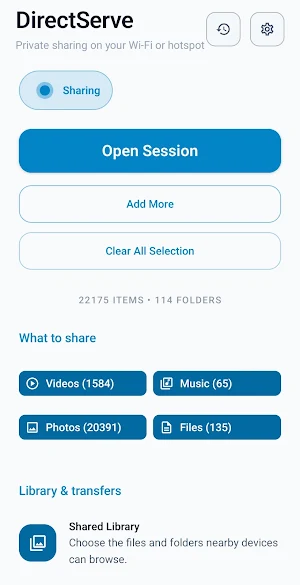
Transfer files from Android to iPhone, PC, Mac, TV, tablet, or Chromebook over WiFi or hotspot — with no app needed on the other device.
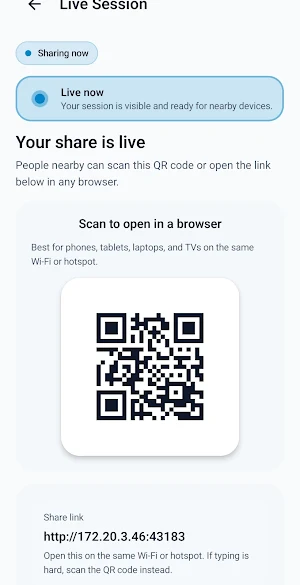
Open a link, scan a QR code, or discover your phone as a DLNA/UPnP media server. DirectServe works locally without cloud uploads, accounts, USB cables, internet, or receiver installs.
🔹 KEY FEATURES
🔗 Share to Any Browser
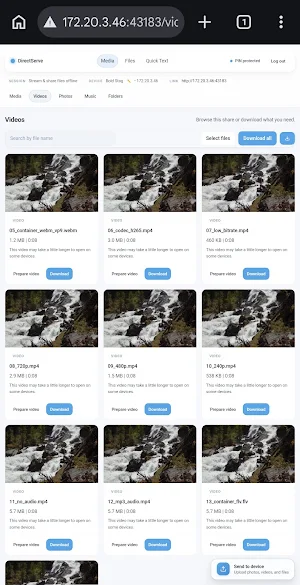
Open and download videos, photos, music, PDFs, documents, archives, and files from iPhone, iPad, Android, Windows, Mac, Linux, Chromebook, tablets, and browser-enabled TVs.
📱➡️🍎 Android to iPhone Transfer
Send files from Android to iPhone or iPad over WiFi or hotspot — no AirDrop, no USB, no cloud storage, no iOS app.
📱➡️💻 Android to PC / Laptop Sharing
Browse, preview, download, and manage files from a browser on Windows, Mac, Linux, or Chromebook.
🔄 Two-Way File Transfer
Receive files back from PC, iPhone, tablet, or another phone. Upload approval keeps you in control.
🎬 Stream Your Media
Play supported videos and music directly from your Android phone in any browser. If a browser cannot play a file, you can still download the original.
⚡ Smart Media Compatibility
DirectServe tries direct playback first and prepares browser-compatible streams only when needed, depending on file, device, and browser support.
📺 DLNA / UPnP Media Server
Make your Android phone visible as a local media server for Smart TVs, VLC, Kodi, Windows Media Player, PlayStation, Xbox, and other DLNA/UPnP players.
📡 Stream to TV
Watch supported videos, music, and photos from your phone on Smart TVs, browsers, VLC, Kodi, consoles, and supported media players.
📲 Live Screen Mirroring
Mirror your Android screen to another device through a browser on the same WiFi or hotspot. Great for demos, meetings, teaching, and big-screen viewing.
💬 Quick Text Sharing
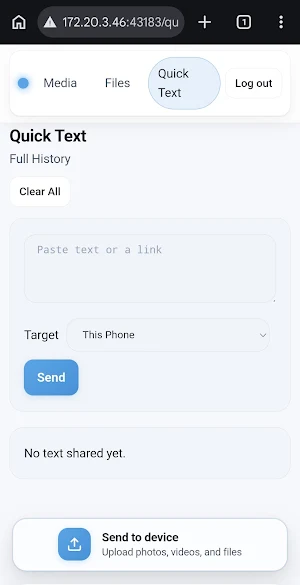
Send links, notes, messages, and codes between your phone and connected browsers.
📶 Works on WiFi or Hotspot
Use DirectServe anywhere nearby devices can join the same network — even with no internet.
🔒 Private Local Sharing
Your files stay on your Android phone. DirectServe never uploads your library to the cloud.
🛡️ Session Controls
Optional PIN protection, upload approval, device blocking, download control, instant stop, and cleanup of temporary playback files.
🔹 USE DIRECTSERVE FOR
• Android to iPhone file transfer without AirDrop
• Android to PC file sharing over WiFi
• Phone to laptop file transfer without USB
• Sending large videos without cables or cloud
• Streaming Android videos to a Smart TV
• Using Android as a DLNA / UPnP media server
• Playing media in VLC, Kodi, Smart TV, PlayStation, or Xbox
• A private local media streaming hub
• Mirroring your Android screen to PC, TV, tablet, or phone
• Sharing files without internet while traveling
• Receiving files from iPhone, PC, tablet, or another phone
• Sending links, notes, and text between devices
🔹 WHY CHOOSE DIRECTSERVE
✅ No receiver app required
✅ Works with iPhone, PC, Mac, Linux, Chromebook, TV, and tablets
✅ DLNA/UPnP media discovery
✅ Works over WiFi or hotspot — no internet needed
✅ No cloud upload
✅ No account required
✅ No USB cable
✅ Optional PIN protection
✅ Upload approval and download controls
🌍 LANGUAGE SUPPORT
English, Afrikaans, Arabic, Chinese (Simplified & Traditional), Dutch, French, German, Greek, Hindi, Indonesian, Italian, Japanese, Korean, Malayalam, Portuguese, Portuguese (Brazil), Russian, Spanish, Spanish (US), Swedish, Tamil, Telugu, Thai, Turkish, Vietnamese.
🔹 PRIVACY
DirectServe is designed for private local sharing. Your files stay on your device unless you choose to share them with nearby devices on the same WiFi or hotspot. No cloud account is required
Open a link, scan a QR code, or discover your phone as a DLNA/UPnP media server. DirectServe works locally without cloud uploads, accounts, USB cables, internet, or receiver installs.
🔹 KEY FEATURES
🔗 Share to Any Browser
Open and download videos, photos, music, PDFs, documents, archives, and files from iPhone, iPad, Android, Windows, Mac, Linux, Chromebook, tablets, and browser-enabled TVs.
📱➡️🍎 Android to iPhone Transfer
Send files from Android to iPhone or iPad over WiFi or hotspot — no AirDrop, no USB, no cloud storage, no iOS app.
📱➡️💻 Android to PC / Laptop Sharing
Browse, preview, download, and manage files from a browser on Windows, Mac, Linux, or Chromebook.
🔄 Two-Way File Transfer
Receive files back from PC, iPhone, tablet, or another phone. Upload approval keeps you in control.
🎬 Stream Your Media
Play supported videos and music directly from your Android phone in any browser. If a browser cannot play a file, you can still download the original.
⚡ Smart Media Compatibility
DirectServe tries direct playback first and prepares browser-compatible streams only when needed, depending on file, device, and browser support.
📺 DLNA / UPnP Media Server
Make your Android phone visible as a local media server for Smart TVs, VLC, Kodi, Windows Media Player, PlayStation, Xbox, and other DLNA/UPnP players.
📡 Stream to TV
Watch supported videos, music, and photos from your phone on Smart TVs, browsers, VLC, Kodi, consoles, and supported media players.
📲 Live Screen Mirroring
Mirror your Android screen to another device through a browser on the same WiFi or hotspot. Great for demos, meetings, teaching, and big-screen viewing.
💬 Quick Text Sharing
Send links, notes, messages, and codes between your phone and connected browsers.
📶 Works on WiFi or Hotspot
Use DirectServe anywhere nearby devices can join the same network — even with no internet.
🔒 Private Local Sharing
Your files stay on your Android phone. DirectServe never uploads your library to the cloud.
🛡️ Session Controls
Optional PIN protection, upload approval, device blocking, download control, instant stop, and cleanup of temporary playback files.
🔹 USE DIRECTSERVE FOR
• Android to iPhone file transfer without AirDrop
• Android to PC file sharing over WiFi
• Phone to laptop file transfer without USB
• Sending large videos without cables or cloud
• Streaming Android videos to a Smart TV
• Using Android as a DLNA / UPnP media server
• Playing media in VLC, Kodi, Smart TV, PlayStation, or Xbox
• A private local media streaming hub
• Mirroring your Android screen to PC, TV, tablet, or phone
• Sharing files without internet while traveling
• Receiving files from iPhone, PC, tablet, or another phone
• Sending links, notes, and text between devices
🔹 WHY CHOOSE DIRECTSERVE
✅ No receiver app required
✅ Works with iPhone, PC, Mac, Linux, Chromebook, TV, and tablets
✅ DLNA/UPnP media discovery
✅ Works over WiFi or hotspot — no internet needed
✅ No cloud upload
✅ No account required
✅ No USB cable
✅ Optional PIN protection
✅ Upload approval and download controls
🌍 LANGUAGE SUPPORT
English, Afrikaans, Arabic, Chinese (Simplified & Traditional), Dutch, French, German, Greek, Hindi, Indonesian, Italian, Japanese, Korean, Malayalam, Portuguese, Portuguese (Brazil), Russian, Spanish, Spanish (US), Swedish, Tamil, Telugu, Thai, Turkish, Vietnamese.
🔹 PRIVACY
DirectServe is designed for private local sharing. Your files stay on your device unless you choose to share them with nearby devices on the same WiFi or hotspot. No cloud account is required
What’s new
Version 1.0.26 · Updated August 30, 2026
What’s new in DirectServe 1.0.26: • Added full Android 16 compatibility. • Sharing links now show the reliable local IP address. • Nearby devices display a friendly name with their IP address. • Improved local sharing clarity and connection reliability. • General stability and compatibility improvements.
Alternatives to DirectServe: File Transfer
Looking for apps like DirectServe: File Transfer? Here are 6 similar Android apps on Google Play. The highest rated is JustTapVPN — Бесплатный ВПН (3.8/5), and all 6 are free to download.
-
CipherWay VPN
-
DeepRestore
-
Vivo Control
-
Checksum Calculator
-
Moon Phase Dial
-
JustTapVPN — Бесплатный ВПН 3.8
| App | Rating | Price | Installs | Last updated | Compare |
|---|---|---|---|---|---|
| DirectServe: File Transfer | – | Free | 100+ | Aug 30, 2026 | |
| CipherWay VPN | – | Free | 10,000+ | Aug 18, 2026 | Compare |
| DeepRestore | – | Free | 10,000+ | May 22, 2026 | Compare |
| Vivo Control | – | Free | 500+ | – | Compare |
| Checksum Calculator | – | Free | 100+ | May 4, 2026 | Compare |
| Moon Phase Dial | – | Free | 10+ | Aug 25, 2026 | Compare |
| JustTapVPN — Бесплатный ВПН | 3.8 / 5 | Free | 100,000+ | Sep 3, 2026 | Compare |
Similar apps on Google Play
- CipherWay VPN
- DeepRestore
- Vivo Control
- Checksum Calculator
- Moon Phase Dial
- JustTapVPN — Бесплатный ВПН
- PetCareHUB
- VistaCCD
- Chemical Resistance Check
- ZapiLog
- UREKA유레카 - UR위키, UR코드 스캐너
- PLC Simulator & Automation Lab
- Candy Horizon
- PowerOutage.com Lineman
- GM9 - Contact Number Fixer
- PDF Reader - File Manager
- NovaTally
- NexTrapp
- Authenticator: 2FA & Password
- Peles Birthday Reminder
- Ultra Fast AI Speed Test
- VitalMobile
- GovWell
- Vistaguay
- Energi2