
PLC Simulator & Automation Lab
Tools In-app purchases
Learn PLC programming: ladder logic & automation simulator — motors, VFD, I/O
- Rating
- 4.5
- 89 ratings
- Downloads
- 1K+
- on Google Play
- Price
- Free
- In-app purchases
- Updated
- Sep 11
- 2026 · v1.13.2
Screenshots
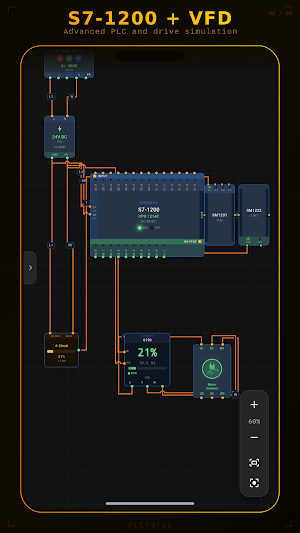
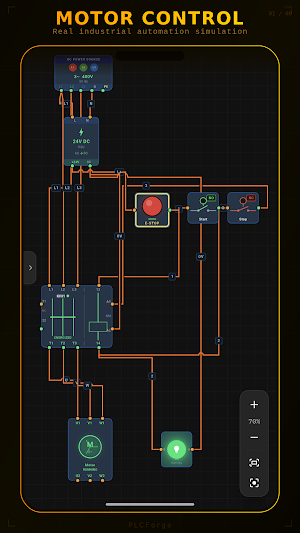
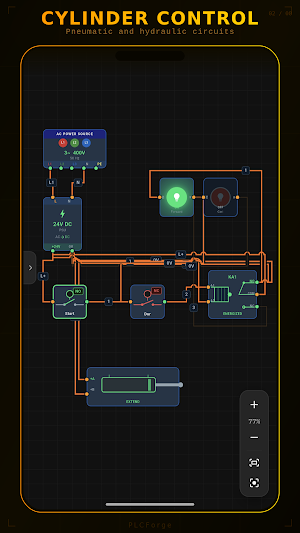


About PLC Simulator & Automation Lab
PLC with ladder logic, and watch your circuit run in real time — no hardware required.
Whether you're an automation student, an electrical technician, or an engineer, PLCForge lets you test your ideas safely and instantly.
▶ WHAT YOU CAN DO
• Place, wire, pan and zoom components on an interactive canvas
• Simulate a realistic power chain: 3~ AC supply → power supply → PLC → outputs
• Control the circuit live by tapping buttons, sensors and the E-stop
• Watch motors spin, lamps light up and contactors pull in
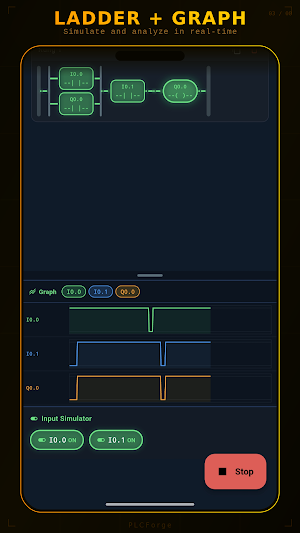
▶ FULL SANDBOX PLC LADDER EDITOR
Tap the PLC and write your own ladder program:
• Contacts: NO / NC, rising & falling edge
• Coils: output, SET, RESET (latching / sealing)
• Timers: TON, TOF, TP
• Counters: CTU, CTD
• Compare (CMP) and math: ADD, SUB, MUL, DIV, MOV
• Live signal graph and input simulator
▶ RICH COMPONENT LIBRARY
PLC (CPU 1214C-style) + expansion modules (DI/DO/AI/AO) • push buttons (NO/NC) • emergency stop • selector & limit switches • contactor • thermal overload
relay • relay • 3-phase induction motor • PNP sensor • analog / temperature / pressure sensors • indicator lamps • buzzer • timer relay • DC power supply
• 3~ AC source • VFD (variable frequency drive) • servo drive • conveyor belt • pneumatic cylinder • solenoid valve
▶ FAULT SIMULATION
Inject real-world short-circuit and open-circuit faults across 27 components. The safest way to learn troubleshooting and understand how circuits behave
when things go wrong.
▶ STEP-BY-STEP GUIDED COURSE
An interactive curriculum of 24+ stops, from beginner to advanced:
Buttons → switches → emergency stop → lamps → relays → contactors → timers → counters → sensors → protection → motors → VFD → pneumatics → PLC basics →
digital I/O → ladder logic → analog I/O → compare & math → SET/RESET → capstone projects.
Every stop includes interactive demos and "Try on Canvas" circuits.
▶ CHALLENGES & READY-MADE TEMPLATES
• Challenge tasks ordered from easy to hard
• Prebuilt circuit templates: Motor Start-Stop, Sensor-Lamp, Timed Lamp, E-Stop Protected Motor, Conveyor System, Alarm Circuit, PLC Solenoid Valve,
Analog VFD Speed Control and more
▶ PROFESSIONAL TOOLS
• Save / load multiple projects
• Undo / redo
• Snap to grid
• Zoom to fit
• Wire labeling and coloring
• Build and save your own templates
▶ 5 LANGUAGES
Full support for English, Turkish, German, Spanish and Arabic.
▶ WHO IS IT FOR?
• Automation and electrical engineering students
• Vocational and technical school students
• Field technicians and maintenance staff
• Anyone learning PLCs from scratch
• Engineers who want to prototype ideas fast
Experiment as much as you like — no hardware to buy, no wiring risk. With PLCForge, learning automation is safe, hands-on and fun.
Download now and build your first circuit!
What’s new
Version 1.13.2 · Updated September 11, 2026
Simulation fixes and interface improvements 🔧 • Fixed simulation issues found in the HMI panel and some components — circuits now behave even closer to a real panel • A motor fed from the same phase no longer runs; the thermal relay only sees the overcurrent on its own branch • Colour and Duplicate buttons added to the selected-component bar • Small refinements on several screens
User reviews

thank you for this software, everything is good but needs more features like rooted the equipment ,terminal connector , more output and input device how does simulation work after wiring complete how to upload the program and simulation need a clear instruction

Plz add HMI screen

this app will help you in learning plc from very to advance with very best and easy way. thanks to owner for the great contribution.

UI/UX are excellent and most loved 😍

thia app is very useful for automation Engineer's

Thank you for your support. Earlier, even after connecting the AC supply to the PSU, the PLC was not running. Now it is working perfectly. It is also possible that I made a wiring mistake at first. Thank you for your clear explanation and quick response. This app is very helpful for learning PLC programming.
Alternatives to PLC Simulator & Automation Lab
Looking for apps like PLC Simulator & Automation Lab? Here are 6 similar Android apps on Google Play. The highest rated is ASE Test Prep: Auto Exam 2026 (4.9/5), and all 6 are free to download.
-
Coast: Native Work Order CMMS 4.4
-
ICO – Smart pool/spa partner 4.1
-
Froling Connect
-
SHRM Test Prep 2026 4.4
-
ASE Test Prep: Auto Exam 2026 4.9
-
Procore 3.8
| App | Rating | Price | Installs | Last updated | Compare |
|---|---|---|---|---|---|
| PLC Simulator & Automation Lab | 4.5 / 5 | Free | 1,000+ | Sep 11, 2026 | |
| Coast: Native Work Order CMMS | 4.4 / 5 | Free | 50,000+ | Oct 26, 2026 | Compare |
| ICO – Smart pool/spa partner | 4.1 / 5 | Free | 50,000+ | Feb 14, 2026 | Compare |
| Froling Connect | – | Free | 100,000+ | Oct 14, 2026 | Compare |
| SHRM Test Prep 2026 | 4.4 / 5 | Free | 10,000+ | Dec 6, 2025 | Compare |
| ASE Test Prep: Auto Exam 2026 | 4.9 / 5 | Free | 50,000+ | Sep 10, 2026 | Compare |
| Procore | 3.8 / 5 | Free | 1,000,000+ | – | Compare |