
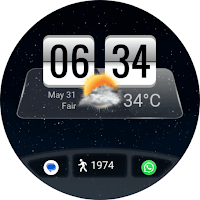
Flip Clock Weather Watch Face
Personalization
A digital watch face for Wear OS with weather reports
- Downloads
- 418+
- on Google Play
- Price
- $1.49
- No in-app purchases
- Updated
- Sep 12
- 2026
Screenshots
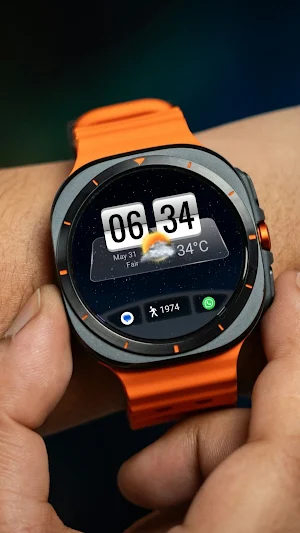
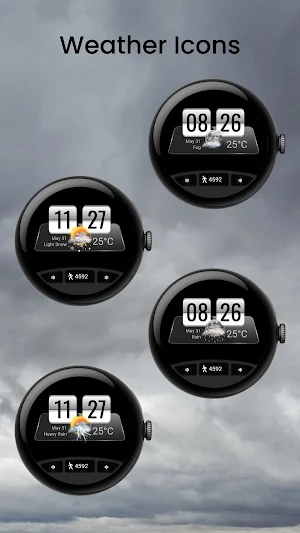
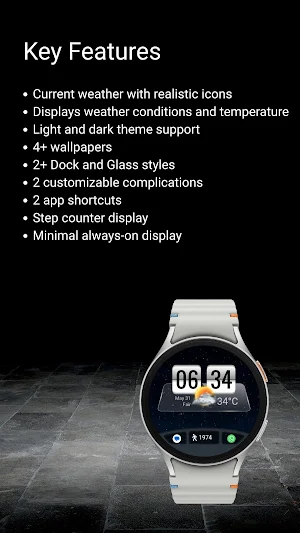


About Flip Clock Weather Watch Face
Flip Clock 2 is a digital watch face based on a classic flip clock style, combined with current weather and everyday information.
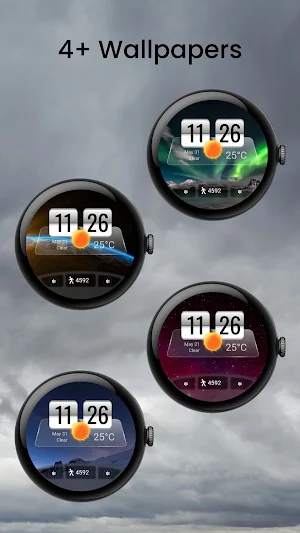
The watch face shows time, date, step count, and current weather conditions with large, realistic icons that update throughout the day. Everything is designed to stay clear at a glance without adding clutter.
You can switch between light and dark themes, choose from available wallpapers, and set up shortcuts or complications for quick access to the things you use most.
✨ Key Features
- Flip clock–style digital time display
- Current weather with realistic, changing icons
- Displays weather conditions and temperature
- Light and dark theme support
- 5+ wallpapers
- 3+ glass styles
- 3+ dock styles
- 2 customizable complications
- 2 app shortcuts
- Step counter display
- Always-on display optimized for battery life
- Supports 12-hour and 24-hour formats
☀️ IMPORTANT: If the weather doesn't update:
1. Try switching between watch faces
2. Open the default 'Weather' app on your watch and enable location permission.
3. Ensure location access is set to "Always Allow" for both the watch face and the weather provider.
4. Check that Location (GPS) is toggled ON in both the watch and the paired smartphone settings.
5. Turn off battery Power Saving mode to allow background data sync.
⚠️ Compatibility
This is a Wear OS watch face app for smartwatches running Wear OS 5 or higher, built with the new Watch Face Format required on modern devices.
Compatible devices include:
➡️ Galaxy Watch 8, 7, 6, 5, and 4 (including Classic and Ultra models)
➡️ Pixel Watch 4, 3, 2, and 1
➡️ Other watches running Wear OS 5+
Contact Us
If you have questions or feedback, feel free to contact me at [email protected] for support.
The watch face shows time, date, step count, and current weather conditions with large, realistic icons that update throughout the day. Everything is designed to stay clear at a glance without adding clutter.
You can switch between light and dark themes, choose from available wallpapers, and set up shortcuts or complications for quick access to the things you use most.
✨ Key Features
- Flip clock–style digital time display
- Current weather with realistic, changing icons
- Displays weather conditions and temperature
- Light and dark theme support
- 5+ wallpapers
- 3+ glass styles
- 3+ dock styles
- 2 customizable complications
- 2 app shortcuts
- Step counter display
- Always-on display optimized for battery life
- Supports 12-hour and 24-hour formats
☀️ IMPORTANT: If the weather doesn't update:
1. Try switching between watch faces
2. Open the default 'Weather' app on your watch and enable location permission.
3. Ensure location access is set to "Always Allow" for both the watch face and the weather provider.
4. Check that Location (GPS) is toggled ON in both the watch and the paired smartphone settings.
5. Turn off battery Power Saving mode to allow background data sync.
⚠️ Compatibility
This is a Wear OS watch face app for smartwatches running Wear OS 5 or higher, built with the new Watch Face Format required on modern devices.
Compatible devices include:
➡️ Galaxy Watch 8, 7, 6, 5, and 4 (including Classic and Ultra models)
➡️ Pixel Watch 4, 3, 2, and 1
➡️ Other watches running Wear OS 5+
Contact Us
If you have questions or feedback, feel free to contact me at [email protected] for support.
What’s new
Updated September 12, 2026
- Updated images based on recent watch face design changes
User reviews

The date always shows June 30. The developer has fixed it
Alternatives to Flip Clock Weather Watch Face
Looking for apps like Flip Clock Weather Watch Face? Here are 6 similar Android apps on Google Play. The highest rated is Weather Animated Pro (4.4/5).
-
FSW316 Hybrid Watch Face
-
Weather Animated Pro 4.4
-
Digital Watchface M19
-
SamWatch Digital Weather 2 4.1
-
Live Weather Watch Face
-
Obsidian Split Watch Face
| App | Rating | Price | Installs | Last updated | Compare |
|---|---|---|---|---|---|
| Flip Clock Weather Watch Face | – | $1.49 | 100+ | Sep 12, 2026 | |
| FSW316 Hybrid Watch Face | – | 1.49 USD | 10+ | Sep 5, 2026 | Compare |
| Weather Animated Pro | 4.4 / 5 | 1.99 USD | 500+ | Aug 21, 2026 | Compare |
| Digital Watchface M19 | – | 1.49 USD | 100+ | Aug 12, 2026 | Compare |
| SamWatch Digital Weather 2 | 4.1 / 5 | 1.49 USD | 1,000+ | Aug 13, 2026 | Compare |
| Live Weather Watch Face | – | 0.99 USD | 100+ | Oct 4, 2026 | Compare |
| Obsidian Split Watch Face | – | 1.99 USD | 50+ | Aug 18, 2026 | Compare |
Similar apps on Google Play
- FSW316 Hybrid Watch Face
- Weather Animated Pro
- Digital Watchface M19
- SamWatch Digital Weather 2
- Live Weather Watch Face
- Obsidian Split Watch Face
- Suva Digital Watch Face
- Weather Flip Animated
- FSW292 Weather, Digital
- MIMIX Digital WP05 Watchface
- HANSWATCH Hifrov
- Weather Ultra
- AWD BIG Weather 2
- Weather Carbon
- Digital watchface D21
- OMG 452 - Digital Watch Face
- MJ166 Clean Digital Watch
- ML2U 243 Watch Face
- DIGI FLIPPONS WS38 Watch face
- Flip Clock
- FSW291 Digital Watch face
- Weather Info Watchface
- OMG 38 - Digital Watch Face
- ML2U 377 Watch Face
- Flip Clock Digital Watch Face
- Weather Flip DARK Animated
- Weather Dashboard - Watch Face
- Digital Astra Watch face