

Futuredesk
Tools
FutureDesk: Employee check-ins, leave requests, tasks & work updates.
- Downloads
- 21+
- on Google Play
- Price
- Free
- No in-app purchases
- Updated
- Jun 8
- 2026 · v1.0.0
Screenshots


About Futuredesk
FutureDesk – Smart Employee Management & CRM Solution
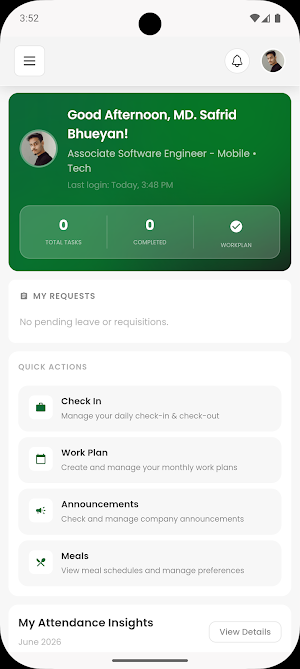
FutureDesk is a powerful employee management and CRM platform designed to simplify daily workplace operations, improve team collaboration, and enhance organizational productivity. Whether you manage a small business, a growing startup, or a large enterprise, FutureDesk provides the tools needed to keep your workforce connected, organized, and efficient.
With a modern and intuitive interface, FutureDesk enables employees and managers to handle essential workplace activities from a single platform. From attendance tracking and leave management to task updates and team communication, FutureDesk helps streamline workflows and reduce administrative overhead.
Key Features
Employee Attendance & Check-In
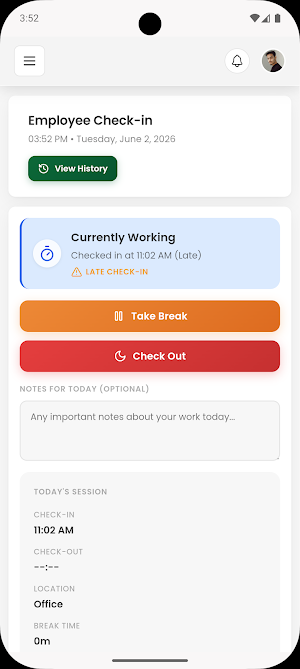
Employees can easily check in and check out directly from the app. Attendance records are maintained automatically, helping organizations monitor workforce activity and maintain accurate attendance logs.
Leave Request Management
FutureDesk simplifies leave management by allowing employees to submit leave requests digitally. Managers can review, approve, or reject requests efficiently, ensuring a transparent and organized approval process.
Task & Work Updates
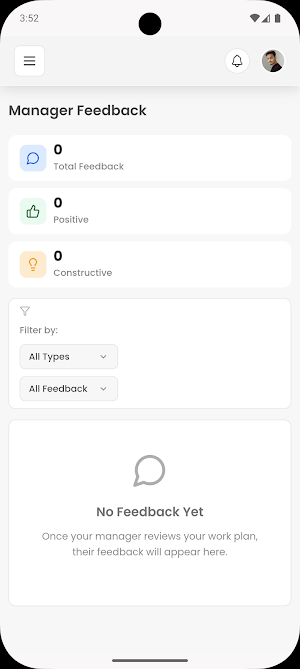
Keep everyone aligned with real-time work updates. Employees can share progress, provide status updates, and report completed tasks, enabling managers and team members to stay informed about ongoing projects and responsibilities.
Team Collaboration
Enhance workplace communication through a centralized platform. FutureDesk encourages collaboration by allowing employees and management to share updates, coordinate activities, and maintain better visibility across teams.
Employee Directory
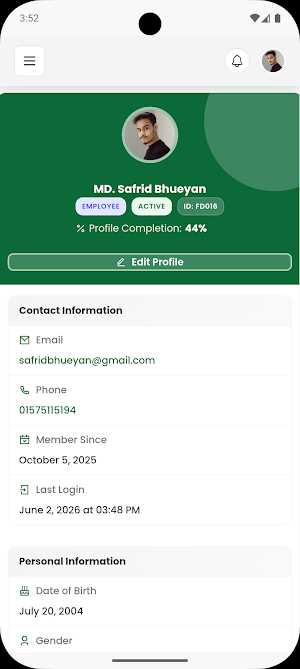
Access employee information quickly through a centralized directory. Team members can easily find colleagues and stay connected within the organization.
Notifications & Alerts
Receive important notifications regarding attendance, leave requests, approvals, task assignments, and company updates. Stay informed and never miss critical workplace information.
Workforce Monitoring
Managers gain valuable insights into employee activities, attendance patterns, and work progress. This helps organizations make informed decisions and improve operational efficiency.
CRM Capabilities
FutureDesk also supports customer relationship management processes by helping teams manage interactions, coordinate activities, and maintain organized business workflows.
Secure Access
The platform is built with security in mind, ensuring that employee and organizational data remains protected while providing authorized users with convenient access to the information they need.
Benefits of Using FutureDesk
Streamline employee management processes
Improve attendance tracking accuracy
Simplify leave application and approval workflows
Enhance team communication and collaboration
Increase visibility into workforce activities
Reduce manual administrative tasks
Improve organizational productivity
Support business growth with scalable management tools
Who Can Use FutureDesk?
FutureDesk is suitable for:
Small and medium-sized businesses
Corporate organizations
Startups
Remote and hybrid teams
Service-based companies
Sales and CRM teams
Human resource departments
Operations management teams
Whether employees are working from the office, remotely, or in a hybrid environment, FutureDesk helps maintain accountability, communication, and productivity across the organization.
User-Friendly Experience
Designed with simplicity and efficiency in mind, FutureDesk offers an easy-to-use interface that minimizes learning time and maximizes adoption. Employees can quickly access essential features, while managers can efficiently oversee team activities through a centralized dashboard.
FutureDesk is a powerful employee management and CRM platform designed to simplify daily workplace operations, improve team collaboration, and enhance organizational productivity. Whether you manage a small business, a growing startup, or a large enterprise, FutureDesk provides the tools needed to keep your workforce connected, organized, and efficient.
With a modern and intuitive interface, FutureDesk enables employees and managers to handle essential workplace activities from a single platform. From attendance tracking and leave management to task updates and team communication, FutureDesk helps streamline workflows and reduce administrative overhead.
Key Features
Employee Attendance & Check-In
Employees can easily check in and check out directly from the app. Attendance records are maintained automatically, helping organizations monitor workforce activity and maintain accurate attendance logs.
Leave Request Management
FutureDesk simplifies leave management by allowing employees to submit leave requests digitally. Managers can review, approve, or reject requests efficiently, ensuring a transparent and organized approval process.
Task & Work Updates
Keep everyone aligned with real-time work updates. Employees can share progress, provide status updates, and report completed tasks, enabling managers and team members to stay informed about ongoing projects and responsibilities.
Team Collaboration
Enhance workplace communication through a centralized platform. FutureDesk encourages collaboration by allowing employees and management to share updates, coordinate activities, and maintain better visibility across teams.
Employee Directory
Access employee information quickly through a centralized directory. Team members can easily find colleagues and stay connected within the organization.
Notifications & Alerts
Receive important notifications regarding attendance, leave requests, approvals, task assignments, and company updates. Stay informed and never miss critical workplace information.
Workforce Monitoring
Managers gain valuable insights into employee activities, attendance patterns, and work progress. This helps organizations make informed decisions and improve operational efficiency.
CRM Capabilities
FutureDesk also supports customer relationship management processes by helping teams manage interactions, coordinate activities, and maintain organized business workflows.
Secure Access
The platform is built with security in mind, ensuring that employee and organizational data remains protected while providing authorized users with convenient access to the information they need.
Benefits of Using FutureDesk
Streamline employee management processes
Improve attendance tracking accuracy
Simplify leave application and approval workflows
Enhance team communication and collaboration
Increase visibility into workforce activities
Reduce manual administrative tasks
Improve organizational productivity
Support business growth with scalable management tools
Who Can Use FutureDesk?
FutureDesk is suitable for:
Small and medium-sized businesses
Corporate organizations
Startups
Remote and hybrid teams
Service-based companies
Sales and CRM teams
Human resource departments
Operations management teams
Whether employees are working from the office, remotely, or in a hybrid environment, FutureDesk helps maintain accountability, communication, and productivity across the organization.
User-Friendly Experience
Designed with simplicity and efficiency in mind, FutureDesk offers an easy-to-use interface that minimizes learning time and maximizes adoption. Employees can quickly access essential features, while managers can efficiently oversee team activities through a centralized dashboard.
User reviews

loved it
Alternatives to Futuredesk
Looking for apps like Futuredesk? Here are 4 similar Android apps on Google Play. All of them are free to download.




| App | Rating | Price | Installs | Last updated | Compare |
|---|---|---|---|---|---|
| Futuredesk | – | Free | 10+ | Jun 8, 2026 | |
| Village Partner | – | Free | 1+ | May 19, 2026 | Compare |
| MurgiCare | – | Free | 100+ | Sep 17, 2026 | Compare |
| Future CAM | – | Free | 100+ | Nov 18, 2025 | Compare |
| Futuredesh | – | Free | 100+ | Oct 1, 2026 | Compare |
Compare Futuredesk with the top alternatives: ratings, updates, ASO score and keyword gaps →