

Night Mode - Blue Light Filter
Health & Fitness Contains ads
Reduces blue light to protect your eyes at night and for better sleep
- Rating
- 4.4
- 3.2K ratings
- Downloads
- 100K+
- on Google Play
- Price
- Free
- No in-app purchases
- Updated
- Sep 12
- 2025 · v1.3.5
Screenshots


About Night Mode - Blue Light Filter
Faster falling asleep & relax
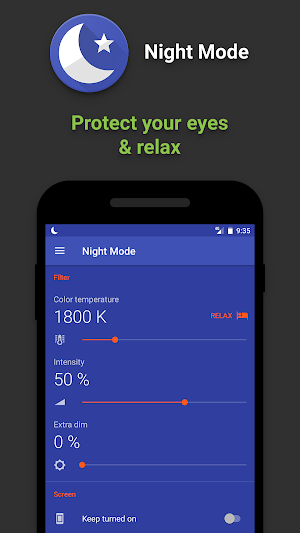
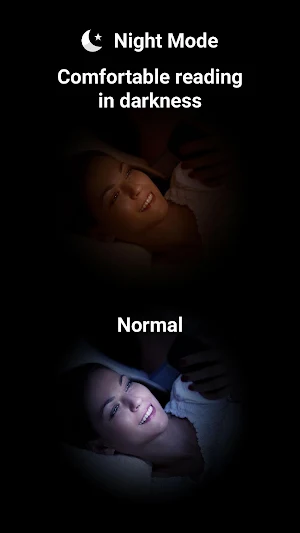
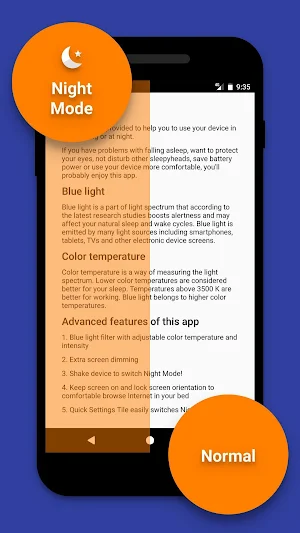
Night Mode app filters blue light that according to the latest research studies boosts alertness and may affect your natural sleep and wake cycles (circadian rythm). Additionally it precisely controls screen color temperature to setup the best light to calm down and relax.
Protect your eyes
When using your device at night or twilight, even minimum screen brightness may tire your eyes. Shift to Night Mode to turn on extra screen brightness reduction by dedicated dim filter as well as by main blue light filter.
Do not disturb others
If you sleep with other person or use your device in places where screen light may disturb others, this app is for you.
Read comfortable in bed
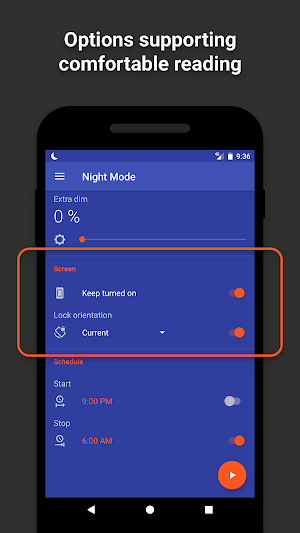
If you are night owl that uses your mobile in bed for browsing Internet or reading, this app can prevent turning off the screen as well as lock screen rotation to any orientation you like, even upside down.
Quick shift
Just shake your device to turn into Night Mode and back (this is additional feature to turn on in app's settings).
For Nougat users it's possible to add Quick Settings Tile to quickly shift to Night Mode.
Automatic scheduler can switch Night Mode by preferred time, for example turn on on twilight and off in the morning.
Save battery power
Night Mode lowers battery power consumption by reducing blue light and screen highlight.
Customization
Night Mode has many customization options like blue light filter color temperature, intensity, shaking sensitivity, notification visibility, pause duration, app theme and more.
Permissions
Draw over other apps – required to overlay blue light filter.
Run at startup – to allow scheduling and keep filter on/off state during device restarts.
Network access – to allow bug reporting (optional) and showing ads (not many).
Night Mode app filters blue light that according to the latest research studies boosts alertness and may affect your natural sleep and wake cycles (circadian rythm). Additionally it precisely controls screen color temperature to setup the best light to calm down and relax.
Protect your eyes
When using your device at night or twilight, even minimum screen brightness may tire your eyes. Shift to Night Mode to turn on extra screen brightness reduction by dedicated dim filter as well as by main blue light filter.
Do not disturb others
If you sleep with other person or use your device in places where screen light may disturb others, this app is for you.
Read comfortable in bed
If you are night owl that uses your mobile in bed for browsing Internet or reading, this app can prevent turning off the screen as well as lock screen rotation to any orientation you like, even upside down.
Quick shift
Just shake your device to turn into Night Mode and back (this is additional feature to turn on in app's settings).
For Nougat users it's possible to add Quick Settings Tile to quickly shift to Night Mode.
Automatic scheduler can switch Night Mode by preferred time, for example turn on on twilight and off in the morning.
Save battery power
Night Mode lowers battery power consumption by reducing blue light and screen highlight.
Customization
Night Mode has many customization options like blue light filter color temperature, intensity, shaking sensitivity, notification visibility, pause duration, app theme and more.
Permissions
Draw over other apps – required to overlay blue light filter.
Run at startup – to allow scheduling and keep filter on/off state during device restarts.
Network access – to allow bug reporting (optional) and showing ads (not many).
What’s new
Version 1.3.5 · Updated September 12, 2025
Changes: - Better support for Android 16. - Better navigation experience starting from Android 15. - Better support for various screen sizes. - Android 5.x versions are no longer supported. Bugfixes: - Fixed bottom part of the UI while night mode enabled. - Improved app stability.
User reviews

Excellent result oriented app. This gave me full satisfaction . This is too easy to use .This is the. most useful app. Thank you .

Best night mode app and easy to use in my opinion.

really easy and simple to use with good instructions

Great App. Very useful.

This app is well built and gave me a full sastifaction. I like the option which you can change the dims of the display & the temperature of the colour. Ads are not annoying, No auto turning off. Ignore those negative comment. This app deserve a 5 stars. A big thank you to your team!

Okay.
Alternatives to Night Mode - Blue Light Filter
Looking for apps like Night Mode - Blue Light Filter? Here are 6 similar Android apps on Google Play. The highest rated is Speedometer (4.6/5), and 5 of the 6 are free to download.
-
Battery Indicator 4.5
-
Compass 4.5
-
Alarms: Notes & Task List 4.3
-
Handwritten Messages, MMS 4.0
-
Speedometer 4.6
-
Handwritten Messages Pro 3.9
| App | Rating | Price | Installs | Last updated | Compare |
|---|---|---|---|---|---|
| Night Mode - Blue Light Filter | 4.4 / 5 | Free | 100,000+ | Sep 12, 2025 | |
| Battery Indicator | 4.5 / 5 | Free | 1,000,000+ | – | Compare |
| Compass | 4.5 / 5 | Free | 1,000,000+ | Aug 30, 2025 | Compare |
| Alarms: Notes & Task List | 4.3 / 5 | Free | 100,000+ | – | Compare |
| Handwritten Messages, MMS | 4.1 / 5 | Free | 50,000+ | – | Compare |
| Speedometer | 4.6 / 5 | Free | 50,000+ | – | Compare |
| Handwritten Messages Pro | 3.9 / 5 | 2.49 USD | 100+ | – | Compare |
Similar apps on Google Play
- Battery Indicator
- Compass
- Night Mode - Blue Light Filter
- Alarms: Notes & Task List
- Handwritten Messages, MMS
- Speedometer
- Handwritten Messages Pro
- Night Mode Pro
- Speedometer Pro
- Alarms Pro
- Compass Pro
- My Jump
- Mirror: Frames - Love
- Mirror: Frames - Flowers
- Mirror: Frames - Various
- Mirror: Effects - Various
- Mirror
- Flashlight Lite
- Flashlight
- Battery Indicator Pro