
LocalNAS: Turn Phone to NAS
Tools
Turn an old phone's storage into a NAS for local file transfers.
- Downloads
- 22+
- on Google Play
- Price
- $5.99
- No in-app purchases
- Updated
- Sep 7
- 2026 · v1.0
Screenshots
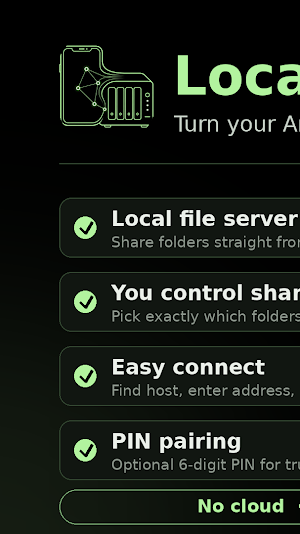
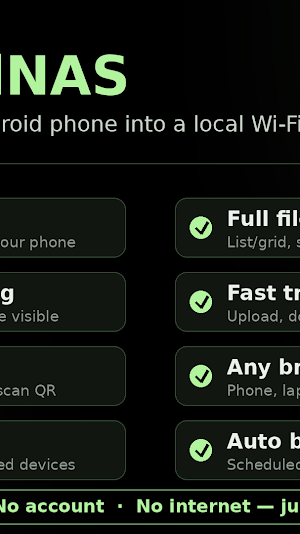
About LocalNAS: Turn Phone to NAS
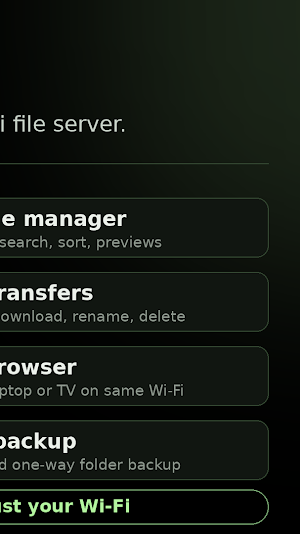
LocalNAS turns an Android phone into a NAS server. Choose the folders you want to share, then connect your own devices on the same network to browse, upload, download, and organize files. It provides direct Wi-Fi file transfer without a cloud account or internet connection.
Use LocalNAS for local network storage: move photos from one device, send documents to a laptop, make selected videos available in a browser, or keep a shared folder ready for your trusted devices.
What you can do
- Turn one Android phone into a local file server and choose the folders it shares.
- Find a host on your local network, enter its address manually, or connect with a QR code.
- Pair with an optional 6-digit PIN before accessing shared files.
- Browse folders in list or grid view, search the current folder, sort content, and preview images and PDFs.
- Upload files, multiple files, or a whole folder; download files to your device; create folders; rename or delete files you are allowed to manage.
- Scan or import a document and upload it to a shared folder.
- Follow transfer progress and reconnect to saved devices when they are available again.
- Open the host's local browser drive from another phone, a laptop, or a TV browser on the same network.
- Schedule one-way Wi-Fi backup of a chosen folder to a paired host.
How it works
1. On the host phone, select the folders to share and start LocalNAS.
2. On another device connected to the same Wi-Fi network, find the host, scan its QR code, or enter its local address.
3. Enter the host PIN when required, then work with the folders the host has shared with you.
Designed for local use
LocalNAS is made for trusted local Wi-Fi networks. It does not require an account or an internet connection to transfer files. The host controls which folders are shared and can require a PIN for pairing. Keep the host running while other devices need access, and connect only devices and networks you trust.
Use LocalNAS for local network storage: move photos from one device, send documents to a laptop, make selected videos available in a browser, or keep a shared folder ready for your trusted devices.
What you can do
- Turn one Android phone into a local file server and choose the folders it shares.
- Find a host on your local network, enter its address manually, or connect with a QR code.
- Pair with an optional 6-digit PIN before accessing shared files.
- Browse folders in list or grid view, search the current folder, sort content, and preview images and PDFs.
- Upload files, multiple files, or a whole folder; download files to your device; create folders; rename or delete files you are allowed to manage.
- Scan or import a document and upload it to a shared folder.
- Follow transfer progress and reconnect to saved devices when they are available again.
- Open the host's local browser drive from another phone, a laptop, or a TV browser on the same network.
- Schedule one-way Wi-Fi backup of a chosen folder to a paired host.
How it works
1. On the host phone, select the folders to share and start LocalNAS.
2. On another device connected to the same Wi-Fi network, find the host, scan its QR code, or enter its local address.
3. Enter the host PIN when required, then work with the folders the host has shared with you.
Designed for local use
LocalNAS is made for trusted local Wi-Fi networks. It does not require an account or an internet connection to transfer files. The host controls which folders are shared and can require a PIN for pairing. Keep the host running while other devices need access, and connect only devices and networks you trust.
What’s new
Version 1.0 · Updated September 7, 2026
- Turn your phone into a local NAS server. - Connect devices with QR code or PIN pairing. - Browse, search, upload, download, and manage files. - Open your local browser drive on phones, laptops, or TVs. - Track transfers and enable optional Wi-Fi folder backups.
User reviews

Awesome app! My old phones finally have a purpose other than collecting dust—they’re now storage heroes!
Alternatives to LocalNAS: Turn Phone to NAS
Looking for apps like LocalNAS: Turn Phone to NAS? Here are 6 similar Android apps on Google Play. The highest rated is Ollama Local AI - Phone IDE 🦙 (4.2/5), and 5 of the 6 are free to download.
-
Ollama Local AI - Phone IDE 🦙 4.2
-
Ollama Router Pro: LLM Gateway
-
Llama.cpp Edge Gallery AI 4.0
-
Battery Guardian: Charge Alarm
-
StepBurn: AI Meal & Step Track
-
Meta Spark: YouTube SEO AI
| App | Rating | Price | Installs | Last updated | Compare |
|---|---|---|---|---|---|
| LocalNAS: Turn Phone to NAS | – | $5.99 | 10+ | Sep 7, 2026 | |
| Ollama Local AI - Phone IDE 🦙 | 4.2 / 5 | Free | 50,000+ | Oct 27, 2026 | Compare |
| Ollama Router Pro: LLM Gateway | – | 9.99 USD | 10+ | Oct 10, 2026 | Compare |
| Llama.cpp Edge Gallery AI | 4.0 / 5 | Free | 1,000+ | Oct 10, 2026 | Compare |
| Battery Guardian: Charge Alarm | – | Free | 500+ | Sep 9, 2026 | Compare |
| StepBurn: AI Meal & Step Track | – | Free | 500+ | Aug 23, 2026 | Compare |
| Meta Spark: YouTube SEO AI | – | Free | 5+ | – | Compare |