

FPS Mode Game Booster
GINBOX Tools In-app purchases Contains ads
FPS Game app to reduce lag, manage game mode and stay focused while you play
- Rating
- 4.8
- 7.2K ratings
- Downloads
- 260K+
- on Google Play
- Price
- Free
- In-app purchases
- Updated
- Oct 20
- 2026 · v1.0.5
Screenshots


About FPS Mode Game Booster
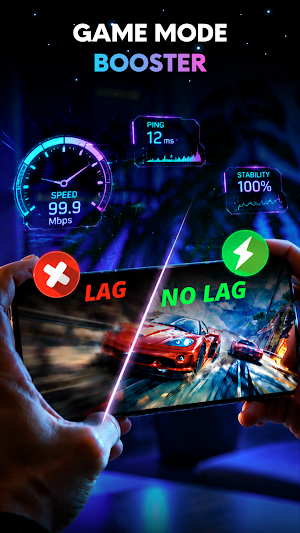
Take your mobile gaming experience to the next level with FPS Mode Game Booster — a smart gaming support app for FPS games, action games, and high-speed mobile games.
Get into the game and leave distractions behind with FPS Mode Game Booster app. Designed for intense mobile gaming, this app helps create a focused gaming environment for your favorite games. Set up your preferred game mode, access your game and app, and stay focused on the action without unwanted calls and notifications during using.
🎮 Gaming Mode Widget
Choose your preferred game mode and keep your gaming setup ready whenever you want to play. With Game Mode FPS app, you can quick access to your game mode setup from a convenient widget on your home screen. The game mode widget puts your gaming setup within easy reach, helping you get into the action with just a tap.
🚀 RAM & Internet Status
Stay aware of your device and network status during gameplay with RAM and internet status. This helps you see the current state of your device while using the app. Keep the information you need within reach and stay focused on your gaming session.
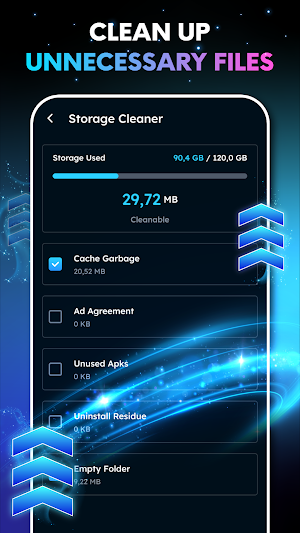
✅ Clean Up Storage
Use Storage Cleaner to find unnecessary files and free up space on your device. Keeping your storage organized gives you more room for your favorite games, apps, and media, helping you prepare your phone before starting a gaming session.
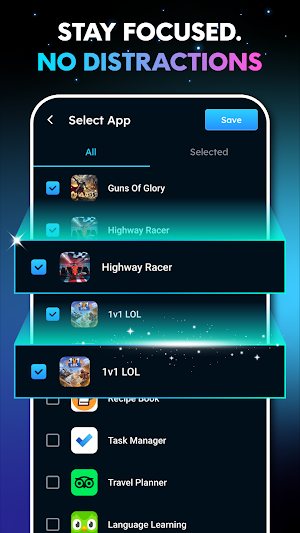
🔕 Ignore Calls & app Notifications
Stay focused on your favorite game with a gaming environment designed to keep unwanted interruptions away. Game Mode FPS can help incoming calls and notifications can not distract you playing.
With distractions out of the way, the game mode helps you stay in the action without unwanted alerts interrupting your gaming session.
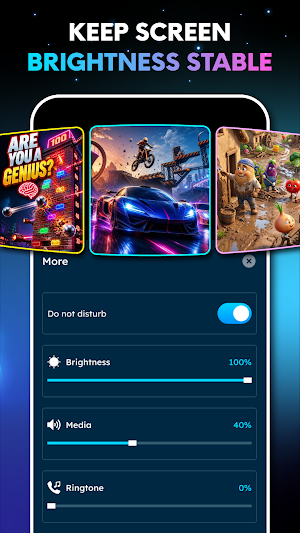
☀️ Keep Your Screen Brightness Steady
Disable Auto Brightness while gaming to keep your screen brightness consistent throughout your session. This gives you control over your display while playing games and using apps.
FPS Mode Game is practical for mobile gamers who want a simple way to organize their gaming setup, reduce distractions, and reduce lag during their gaming sessions.
Get into the game and leave distractions behind with FPS Mode Game Booster app. Designed for intense mobile gaming, this app helps create a focused gaming environment for your favorite games. Set up your preferred game mode, access your game and app, and stay focused on the action without unwanted calls and notifications during using.
🎮 Gaming Mode Widget
Choose your preferred game mode and keep your gaming setup ready whenever you want to play. With Game Mode FPS app, you can quick access to your game mode setup from a convenient widget on your home screen. The game mode widget puts your gaming setup within easy reach, helping you get into the action with just a tap.
🚀 RAM & Internet Status
Stay aware of your device and network status during gameplay with RAM and internet status. This helps you see the current state of your device while using the app. Keep the information you need within reach and stay focused on your gaming session.
✅ Clean Up Storage
Use Storage Cleaner to find unnecessary files and free up space on your device. Keeping your storage organized gives you more room for your favorite games, apps, and media, helping you prepare your phone before starting a gaming session.
🔕 Ignore Calls & app Notifications
Stay focused on your favorite game with a gaming environment designed to keep unwanted interruptions away. Game Mode FPS can help incoming calls and notifications can not distract you playing.
With distractions out of the way, the game mode helps you stay in the action without unwanted alerts interrupting your gaming session.
☀️ Keep Your Screen Brightness Steady
Disable Auto Brightness while gaming to keep your screen brightness consistent throughout your session. This gives you control over your display while playing games and using apps.
FPS Mode Game is practical for mobile gamers who want a simple way to organize their gaming setup, reduce distractions, and reduce lag during their gaming sessions.
User reviews

the best one yet

nice

👍 you v

nice app ❤️❤️❤️❤️❤️❤️❤️❤️❤️❤️❤️❤️❤️❤️❤️❤️❤️❤️❤️❤️

beautiful app

🤗
Alternatives to FPS Mode Game Booster
Looking for apps like FPS Mode Game Booster? Here are 6 similar Android apps on Google Play. The highest rated is Cold Shower (4.5/5), and all 6 are free to download.
-
GGDROP – Top CS2 Items! 4.4
-
Speedify: Bond Satellite + 5G 3.5
-
IFSTA Essentials 8 3.4
-
Spatial Touch™ - Touchless 3.9
-
G-CPU:Monitor CPU, RAM, Widget 4.2
-
Cold Shower 4.5
| App | Rating | Price | Installs | Last updated | Compare |
|---|---|---|---|---|---|
| FPS Mode Game Booster | 4.8 / 5 | Free | 100,000+ | Oct 20, 2026 | |
| GGDROP – Top CS2 Items! | 4.4 / 5 | Free | 100,000+ | Oct 21, 2026 | Compare |
| Speedify: Bond Satellite + 5G | 3.5 / 5 | Free | 10,000,000+ | Sep 29, 2026 | Compare |
| IFSTA Essentials 8 | 3.4 / 5 | Free | 5,000+ | Sep 14, 2026 | Compare |
| Spatial Touch™ - Touchless | 3.9 / 5 | Free | 10,000,000+ | Oct 22, 2026 | Compare |
| G-CPU:Monitor CPU, RAM, Widget | 4.2 / 5 | Free | 1,000,000+ | Sep 15, 2026 | Compare |
| Cold Shower | 4.5 / 5 | Free | 1,000,000+ | Oct 20, 2025 | Compare |
Similar apps on Google Play
- GGDROP – Top CS2 Items!
- Speedify: Bond Satellite + 5G
- IFSTA Essentials 8
- Spatial Touch™ - Touchless
- G-CPU:Monitor CPU, RAM, Widget
- Cold Shower
- Loudplay — PC games on Android
- CPU Monitor - temperature
- MEGA VPN - Privacy Online
- LagoFast Game Booster: Low Lag
- Reveri: Relief in Minutes
- Sentry Pro for Tesla
- Wingfield Sports
- Sensi
- Intra
- Razer Cortex Games: Rewards
- Game Booster 4x Faster Pro
- DropsTab: Crypto Tracker
- Final Surge
- Freedom Street Garage
- WireGuard
- Taskbar
- GameChanger