
Kitchen Display Clover
4 Leaf Labs Tools
Every order, one screen. Clover-built KDS your kitchen can actually rely on.
- Downloads
- 41+
- on Google Play
- Price
- Free
- No in-app purchases
- Updated
- Oct 22
- 2026 · v3.20261020.0
Screenshots


About Kitchen Display Clover
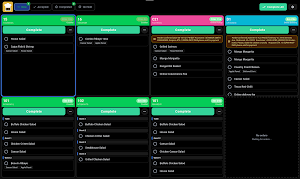
Kitchen Display gives your kitchen a clear, reliable, fully customizable order screen — built for Clover POS.
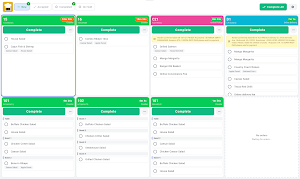
Manage every order from every source in one place — DoorDash, Uber Eats, Clover POS, Kiosk, and Online Orders — with a workflow you control down to the last detail.
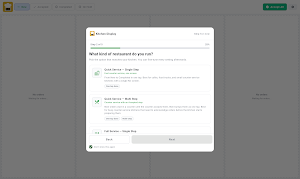
Our latest release includes a redesigned interface, a smarter multi-step fulfillment system, and per-screen customization so each station shows exactly what your team needs. Run as many displays as you want on a single subscription, each with its own settings.
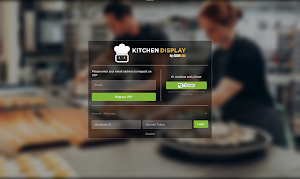
Logging in is simple and secure: sign in through your browser with your Clover account, or scan a QR code to connect.
Device requirement: Kitchen Display requires an Android tablet, Android TV, or Android TV box. It does not run on the Clover POS device.
━━━━━━━━━━━━━━━━━━━━━━━━━━━━━━
KEY FEATURES
▸ MULTI-STEP FULFILLMENT
New → Accepted → Completed, plus dedicated On Hold and Cancelled tabs. Show or hide any tab per screen.
▸ ORDERS FROM EVERY SOURCE
DoorDash, Uber Eats, Clover POS, Kiosk, and Online Orders — all in one unified display.
▸ COMPLETE ORDERS YOUR WAY
One tap for the whole order, or check off items one by one. Split and partial-completion views show what's still pending.
▸ TIMERS & LATE-ORDER DETECTION
Per card or per item. Late orders shift from orange to red once they pass your target time.
▸ HOLD & SCHEDULING
Put orders on hold for minutes, hours, or days, or schedule them for a specific date and time. Undo any action.
▸ VISUAL CUSTOMIZATION
Colors by order type, adjustable text size, spacing, and light, dark, or system appearance.
▸ NEW-ITEM HIGHLIGHTS
Flash, pulse, or color-highlight so your staff never miss an update.
▸ PER-SCREEN ROLES & PERMISSIONS
Control which tabs and actions each station sees. Focused line view, full control for managers.
▸ ADVANCED FILTERING
By item labels, order type, device source, and item category.
▸ GUEST-BASED PLATING
Split orders by guest with Clover Dining so your team plates exactly right.
▸ BUMPER BAR COMPATIBLE
On-screen key hints and a built-in shortcut tutorial.
▸ SOUND, NOTIFICATIONS & HAPTICS
Alerts for new orders, new items, late orders, and connection issues.
▸ BUILT-IN CONNECTION TESTING
Reports directly to our team so issues are caught fast.
▸ MULTI-LANGUAGE SUPPORT
English and Spanish, with more official languages on the way.
━━━━━━━━━━━━━━━━━━━━━━━━━━━━━━
COMPATIBILITY
Requires an Android tablet, Android TV, or Android TV box. Not compatible with the Clover POS device.
━━━━━━━━━━━━━━━━━━━━━━━━━━━━━━
PRICING
One subscription covers as many screens as you want to run — no per-device fees.- Starting from $49.95/Month after your 30 Day Free Trial (only new Clover Accounts). Cancel any time.
━━━━━━━━━━━━━━━━━━━━━━━━━━━━━━
#KitchenDisplay #Clover #KDS #RestaurantTech #POS
Manage every order from every source in one place — DoorDash, Uber Eats, Clover POS, Kiosk, and Online Orders — with a workflow you control down to the last detail.
Our latest release includes a redesigned interface, a smarter multi-step fulfillment system, and per-screen customization so each station shows exactly what your team needs. Run as many displays as you want on a single subscription, each with its own settings.
Logging in is simple and secure: sign in through your browser with your Clover account, or scan a QR code to connect.
Device requirement: Kitchen Display requires an Android tablet, Android TV, or Android TV box. It does not run on the Clover POS device.
━━━━━━━━━━━━━━━━━━━━━━━━━━━━━━
KEY FEATURES
▸ MULTI-STEP FULFILLMENT
New → Accepted → Completed, plus dedicated On Hold and Cancelled tabs. Show or hide any tab per screen.
▸ ORDERS FROM EVERY SOURCE
DoorDash, Uber Eats, Clover POS, Kiosk, and Online Orders — all in one unified display.
▸ COMPLETE ORDERS YOUR WAY
One tap for the whole order, or check off items one by one. Split and partial-completion views show what's still pending.
▸ TIMERS & LATE-ORDER DETECTION
Per card or per item. Late orders shift from orange to red once they pass your target time.
▸ HOLD & SCHEDULING
Put orders on hold for minutes, hours, or days, or schedule them for a specific date and time. Undo any action.
▸ VISUAL CUSTOMIZATION
Colors by order type, adjustable text size, spacing, and light, dark, or system appearance.
▸ NEW-ITEM HIGHLIGHTS
Flash, pulse, or color-highlight so your staff never miss an update.
▸ PER-SCREEN ROLES & PERMISSIONS
Control which tabs and actions each station sees. Focused line view, full control for managers.
▸ ADVANCED FILTERING
By item labels, order type, device source, and item category.
▸ GUEST-BASED PLATING
Split orders by guest with Clover Dining so your team plates exactly right.
▸ BUMPER BAR COMPATIBLE
On-screen key hints and a built-in shortcut tutorial.
▸ SOUND, NOTIFICATIONS & HAPTICS
Alerts for new orders, new items, late orders, and connection issues.
▸ BUILT-IN CONNECTION TESTING
Reports directly to our team so issues are caught fast.
▸ MULTI-LANGUAGE SUPPORT
English and Spanish, with more official languages on the way.
━━━━━━━━━━━━━━━━━━━━━━━━━━━━━━
COMPATIBILITY
Requires an Android tablet, Android TV, or Android TV box. Not compatible with the Clover POS device.
━━━━━━━━━━━━━━━━━━━━━━━━━━━━━━
PRICING
One subscription covers as many screens as you want to run — no per-device fees.- Starting from $49.95/Month after your 30 Day Free Trial (only new Clover Accounts). Cancel any time.
━━━━━━━━━━━━━━━━━━━━━━━━━━━━━━
#KitchenDisplay #Clover #KDS #RestaurantTech #POS
What’s new
Version 3.20261020.0 · Updated October 22, 2026
- Improved sign-in reliability and live order updates. - Fixed inventory sync getting stuck and improved progress indicators. - Improved grouping of identical items within an order. - Fixed settings and filter changes not saving reliably. - Improved layouts with larger text and Quick Start navigation. - Added support recordings and usage analytics with privacy controls.
Alternatives to Kitchen Display Clover
Looking for apps like Kitchen Display Clover? Here are 4 similar Android apps on Google Play. The highest rated is Life Time Digital (4.7/5), and all 4 are free to download.
-
Fay Nutrition Dietitians 4.6
-
AscentConnect 3.9
-
Life Time Digital 4.7
-
Qapital: The Money Saving App 4.2
| App | Rating | Price | Installs | Last updated | Compare |
|---|---|---|---|---|---|
| Kitchen Display Clover | – | Free | 10+ | Oct 22, 2026 | |
| Fay Nutrition Dietitians | 4.6 / 5 | Free | 10,000+ | Oct 21, 2026 | Compare |
| AscentConnect | 3.9 / 5 | Free | 10,000+ | Sep 22, 2026 | Compare |
| Life Time Digital | 4.7 / 5 | Free | 500,000+ | Sep 25, 2026 | Compare |
| Qapital: The Money Saving App | 4.2 / 5 | Free | 1,000,000+ | Sep 23, 2026 | Compare |