

Chartlyx: Chart Maker Offline
Productivity
Build charts offline with editable data, styles, and PNG export
- Downloads
- 100+
- on Google Play
- Price
- Free
- No in-app purchases
- Updated
- Oct 1
- 2026 · v1.0.3
Screenshots


About Chartlyx: Chart Maker Offline
Chartlyx is an offline chart maker designed to help you create, edit, and export charts quickly and easily. It provides a simple yet powerful way to turn your data into clear and customizable visual charts without requiring an internet connection.
With Chartlyx, you can create chart projects, manage your data using an interactive table, and instantly preview the results. Everything updates in real time, allowing you to focus on your data without interruptions.
Create and Manage Charts
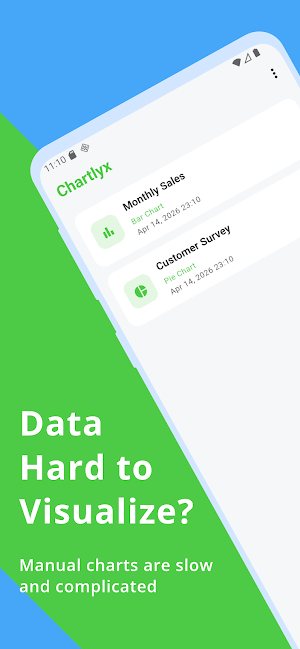
Start by creating a chart with a custom title. Organize multiple chart projects and access them anytime. Your data is stored locally on your device for full control and privacy.
Editable Data Table
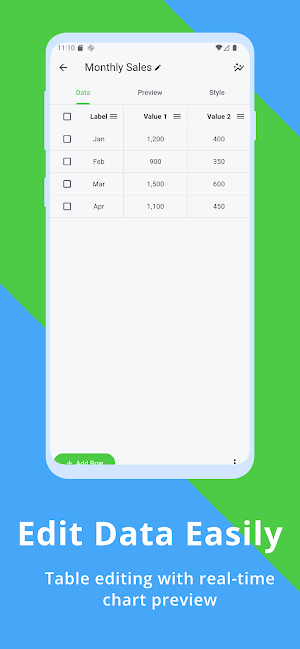
Input your data through an easy-to-use table interface. Add rows, delete rows, and edit values instantly. Changes are reflected immediately in the chart preview.
Multiple Chart Types
Chartlyx supports a wide range of chart types:
- Bar charts
- Line charts
- Pie charts
- Donut charts
- Scatter charts
- Area charts
- Multi-series charts
Live Preview
Your chart updates automatically as you edit data. This real-time preview helps you quickly understand and refine your data visualization.
Customizable Styles
Personalize your charts with flexible styling options:
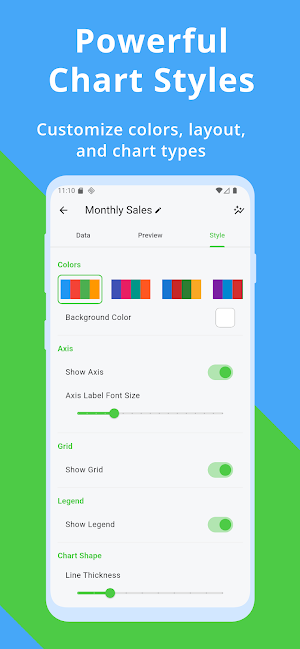
- Change colors
- Toggle grid and axis visibility
- Adjust line thickness and bar width
- Customize background and layout
- Show or hide legends
Offline First Experience
Chartlyx works fully offline. You do not need an account or internet connection. Your charts remain private and accessible anytime.
Export as Image
Export your charts as high-quality PNG images. These can be used for reports, presentations, or sharing.
Ready-to-Use Templates
Start faster with built-in templates such as:
- Monthly sales
- Employee ranking
- Website traffic
- Survey results
Lightweight and Fast
The app is optimized for performance, ensuring smooth interaction and quick rendering even with multiple charts.
Use Cases
Chartlyx is suitable for:
- Business reports
- Student assignments
- Personal tracking
- Data visualization
- Quick chart creation
Chartlyx combines simplicity and flexibility into one efficient tool, making it easy to create charts anytime, anywhere.
With Chartlyx, you can create chart projects, manage your data using an interactive table, and instantly preview the results. Everything updates in real time, allowing you to focus on your data without interruptions.
Create and Manage Charts
Start by creating a chart with a custom title. Organize multiple chart projects and access them anytime. Your data is stored locally on your device for full control and privacy.
Editable Data Table
Input your data through an easy-to-use table interface. Add rows, delete rows, and edit values instantly. Changes are reflected immediately in the chart preview.
Multiple Chart Types
Chartlyx supports a wide range of chart types:
- Bar charts
- Line charts
- Pie charts
- Donut charts
- Scatter charts
- Area charts
- Multi-series charts
Live Preview
Your chart updates automatically as you edit data. This real-time preview helps you quickly understand and refine your data visualization.
Customizable Styles
Personalize your charts with flexible styling options:
- Change colors
- Toggle grid and axis visibility
- Adjust line thickness and bar width
- Customize background and layout
- Show or hide legends
Offline First Experience
Chartlyx works fully offline. You do not need an account or internet connection. Your charts remain private and accessible anytime.
Export as Image
Export your charts as high-quality PNG images. These can be used for reports, presentations, or sharing.
Ready-to-Use Templates
Start faster with built-in templates such as:
- Monthly sales
- Employee ranking
- Website traffic
- Survey results
Lightweight and Fast
The app is optimized for performance, ensuring smooth interaction and quick rendering even with multiple charts.
Use Cases
Chartlyx is suitable for:
- Business reports
- Student assignments
- Personal tracking
- Data visualization
- Quick chart creation
Chartlyx combines simplicity and flexibility into one efficient tool, making it easy to create charts anytime, anywhere.
What’s new
Version 1.0.3 · Updated October 1, 2026
Add reset value data functionality
Alternatives to Chartlyx: Chart Maker Offline
Looking for apps like Chartlyx: Chart Maker Offline? Here are 6 similar Android apps on Google Play. All of them are free to download.
-
ZXshell - SSH Terminal
-
Mermafy: Mermaid Diagram Tool
-
ServFlux: Service Order Track
-
TapFloz: Quick Sales Log
-
Notezzy: Live Notes & Draw
-
Slidexio: Instant Presentation
| App | Rating | Price | Installs | Last updated | Compare |
|---|---|---|---|---|---|
| Chartlyx: Chart Maker Offline | – | Free | 100+ | Oct 1, 2026 | |
| ZXshell - SSH Terminal | – | Free | 100+ | Aug 13, 2026 | Compare |
| Mermafy: Mermaid Diagram Tool | – | Free | 500+ | Sep 11, 2026 | Compare |
| ServFlux: Service Order Track | – | Free | 0+ | Sep 22, 2026 | Compare |
| TapFloz: Quick Sales Log | – | Free | 5+ | – | Compare |
| Notezzy: Live Notes & Draw | – | Free | 10+ | Aug 11, 2026 | Compare |
| Slidexio: Instant Presentation | – | Free | 500+ | Sep 17, 2026 | Compare |