
Secure PDF:Photo, Video, Scan
Tools In-app purchases Contains ads
Imageto PDF converter, PDF maker, document scanner & photo extractor. Free.
- Downloads
- 156+
- on Google Play
- Price
- Free
- In-app purchases
- Updated
- Aug 18
- 2026 · v1.0.0
Screenshots


About Secure PDF:Photo, Video, Scan
Turn photos, videos, scans and documents into one PDF you can actually keep.
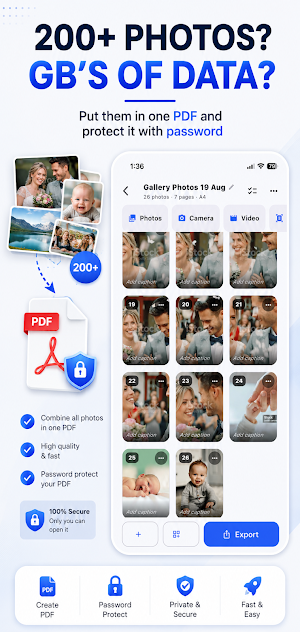
Photo, Video, Scan to PDF is an image to PDF converter, document scanner and PDF toolkit in one app. Everything runs on your device — no account, no upload, no watermark on anything you make.
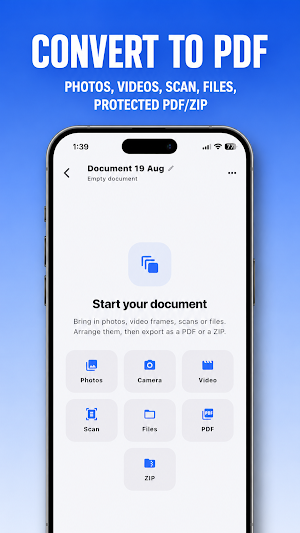
CONVERT ANYTHING TO PDF
• Photos to PDF — pick JPG, PNG, WEBP or HEIC images and arrange them into a document
• Camera to PDF — photograph a page and it goes straight into the document
• Scan to PDF — the built-in document scanner finds the edges, straightens the page and cleans it up
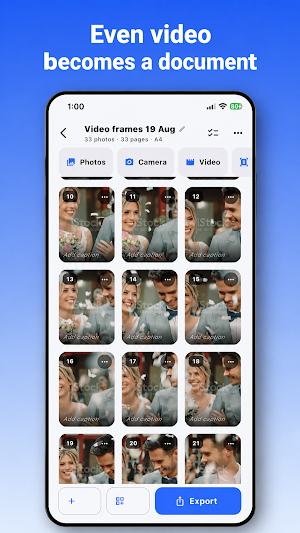
• Video to PDF — point it at a clip and it pulls out the sharpest frames, so a whiteboard recording or a video receipt becomes a readable document
• Files to PDF — open a Word, Excel, PowerPoint, EPUB or OpenDocument file and take the pictures out of it
EXTRACT IMAGES, DON'T SCREENSHOT PAGES
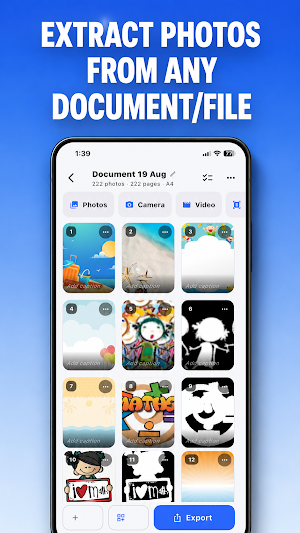
Most converters hand you a picture of the whole page, text and all. This one reads the file and pulls out the actual images inside it.
• Extract images from PDF — three photos on a page come out as three photos, not one page with text across it
• Extract images from Word, Excel, PowerPoint, EPUB and OpenDocument files
• Extract images from ZIP archives, including password-protected ones
• Reuse every extracted image: edit it, put it in a new PDF, or save it to your gallery
BUILD THE PAGE THE WAY YOU WANT
• 1, 2, 4, 6 or 9 images per page
• A4, A3, Letter, Legal, or a page shaped to fit the photo
• Portrait or landscape, with margins and spacing you control
• Drag any photo anywhere on the page with your finger — not just into a fixed grid
• Pinch to resize, or pull the corner to change width and height separately
• Match photo sizes so every picture on a sheet is the same shape
• Captions under photos, page numbers, borders and background colour
• Reorder by dragging, delete, rotate, duplicate
• See the finished page before you export it
PHOTO EDITOR
A full editor, usable on its own or while you build a document.
• Crop with Free, Square, 4:3, 3:2, 16:9, A4 or Letter framing
• Straighten, rotate and flip
• Adjust exposure, brightness, contrast, saturation, warmth, tint, sharpen and vignette
• Filters: Auto, Vivid, Warm, Cool, Fade, Mono, Noir, Sepia, Document and Ink
• Add text on the photo, move it, resize it, rotate it
• Edit several photos in one session and export them all
PROTECT WHAT YOU MAKE
• Password protect PDF with AES-256 encryption
• Unlock PDF — open a password-protected PDF you own and save a copy with no password
• Password protect ZIP — lock a folder of photos into an encrypted archive
• Unzip protected ZIP files and get the photos back
• Passwords are never stored, sent anywhere, or recoverable by us
SHRINK AND SHARE
• Compress PDF at Light, Balanced or Strong — a photo-heavy PDF usually loses most of its size
• It never hands back a bigger file: if a PDF cannot be shrunk, you keep the original and are told why
• Export as PDF, as a ZIP of images, or as a password-protected version of either
• Share to email, messaging, cloud storage or save to your device
BUILT-IN VIEWER
• Open PDFs, password-protected PDFs, ZIP archives and images
• Swipe through photos, zoom in, or run a slideshow
WHY PEOPLE KEEP IT
• 200 photos become one file you can find again
• Compress an album and keep the memories without the storage
• Lock private documents behind a password
• Works offline — your files never leave your phone
• No watermark, ever
AD-FREE OPTION
The app is free and supported by ads, which do not appear at all for the first two days after you install it. A monthly or yearly subscription removes them completely.
Privacy policy: https://gist.github.com/nasimashujaat/77591a2566c28d71a5835014e9ec6920
Photo, Video, Scan to PDF is an image to PDF converter, document scanner and PDF toolkit in one app. Everything runs on your device — no account, no upload, no watermark on anything you make.
CONVERT ANYTHING TO PDF
• Photos to PDF — pick JPG, PNG, WEBP or HEIC images and arrange them into a document
• Camera to PDF — photograph a page and it goes straight into the document
• Scan to PDF — the built-in document scanner finds the edges, straightens the page and cleans it up
• Video to PDF — point it at a clip and it pulls out the sharpest frames, so a whiteboard recording or a video receipt becomes a readable document
• Files to PDF — open a Word, Excel, PowerPoint, EPUB or OpenDocument file and take the pictures out of it
EXTRACT IMAGES, DON'T SCREENSHOT PAGES
Most converters hand you a picture of the whole page, text and all. This one reads the file and pulls out the actual images inside it.
• Extract images from PDF — three photos on a page come out as three photos, not one page with text across it
• Extract images from Word, Excel, PowerPoint, EPUB and OpenDocument files
• Extract images from ZIP archives, including password-protected ones
• Reuse every extracted image: edit it, put it in a new PDF, or save it to your gallery
BUILD THE PAGE THE WAY YOU WANT
• 1, 2, 4, 6 or 9 images per page
• A4, A3, Letter, Legal, or a page shaped to fit the photo
• Portrait or landscape, with margins and spacing you control
• Drag any photo anywhere on the page with your finger — not just into a fixed grid
• Pinch to resize, or pull the corner to change width and height separately
• Match photo sizes so every picture on a sheet is the same shape
• Captions under photos, page numbers, borders and background colour
• Reorder by dragging, delete, rotate, duplicate
• See the finished page before you export it
PHOTO EDITOR
A full editor, usable on its own or while you build a document.
• Crop with Free, Square, 4:3, 3:2, 16:9, A4 or Letter framing
• Straighten, rotate and flip
• Adjust exposure, brightness, contrast, saturation, warmth, tint, sharpen and vignette
• Filters: Auto, Vivid, Warm, Cool, Fade, Mono, Noir, Sepia, Document and Ink
• Add text on the photo, move it, resize it, rotate it
• Edit several photos in one session and export them all
PROTECT WHAT YOU MAKE
• Password protect PDF with AES-256 encryption
• Unlock PDF — open a password-protected PDF you own and save a copy with no password
• Password protect ZIP — lock a folder of photos into an encrypted archive
• Unzip protected ZIP files and get the photos back
• Passwords are never stored, sent anywhere, or recoverable by us
SHRINK AND SHARE
• Compress PDF at Light, Balanced or Strong — a photo-heavy PDF usually loses most of its size
• It never hands back a bigger file: if a PDF cannot be shrunk, you keep the original and are told why
• Export as PDF, as a ZIP of images, or as a password-protected version of either
• Share to email, messaging, cloud storage or save to your device
BUILT-IN VIEWER
• Open PDFs, password-protected PDFs, ZIP archives and images
• Swipe through photos, zoom in, or run a slideshow
WHY PEOPLE KEEP IT
• 200 photos become one file you can find again
• Compress an album and keep the memories without the storage
• Lock private documents behind a password
• Works offline — your files never leave your phone
• No watermark, ever
AD-FREE OPTION
The app is free and supported by ads, which do not appear at all for the first two days after you install it. A monthly or yearly subscription removes them completely.
Privacy policy: https://gist.github.com/nasimashujaat/77591a2566c28d71a5835014e9ec6920
What’s new
Version 1.0.0 · Updated August 18, 2026
Create PDF from images, videos, Scans, and even this tool will extract Images from documents for you and then create PDF and make it password protected.
Alternatives to Secure PDF:Photo, Video, Scan
Looking for apps like Secure PDF:Photo, Video, Scan? Here are 4 similar Android apps on Google Play. The highest rated is MyUnum for Members (4.7/5), and all 4 are free to download.
-
WaiverForever - Online Waiver 4.5
-
MYCPE ONE 4.4
-
MyUnum for Members 4.7
-
FAX Desk: Send Fax from Phone 4.5
| App | Rating | Price | Installs | Last updated | Compare |
|---|---|---|---|---|---|
| Secure PDF:Photo, Video, Scan | – | Free | 100+ | Aug 18, 2026 | |
| WaiverForever - Online Waiver | 4.5 / 5 | Free | 10,000+ | – | Compare |
| MYCPE ONE | 4.4 / 5 | Free | 1,000+ | – | Compare |
| MyUnum for Members | 4.7 / 5 | Free | 500,000+ | Sep 11, 2026 | Compare |
| FAX Desk: Send Fax from Phone | 4.5 / 5 | Free | 10,000+ | Dec 19, 2025 | Compare |