

QColorNotes+
Productivity
Beautiful notes app with reminders, trash, pin, checklists, Kanban & widgets.
- Downloads
- 10+
- on Google Play
- Price
- $1.49
- No in-app purchases
- Updated
- Aug 19
- 2026 · v2.0.3
Screenshots



About QColorNotes+
WRITE AND CAPTURE
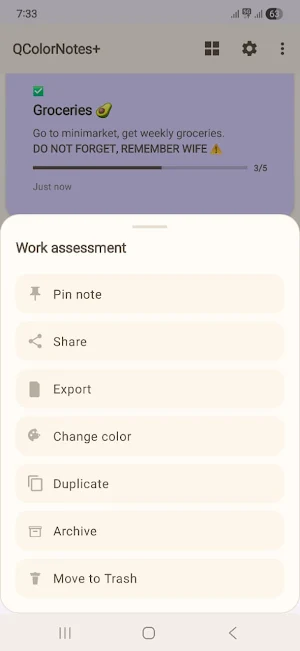
• Create text notes and interactive checklists.
• Format text with bold, italic, underline, colors, highlighting and sizes.
• Attach images selected with Android's system picker.
• Reliable auto-save keeps edits as you work.
• Private on-device voice dictation when Android has a compatible local recognizer.
ORGANIZE YOUR WAY
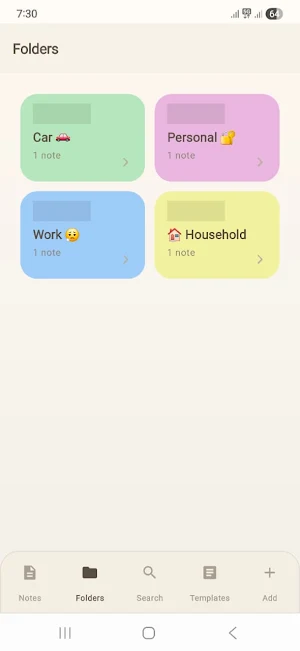
• Use folders, tags, pins and archive.
• Choose from a broad palette of note colors.
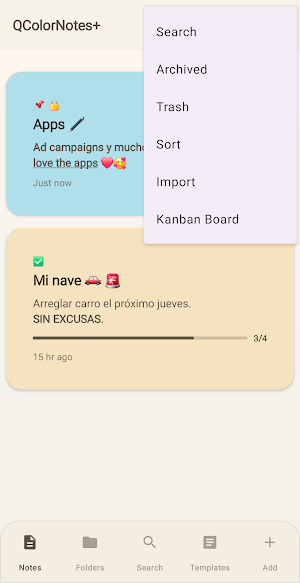
• Find notes with search and filters.
• Recover deleted notes from Trash before permanent cleanup.
• Turn work into a visual Kanban board with customizable columns.
• Reuse content with templates and review previous note versions.
REMINDERS AND CALENDAR
• Schedule time-based reminder notifications.
• Optionally create and synchronize linked events through the Android calendar provider.
• Calendar accounts on your device may sync events according to their provider settings.
BACK UP WITH A CLEAR PURPOSE
• Create password-protected portable backups with notes, folders, tags, checklists and attached images.
• Restore a portable backup on another compatible installation using its password.
• Keep automatic encrypted snapshots tied to the current installation for routine recovery.
• Android may also back up eligible app data or transfer it between devices when system backup is enabled.
QUICK ACCESS
• Add sticky-note, checklist and notes-list widgets to your home screen.
• Import, export and share through Android's system file and share controls.
• Choose English, Spanish or German in the app.
PRIVACY DETAILS
• No QColorNotes+ account, advertising or developer-operated data server.
• Notes are stored in the app's private local storage unless you choose a system service, export, share or backup destination.
• Locked notes hide their content until Android biometric or device-credential authentication succeeds. Locking controls on-screen access; it is not individual database encryption.
Read the privacy policy from the About screen for details about voice recognition, calendar providers and Android backup.
What’s new
Version 2.0.3 · Updated August 19, 2026
• Exported PDFs now look like your note: its colour, paper style, font and all your bold, italic and highlighted text. Printing matches too. • Tap a photo in a note to open it full screen, with the same page-turn effect. • Reorder photos by dragging, and removing one now asks first. • Fixed: the toolbar icons sometimes turned pale. • The Kanban board uses the full screen in landscape.
Alternatives to QColorNotes+
Looking for apps like QColorNotes+? Here are 3 similar Android apps on Google Play. 1 of the 3 are free to download.



| App | Rating | Price | Installs | Last updated | Compare |
|---|---|---|---|---|---|
| QColorNotes+ | – | $1.49 | 10+ | Aug 19, 2026 | |
| MIB2 Controller | – | 5.99 USD | 10+ | – | Compare |
| Zzz Timer Pro+ | – | Free | 10+ | Mar 18, 2026 | Compare |
| Axium Code Editor | – | 4.99 USD | 10+ | Sep 29, 2026 | Compare |
Compare QColorNotes+ with the top alternatives: ratings, updates, ASO score and keyword gaps →