
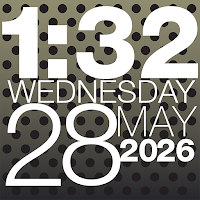
WP CLOCK
Personalization In-app purchases
Bold typographic live wallpaper, desk clock & widget. Customize every element.
- Downloads
- 100+
- on Google Play
- Price
- Free
- In-app purchases
- Updated
- Aug 28
- 2026 · v2.0.6
Screenshots


About WP CLOCK
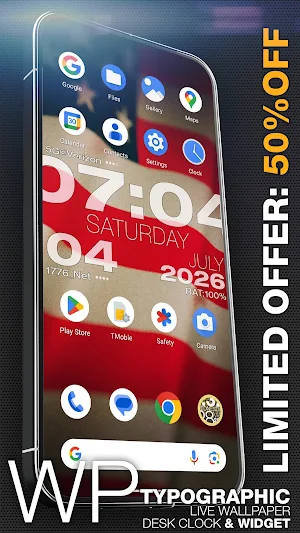
WP Clock is back! Celebrate our launch with 50% off the Premium upgrade for a limited time!
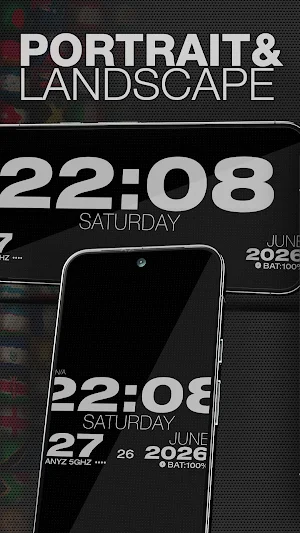
WP Clock is a typographic live wallpaper and fullscreen desk clock built around bold, readable type — not another round analog face.
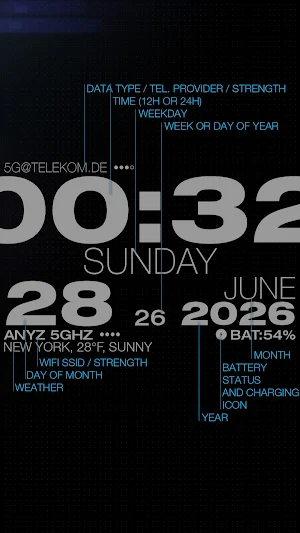
Stack time, weekday, date, carrier, Wi‑Fi, weather and battery in a layout you shape element by element. When something updates, rows bounce with a subtle horizontal wiggle. It feels alive without being noisy.
LIVE WALLPAPER, DESK CLOCK & WIDGET
• Apply as your Android live wallpaper
• Or open standalone as an always-on clock with optional full brightness
• Separate layout, spacing, and alignment for wallpaper and standalone
• NEW: Home Screen Widget (Beta) – Enjoy our iconic typographic layout over your favorite static setups. Note: This feature is actively in development; animations are disabled for widgets, and performance may vary across devices.
WEATHER ON YOUR CLOCK
• Add a forecast row below the date — city, temperature, and condition in one clean typographic line
• Search any city worldwide, or use current location (approximate — only when refreshing, not continuous tracking)
• Conditions localized to your device language
• °C or °F, refresh intervals from 30 minutes to once a day
• Cached readings keep showing offline until the next refresh
MAKE IT YOURS
• Turn elements on or off and style each one — color, size, outline, opacity
• Global style or per-element control
• Fit the clock to screen width or craft a precise typographic stack
• 12- or 24-hour time, optional AM/PM
BACKGROUNDS THAT LIVE
• Solid colors with geometric patterns (dots, rings, diamonds, typography…)
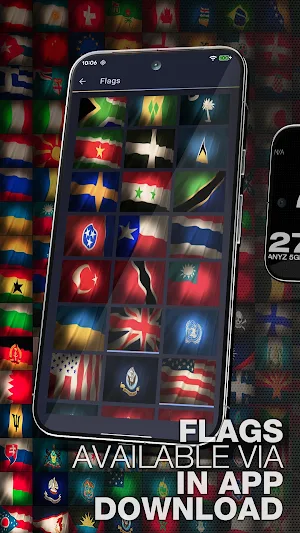
• Custom gallery — add multiple photos at once, mix in downloaded flag packs, and adjust position per image in portrait and landscape
• Slideshow between your saved images — sequential (A→B→C) or random
• Local folder — point at a photo folder on your device and rotate through it without copying files into the app • Download curated packs from the online gallery (flags, soccer balls, and more)
• Wave animations across the pattern when values change
PRESETS & POLISH
• Built-in looks to start from, or save your own presets
• Optional preset rotation — your clock changes style on a schedule
• Bounce animations you can tune — distance, repeats, speed
• Dynamic patterns and background transitions
PREMIUM Try everything free for 7 days. Premium is a one-time purchase — no subscription. Unlock the full photo workflow (larger custom gallery, local folder rotation, slideshows, and drag-to-position), online gallery downloads, full animations, custom presets, and more. All future updates included.
WP Clock is for people who want their home screen and nightstand clock to look designed — not generic.
WP Clock is a typographic live wallpaper and fullscreen desk clock built around bold, readable type — not another round analog face.
Stack time, weekday, date, carrier, Wi‑Fi, weather and battery in a layout you shape element by element. When something updates, rows bounce with a subtle horizontal wiggle. It feels alive without being noisy.
LIVE WALLPAPER, DESK CLOCK & WIDGET
• Apply as your Android live wallpaper
• Or open standalone as an always-on clock with optional full brightness
• Separate layout, spacing, and alignment for wallpaper and standalone
• NEW: Home Screen Widget (Beta) – Enjoy our iconic typographic layout over your favorite static setups. Note: This feature is actively in development; animations are disabled for widgets, and performance may vary across devices.
WEATHER ON YOUR CLOCK
• Add a forecast row below the date — city, temperature, and condition in one clean typographic line
• Search any city worldwide, or use current location (approximate — only when refreshing, not continuous tracking)
• Conditions localized to your device language
• °C or °F, refresh intervals from 30 minutes to once a day
• Cached readings keep showing offline until the next refresh
MAKE IT YOURS
• Turn elements on or off and style each one — color, size, outline, opacity
• Global style or per-element control
• Fit the clock to screen width or craft a precise typographic stack
• 12- or 24-hour time, optional AM/PM
BACKGROUNDS THAT LIVE
• Solid colors with geometric patterns (dots, rings, diamonds, typography…)
• Custom gallery — add multiple photos at once, mix in downloaded flag packs, and adjust position per image in portrait and landscape
• Slideshow between your saved images — sequential (A→B→C) or random
• Local folder — point at a photo folder on your device and rotate through it without copying files into the app • Download curated packs from the online gallery (flags, soccer balls, and more)
• Wave animations across the pattern when values change
PRESETS & POLISH
• Built-in looks to start from, or save your own presets
• Optional preset rotation — your clock changes style on a schedule
• Bounce animations you can tune — distance, repeats, speed
• Dynamic patterns and background transitions
PREMIUM Try everything free for 7 days. Premium is a one-time purchase — no subscription. Unlock the full photo workflow (larger custom gallery, local folder rotation, slideshows, and drag-to-position), online gallery downloads, full animations, custom presets, and more. All future updates included.
WP Clock is for people who want their home screen and nightstand clock to look designed — not generic.
What’s new
Version 2.0.6 · Updated August 28, 2026
Thanks for the details — we found a startup crash in 2.0.5 (black screen). Fix is in 2.0.6; please update when Play offers it and let me know if it opens normally.
User reviews

WP Clock is a fun way to customize your desktop and lock screen. I particularly like the opacity controls and background image positioning controls.
Alternatives to WP CLOCK
Looking for apps like WP CLOCK? Here are 2 similar Android apps on Google Play. All of them are free to download.

| App | Rating | Price | Installs | Last updated | Compare |
|---|---|---|---|---|---|
| WP CLOCK | – | Free | 100+ | Aug 28, 2026 | |
| Pure Light | – | Free | 50+ | Jul 13, 2026 | Compare |
| ChronoLoop | – | Free | 5+ | Mar 13, 2026 | Compare |
Compare WP CLOCK with the top alternatives: ratings, updates, ASO score and keyword gaps →