
FocusFlow
Epic Journey Games Productivity
Minimal Pomodoro focus timer. Track sessions, build streaks, stay in the zone.
- Downloads
- 5+
- on Google Play
- Price
- Free
- No in-app purchases
- Updated
- Mar 5
- 2026
Screenshots


About FocusFlow
Stop multitasking. Start focusing.
FocusFlow is a clean, distraction-free Pomodoro timer designed for people who take their work seriously. No ads, no social features, no clutter — just a beautiful timer and your focus.
Set a session. Press start. Get to work.
The Pomodoro technique breaks your work into focused intervals separated by short breaks. FocusFlow automates the entire cycle so you never have to think about timing again. When your focus session ends, a break begins. When the break ends, you're back to work. Simple.
HOW IT WORKS
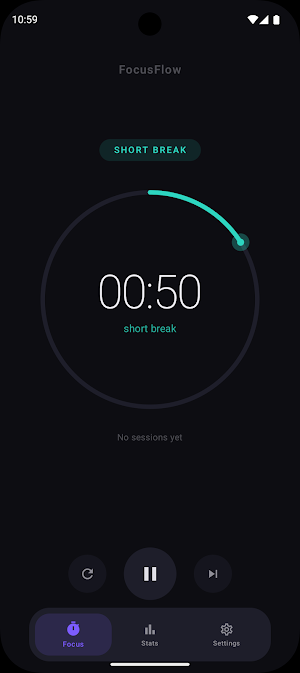
Pick your focus duration or use the classic 25-minute session. Hit start and the animated timer ring begins counting down. When you finish, FocusFlow logs the session and transitions you into a short break. Every few sessions, you earn a longer break. The app handles the rhythm — you handle the work.
FEATURES
Focus Timer
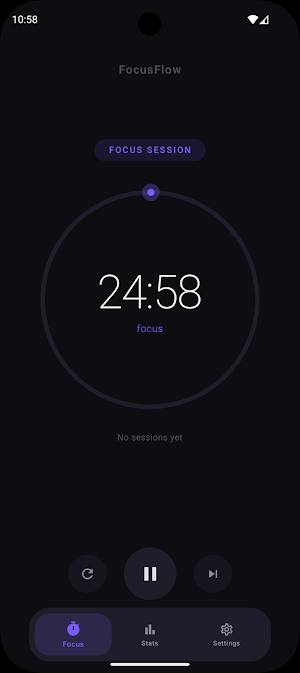
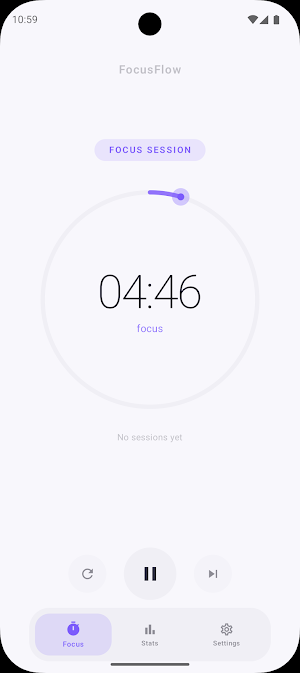
A large, animated countdown ring sits at the center of the screen. No tabs, no sidebars, no distractions. Just your remaining time and a single button. Start, pause, reset, or skip — nothing more.
Custom Durations
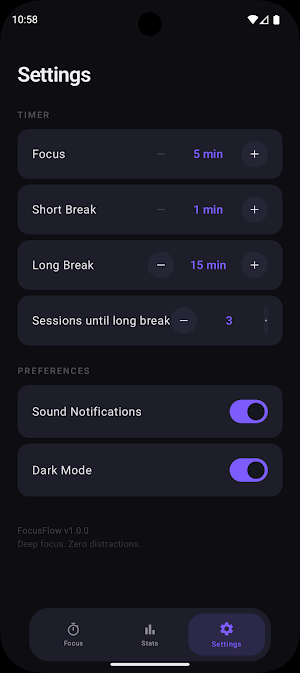
Set your own focus length from 5 to 90 minutes. Adjust short breaks from 1 to 30 minutes and long breaks from 5 to 60 minutes. Choose how many sessions you complete before earning a long break.
Session Tracking
Every completed focus session is saved automatically. See how many sessions you finished today, how many you completed this week, and your total accumulated focus time.
Weekly Progress
A simple bar chart shows your daily session counts across the week. Watch your consistency build over time. A streak counter tracks consecutive days of focus.
Dark and Light Themes
A calm dark theme is the default — easy on the eyes during late-night work sessions. Switch to light mode anytime from settings.
DESIGNED FOR CALM
FocusFlow looks and feels different from typical productivity apps. The interface is deliberately minimal. Typography is large and clear. Colors are muted and intentional. Animations are smooth but never flashy. Every screen is designed to keep you calm and focused, not overwhelmed.
No accounts. No sign-ups. No internet required. Your data stays on your device.
Whether you're a student preparing for exams, a developer in deep work, a writer chasing a deadline, or anyone who needs uninterrupted focus time — FocusFlow gets out of your way and lets you work.
Deep focus. Zero distractions.
FocusFlow is a clean, distraction-free Pomodoro timer designed for people who take their work seriously. No ads, no social features, no clutter — just a beautiful timer and your focus.
Set a session. Press start. Get to work.
The Pomodoro technique breaks your work into focused intervals separated by short breaks. FocusFlow automates the entire cycle so you never have to think about timing again. When your focus session ends, a break begins. When the break ends, you're back to work. Simple.
HOW IT WORKS
Pick your focus duration or use the classic 25-minute session. Hit start and the animated timer ring begins counting down. When you finish, FocusFlow logs the session and transitions you into a short break. Every few sessions, you earn a longer break. The app handles the rhythm — you handle the work.
FEATURES
Focus Timer
A large, animated countdown ring sits at the center of the screen. No tabs, no sidebars, no distractions. Just your remaining time and a single button. Start, pause, reset, or skip — nothing more.
Custom Durations
Set your own focus length from 5 to 90 minutes. Adjust short breaks from 1 to 30 minutes and long breaks from 5 to 60 minutes. Choose how many sessions you complete before earning a long break.
Session Tracking
Every completed focus session is saved automatically. See how many sessions you finished today, how many you completed this week, and your total accumulated focus time.
Weekly Progress
A simple bar chart shows your daily session counts across the week. Watch your consistency build over time. A streak counter tracks consecutive days of focus.
Dark and Light Themes
A calm dark theme is the default — easy on the eyes during late-night work sessions. Switch to light mode anytime from settings.
DESIGNED FOR CALM
FocusFlow looks and feels different from typical productivity apps. The interface is deliberately minimal. Typography is large and clear. Colors are muted and intentional. Animations are smooth but never flashy. Every screen is designed to keep you calm and focused, not overwhelmed.
No accounts. No sign-ups. No internet required. Your data stays on your device.
Whether you're a student preparing for exams, a developer in deep work, a writer chasing a deadline, or anyone who needs uninterrupted focus time — FocusFlow gets out of your way and lets you work.
Deep focus. Zero distractions.
What’s new
Updated March 5, 2026
Open Testing FocusFlow v1.2
Alternatives to FocusFlow
Looking for apps like FocusFlow? Here are 6 similar Android apps on Google Play. All of them are free to download.
-
NoteFlow: AI Meeting Notes
-
NJ Interiors
-
PixElite: AI Video Maker
-
Photo Shoot Planner
-
Byte Tools
-
TimeSheetPro - Working Hours
| App | Rating | Price | Installs | Last updated | Compare |
|---|---|---|---|---|---|
| FocusFlow | – | Free | 5+ | Mar 5, 2026 | |
| NoteFlow: AI Meeting Notes | – | Free | 10,000+ | Sep 23, 2026 | Compare |
| NJ Interiors | – | Free | 10+ | – | Compare |
| PixElite: AI Video Maker | – | Free | 1,000+ | May 14, 2026 | Compare |
| Photo Shoot Planner | – | Free | 50+ | – | Compare |
| Byte Tools | – | Free | 50+ | Oct 22, 2026 | Compare |
| TimeSheetPro - Working Hours | – | Free | 1,000+ | Aug 30, 2026 | Compare |
Compare FocusFlow with the top alternatives: ratings, updates, ASO score and keyword gaps →
Similar apps on Google Play
- NoteFlow: AI Meeting Notes
- NJ Interiors
- PixElite: AI Video Maker
- Photo Shoot Planner
- Byte Tools
- TimeSheetPro - Working Hours
- AI Journal
- FUDI
- mySovitrat - Pro
- Exercise Mate
- ValidaDoc Brasil
- Disferra
- Lapsed - Days Since Tracker
- AlethiaX-Realtime AI Detection
- Net Truyen Pro
- SubKit - Renewals Tracker
- QPWS Monitr
- Progress Field
- Aelus Inquilinos
- IPTV Player - Opus
- DSM Pump Manager
- NestSpot Narrative
- Nilein Cauvery
- tldr: Summarise Any Screen
- Quiz Islam