
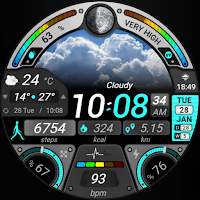
Rainbow Weather - Watch Face
Personalization
Experience the colors of the sky on your wrist!
- Rating
- 4.1
- 116 ratings
- Downloads
- 4.8K+
- on Google Play
- Price
- $1.99
- No in-app purchases
- Updated
- Sep 22
- 2026
Screenshots



About Rainbow Weather - Watch Face
🌟 Built for Wear OS
[ Only for Wear OS 5+ devices (API 34+)]
📌 INSTALLATION NOTES:
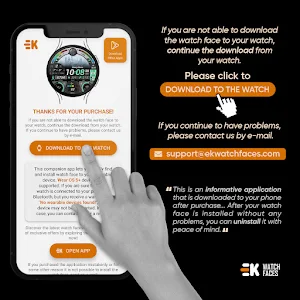
1 - 🔗 Ensure your watch is properly connected to your phone. Open the Phone App on your phone and tap on "DOWNLOAD TO THE WATCH", then follow the instructions on your watch.
⌛ A few minutes after tapping the install button on your watch, the watch face will be installed. You can then select your new watch face!
📱 The phone app serves as a placeholder to make it easier to install and find the watch face on your Wear OS device.
⚠️ Note: If you find yourself stuck in a payment loop, don’t worry! You will only be charged once, even if prompted to pay again. Wait 5 minutes or restart your watch and try again. This could be a synchronization issue between your device and Google servers.
2 - 💻 Alternatively, you can try installing the watch face from a web browser on your PC.
⚠️ Please note that any issues on this side are NOT developer-dependent. The developer has no control over the Play Store from this side. Thank you.
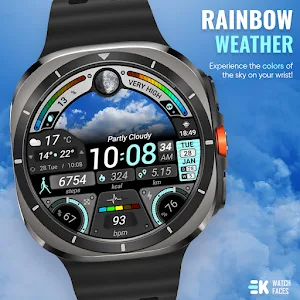
🌈 Experience the colors of the sky on your wrist!
FEATURES
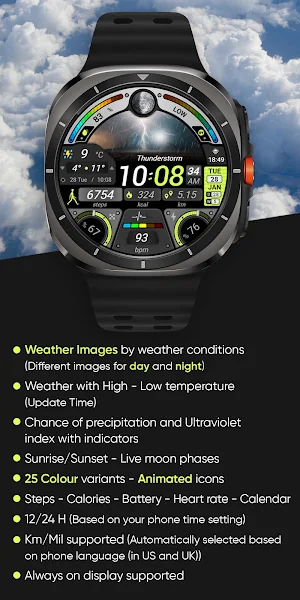
● 🌤️ Weather images by weather conditions (Different images for day and night)
● 🌡️ Weather with High - Low temperature (Update Time)
● 🌧️ Chance of precipitation and Ultraviolet index with indicators
● 🌞 Sunrise/Sunset - Live moon phases
● 🎨 25 Colour variants - Animated icons
● 📊 Steps - Calories - Battery - Heart rate - Calendar
● 🕒 12/24 H (Based on your phone time setting)
● 🚧 Km/Mil supported (Automatically selected based on phone language (in United States and United Kingdom))
● 👀 Always on display supported
🔑 For full functionality, please manually enable Sensors & receive complication data permissions!
WEB
https://www.ekwatchfaces.com
INSTAGRAM
https://www.instagram.com/ekwatchfaces
FACEBOOK
https://www.facebook.com/ekwatchfaces
TWITTER
https://twitter.com/ekwatchfaces
PINTEREST
https://www.pinterest.com/ekwatchfaces
YOUTUBE
https://bit.ly/2TowlDE
[ Only for Wear OS 5+ devices (API 34+)]
📌 INSTALLATION NOTES:
1 - 🔗 Ensure your watch is properly connected to your phone. Open the Phone App on your phone and tap on "DOWNLOAD TO THE WATCH", then follow the instructions on your watch.
⌛ A few minutes after tapping the install button on your watch, the watch face will be installed. You can then select your new watch face!
📱 The phone app serves as a placeholder to make it easier to install and find the watch face on your Wear OS device.
⚠️ Note: If you find yourself stuck in a payment loop, don’t worry! You will only be charged once, even if prompted to pay again. Wait 5 minutes or restart your watch and try again. This could be a synchronization issue between your device and Google servers.
2 - 💻 Alternatively, you can try installing the watch face from a web browser on your PC.
⚠️ Please note that any issues on this side are NOT developer-dependent. The developer has no control over the Play Store from this side. Thank you.
🌈 Experience the colors of the sky on your wrist!
FEATURES
● 🌤️ Weather images by weather conditions (Different images for day and night)
● 🌡️ Weather with High - Low temperature (Update Time)
● 🌧️ Chance of precipitation and Ultraviolet index with indicators
● 🌞 Sunrise/Sunset - Live moon phases
● 🎨 25 Colour variants - Animated icons
● 📊 Steps - Calories - Battery - Heart rate - Calendar
● 🕒 12/24 H (Based on your phone time setting)
● 🚧 Km/Mil supported (Automatically selected based on phone language (in United States and United Kingdom))
● 👀 Always on display supported
🔑 For full functionality, please manually enable Sensors & receive complication data permissions!
WEB
https://www.ekwatchfaces.com
https://www.instagram.com/ekwatchfaces
https://www.facebook.com/ekwatchfaces
https://twitter.com/ekwatchfaces
https://www.pinterest.com/ekwatchfaces
YOUTUBE
https://bit.ly/2TowlDE
What’s new
Updated September 22, 2026
- Security update performed.
User reviews

excellent watch face

Me gusta mucho esta esfera, pero no entiendo lo que significa lo que esta en la esquina inferior izquierda, en la que marca 67%

Fantastic looking watch face for those weather fanatics who like to keep an eye close on the weather conditions throughout the day. One possible future improvement could be a custom shortcut to assign an app of choice? But otherwise highly recommended and best looking weather app.

So far greater. Best new looking watch face to hit the market.

Lots of information, works well
Alternatives to Rainbow Weather - Watch Face
Looking for apps like Rainbow Weather - Watch Face? Here are 6 similar Android apps on Google Play. The highest rated is Watch Face for Wear OS (4.4/5), and 1 of the 6 are free to download.
-
Watch Face for Wear OS 4.4
-
Back to School - Watch Face
-
X-Watch - Watch Face
-
BioSky-X - Watch Face 3.4
-
Newspaper Time - Watch Face
-
Chrono Core - Watch Face 3.1
| App | Rating | Price | Installs | Last updated | Compare |
|---|---|---|---|---|---|
| Rainbow Weather - Watch Face | 4.1 / 5 | $1.99 | 1,000+ | Sep 22, 2026 | |
| Watch Face for Wear OS | 4.4 / 5 | Free | 10,000+ | May 19, 2026 | Compare |
| Back to School - Watch Face | – | 1.99 USD | 500+ | Sep 17, 2026 | Compare |
| X-Watch - Watch Face | – | 1.99 USD | 1,000+ | – | Compare |
| BioSky-X - Watch Face | 3.4 / 5 | 1.99 USD | 1,000+ | Sep 17, 2026 | Compare |
| Newspaper Time - Watch Face | – | 1.99 USD | 500+ | Sep 22, 2026 | Compare |
| Chrono Core - Watch Face | 3.1 / 5 | 1.99 USD | 5,000+ | Sep 17, 2026 | Compare |