
Simple Multiscript Calculator
Tools In-app purchases Contains ads
Premium offline calculator - multi-theme elegance and global numeral support
- Downloads
- 100+
- on Google Play
- Price
- Free
- In-app purchases
- Updated
- Apr 15
- 2026 · v1.0.6
Screenshots
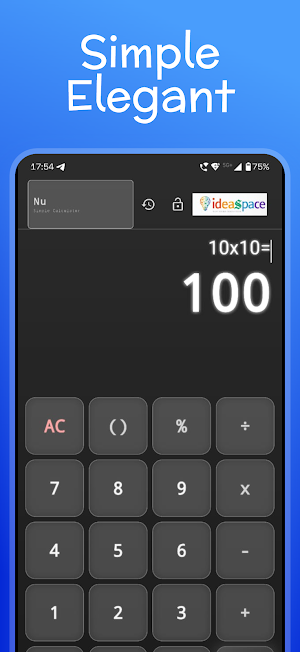


About Simple Multiscript Calculator
Nu: Simple Calculator — Elegance Meets Global Precision
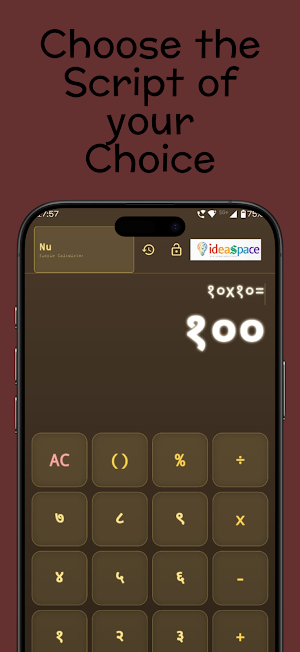
Calculations, Redefined for the World. Elevate your everyday math with Nu, the calculator that blends high-end aesthetic with universal accessibility. Now featuring Multi-Script Support and a Premium Theme Engine, Nu is designed for those who demand both beauty and functional aptness.
Nu delivers a seamless experience in your own native script, to carry out your quick daily calculations wrapped in a stunning modern interface.
✨ What’s New?
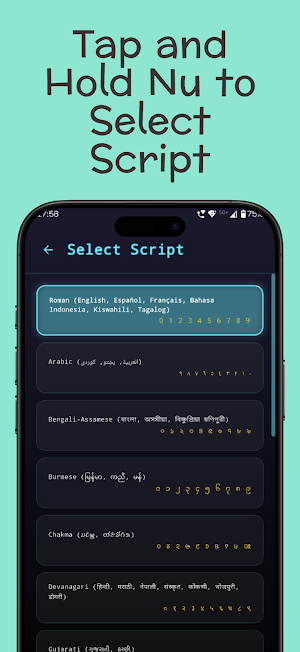
🌍 Global Script Support: Math is universal, and now your calculator is too. Choose from 20+ numeral scripts, including Devanagari, Arabic, Bengali, Tamil, Telugu, Thai, Chinese (Han), and many more. Calculate in the script that feels like home.
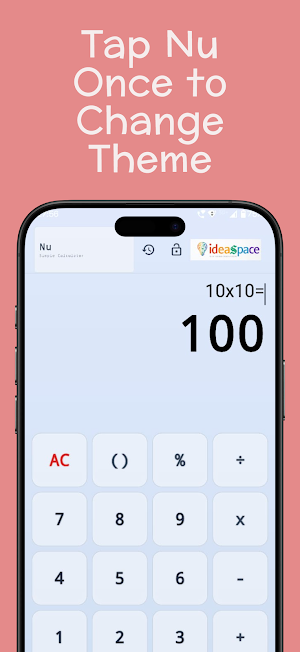
🎨 Premium Theme Engine: Match your calculator to your mood or device aesthetic. Switch between 6 handcrafted themes:
Aegis: The signature neon-blue futuristic vibe.
Solara: A clean, minimalist light mode for clarity.
Dust: A warm, sophisticated sepia for classic elegance.
Crimson: A bold, deep-red void for high-contrast focus.
Cypher: A "Matrix" inspired green-on-black digital aesthetic.
Ash: A subtle, faded grey for ultimate distraction-less math.
🎯 Intelligent Precision: Handles massive numbers and long decimals with ease, automatically switching to scientific notation when needed for absolute accuracy.
⚡ Instant & Lightweight: No bloat, no lag. Optimized for speed to ensure it opens instantly and runs smoothly on any device.
📱 Seamless Accessibility: Fully responsive design that adapts beautifully to phones, tablets, and landscape orientations.
🔒 Privacy-First & 100% Offline: No internet, no tracking, and no unnecessary permissions. Just pure, secure calculation at your fingertips.
The Future of Calculation is Global. We built Nu to replace outdated, cluttered stock apps. It’s more than a calculator—it’s a workspace designed to inspire focus through elegance.
Experience the world’s most beautiful, multi-script calculator. Download Nu today.
Nu: Simple Calculator — User Guidelines
Welcome to Nu. This guide will help you navigate the minimalist interface and customize your calculation experience.
🌟 Customizing Your Experience
Switch Themes: Simply tap the "Nu" logo/header at the top left of the screen to cycle through our 6 premium themes (Aegis, Solara, Dust, Crimson, Cypher, and Ash).
Change Numeral Scripts: Long-press the "Nu" logo/header to open the Script Selection page. You can choose from over 20 global numeral systems (e.g., Devanagari, Arabic, Tamil, Thai).
🧮 Smart Calculation Tips
Parentheses: Use the
()
button for grouped operations. The app intelligently handles nested logic.
Percentage: Tap % to quickly calculate percentages of your current input.
Scientific Notation: For extremely large or small results, Nu automatically switches to scientific notation for maximum precision.
💎 Premium Features (Ad-Free)
If you have upgraded to the Premium version:
History: Tap the Clock/History icon in the header to view and clear your last 10 calculations.
Lock Preferences: Tap the Lock icon in the header to freeze your current theme and script selection, preventing accidental changes.
🔒 Privacy & Offline
Nu works 100% offline. We do not track your calculations, require internet access, or ask for unnecessary permissions. Your math is your business.
Enjoy a distraction-less calculation experience.
Calculations, Redefined for the World. Elevate your everyday math with Nu, the calculator that blends high-end aesthetic with universal accessibility. Now featuring Multi-Script Support and a Premium Theme Engine, Nu is designed for those who demand both beauty and functional aptness.
Nu delivers a seamless experience in your own native script, to carry out your quick daily calculations wrapped in a stunning modern interface.
✨ What’s New?
🌍 Global Script Support: Math is universal, and now your calculator is too. Choose from 20+ numeral scripts, including Devanagari, Arabic, Bengali, Tamil, Telugu, Thai, Chinese (Han), and many more. Calculate in the script that feels like home.
🎨 Premium Theme Engine: Match your calculator to your mood or device aesthetic. Switch between 6 handcrafted themes:
Aegis: The signature neon-blue futuristic vibe.
Solara: A clean, minimalist light mode for clarity.
Dust: A warm, sophisticated sepia for classic elegance.
Crimson: A bold, deep-red void for high-contrast focus.
Cypher: A "Matrix" inspired green-on-black digital aesthetic.
Ash: A subtle, faded grey for ultimate distraction-less math.
🎯 Intelligent Precision: Handles massive numbers and long decimals with ease, automatically switching to scientific notation when needed for absolute accuracy.
⚡ Instant & Lightweight: No bloat, no lag. Optimized for speed to ensure it opens instantly and runs smoothly on any device.
📱 Seamless Accessibility: Fully responsive design that adapts beautifully to phones, tablets, and landscape orientations.
🔒 Privacy-First & 100% Offline: No internet, no tracking, and no unnecessary permissions. Just pure, secure calculation at your fingertips.
The Future of Calculation is Global. We built Nu to replace outdated, cluttered stock apps. It’s more than a calculator—it’s a workspace designed to inspire focus through elegance.
Experience the world’s most beautiful, multi-script calculator. Download Nu today.
Nu: Simple Calculator — User Guidelines
Welcome to Nu. This guide will help you navigate the minimalist interface and customize your calculation experience.
🌟 Customizing Your Experience
Switch Themes: Simply tap the "Nu" logo/header at the top left of the screen to cycle through our 6 premium themes (Aegis, Solara, Dust, Crimson, Cypher, and Ash).
Change Numeral Scripts: Long-press the "Nu" logo/header to open the Script Selection page. You can choose from over 20 global numeral systems (e.g., Devanagari, Arabic, Tamil, Thai).
🧮 Smart Calculation Tips
Parentheses: Use the
()
button for grouped operations. The app intelligently handles nested logic.
Percentage: Tap % to quickly calculate percentages of your current input.
Scientific Notation: For extremely large or small results, Nu automatically switches to scientific notation for maximum precision.
💎 Premium Features (Ad-Free)
If you have upgraded to the Premium version:
History: Tap the Clock/History icon in the header to view and clear your last 10 calculations.
Lock Preferences: Tap the Lock icon in the header to freeze your current theme and script selection, preventing accidental changes.
🔒 Privacy & Offline
Nu works 100% offline. We do not track your calculations, require internet access, or ask for unnecessary permissions. Your math is your business.
Enjoy a distraction-less calculation experience.
What’s new
Version 1.0.6 · Updated April 15, 2026
A Simple Manuscript Calculator made for daily simple tasks. Multi-script support (over 20 languages), last 10 calculations history tracking, a basic scientific calculator included, buy premium to obtain ad-free experience. Optimized UI! Fully offline!
Alternatives to Simple Multiscript Calculator
Looking for apps like Simple Multiscript Calculator? Here are 3 similar Android apps on Google Play. All of them are free to download.


| App | Rating | Price | Installs | Last updated | Compare |
|---|---|---|---|---|---|
| Simple Multiscript Calculator | – | Free | 100+ | Apr 15, 2026 | |
| Chess Academy: Train & Improve | – | Free | 1,000+ | Jul 14, 2026 | Compare |
| Sudoku | – | Free | 100+ | Jun 2, 2026 | Compare |
| Wealth Projector | – | Free | 1,000+ | Jul 21, 2026 | Compare |