

PiP Tube: Float Video Player
Video Players & Editors In-app purchases Contains ads
Floating video player: watch any video site in a popup PiP overlay window
- Downloads
- 13.1K+
- on Google Play
- Price
- Free
- In-app purchases
- Updated
- Oct 16
- 2026 · v1.0.48
Screenshots

About PiP Tube: Float Video Player
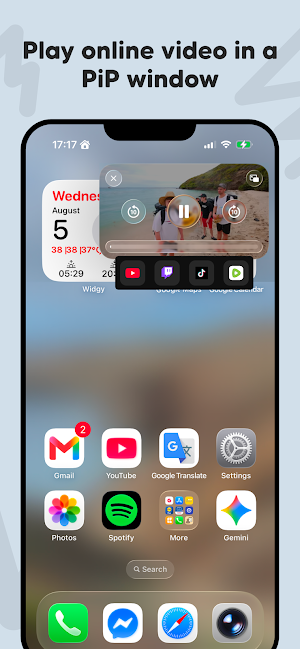
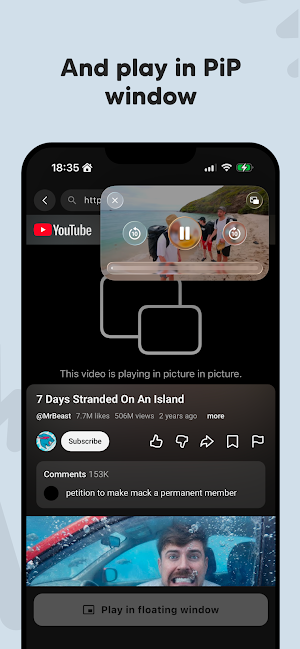
Watch videos your way with PiP Tube, a floating video player that pops any online video out of the page and into a small picture-in-picture (PiP) window on top of your screen. Open YouTube, Twitch, TikTok, Rumble or any other video website, tap once, and your video keeps playing in a movable, resizable popup overlay while you text, chat, browse the web or scroll through other apps.
FLOATING PIP WINDOW ON TOP OF EVERYTHING
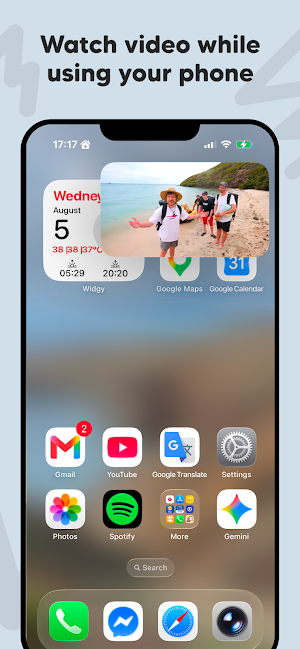
The video pops out into a compact floating window that hovers over your home screen and every other app. Drag the mini player anywhere on the screen, resize the popup to the size you like, and keep watching in picture-in-picture mode while you do anything else on your phone. That is real multitasking: watch and text, watch and browse, watch and play.
OPEN VIDEOS FROM ANY WEBSITE
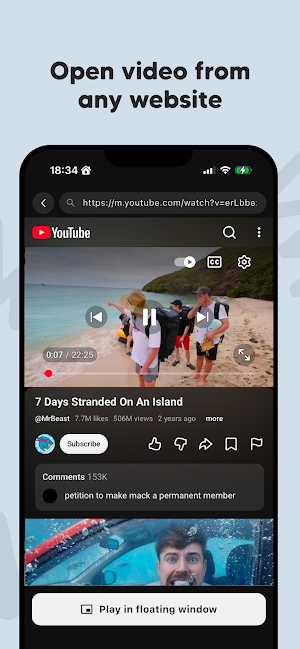
PiP Tube works as a fast built-in video browser. Watch YouTube videos, music videos and live streams, follow your favorite Twitch streamers, catch up on TikTok clips or Rumble channels — or add any other video site yourself. If a website plays video, PiP Tube can float it in a popup window.
ONE TAP TO POP OUT
No complicated setup and no hidden menus. Open any video, tap the "Play in floating window" button below the player, and it instantly jumps into a floating PiP window. Tap again whenever you want to go back to full screen.
WATCH WHILE USING YOUR PHONE
• Reply to messages while a tutorial keeps playing on top
• Follow a cooking video while you read the recipe
• Keep a live stream in the corner while you browse the web
• Watch interviews, podcasts or lectures while taking notes
• Enjoy music videos while scrolling social media
A LIGHTWEIGHT MINI PLAYER FOR TRUE MULTITASKING
PiP Tube is a small, fast overlay video player built for one job: letting you watch web videos in a floating window while you use other apps. No account, no clutter — just open a video and pop it out into picture-in-picture mode.
MORE THAN SPLIT SCREEN
Split screen cuts your display in half. A floating PiP popup gives you the whole screen back: the video overlay sits in the corner while every app stays full size underneath. Move it, shrink it, expand it — the pop-out player adapts to whatever you are doing.
PERFECT FOR
Students who learn from video tutorials, gamers who keep a stream running on top, cooks who follow recipe videos step by step, music fans who want a mini player always on screen, and everyone who hates choosing between watching a video and using their phone.
Download PiP Tube: Float Video Player and turn every video website into a popup, picture-in-picture experience. Your videos, always on top.
PiP Tube is an independent browser-based video player. It is not affiliated with, sponsored or endorsed by YouTube, Twitch, TikTok, Rumble or any other platform. All trademarks are the property of their respective owners.
FLOATING PIP WINDOW ON TOP OF EVERYTHING
The video pops out into a compact floating window that hovers over your home screen and every other app. Drag the mini player anywhere on the screen, resize the popup to the size you like, and keep watching in picture-in-picture mode while you do anything else on your phone. That is real multitasking: watch and text, watch and browse, watch and play.
OPEN VIDEOS FROM ANY WEBSITE
PiP Tube works as a fast built-in video browser. Watch YouTube videos, music videos and live streams, follow your favorite Twitch streamers, catch up on TikTok clips or Rumble channels — or add any other video site yourself. If a website plays video, PiP Tube can float it in a popup window.
ONE TAP TO POP OUT
No complicated setup and no hidden menus. Open any video, tap the "Play in floating window" button below the player, and it instantly jumps into a floating PiP window. Tap again whenever you want to go back to full screen.
WATCH WHILE USING YOUR PHONE
• Reply to messages while a tutorial keeps playing on top
• Follow a cooking video while you read the recipe
• Keep a live stream in the corner while you browse the web
• Watch interviews, podcasts or lectures while taking notes
• Enjoy music videos while scrolling social media
A LIGHTWEIGHT MINI PLAYER FOR TRUE MULTITASKING
PiP Tube is a small, fast overlay video player built for one job: letting you watch web videos in a floating window while you use other apps. No account, no clutter — just open a video and pop it out into picture-in-picture mode.
MORE THAN SPLIT SCREEN
Split screen cuts your display in half. A floating PiP popup gives you the whole screen back: the video overlay sits in the corner while every app stays full size underneath. Move it, shrink it, expand it — the pop-out player adapts to whatever you are doing.
PERFECT FOR
Students who learn from video tutorials, gamers who keep a stream running on top, cooks who follow recipe videos step by step, music fans who want a mini player always on screen, and everyone who hates choosing between watching a video and using their phone.
Download PiP Tube: Float Video Player and turn every video website into a popup, picture-in-picture experience. Your videos, always on top.
PiP Tube is an independent browser-based video player. It is not affiliated with, sponsored or endorsed by YouTube, Twitch, TikTok, Rumble or any other platform. All trademarks are the property of their respective owners.
What’s new
Version 1.0.48 · Updated October 16, 2026
Improve stability of the app
Alternatives to PiP Tube: Float Video Player
Looking for apps like PiP Tube: Float Video Player? Here are 6 similar Android apps on Google Play. The highest rated is Screen Recorder - XRec Lite (4.7/5), and all 6 are free to download.
-
Storyboard GO 4.0
-
Smart Video Crop - Video Cut 3.9
-
PixelFlow: Intro Video maker 4.1
-
kweliTV: Binge On The Culture 4.4
-
BeatSync: Photo & Music Videos 4.1
-
Screen Recorder - XRec Lite 4.7
| App | Rating | Price | Installs | Last updated | Compare |
|---|---|---|---|---|---|
| PiP Tube: Float Video Player | – | Free | 10,000+ | Oct 16, 2026 | |
| Storyboard GO | 4.0 / 5 | Free | 10,000+ | Sep 4, 2026 | Compare |
| Smart Video Crop - Video Cut | 3.9 / 5 | Free | 5,000,000+ | Oct 25, 2026 | Compare |
| PixelFlow: Intro Video maker | 4.1 / 5 | Free | 5,000,000+ | Jan 5, 2026 | Compare |
| kweliTV: Binge On The Culture | 4.4 / 5 | Free | 50,000+ | Dec 12, 2025 | Compare |
| BeatSync: Photo & Music Videos | 4.1 / 5 | Free | 5,000,000+ | Oct 2, 2026 | Compare |
| Screen Recorder - XRec Lite | 4.7 / 5 | Free | 1,000,000+ | Aug 4, 2025 | Compare |
Similar apps on Google Play
- Storyboard GO
- Smart Video Crop - Video Cut
- PixelFlow: Intro Video maker
- kweliTV: Binge On The Culture
- BeatSync: Photo & Music Videos
- Screen Recorder - XRec Lite
- Easy Draw Animals
- AI Video Generator: Voiser AI
- Chaos Audio: Effects & Amp AI
- CDLP
- Screen Recorder - Vidma Record
- Color Grab (color detection)
- Up Tempo: Pitch, Speed Changer
- Film Maker Pro - Movie Maker
- Boosted Ad Maker by Lightricks
- Videoleap: AI Video Editor
- Focus Video - Video Compressor
- VUZ: Live 360 VR Videos
- Likcut
- Stop Motion Studio
- GranPlayer
- Teleprompter for Video
- Momental: Relax & Sleep Sounds
- Node Video
- Elgato Stream Deck Mobile
- GOGH: Animated Drawings
- Video Converter Pro
- Captions Lite
- Screen Recorder GU Recorder
- musicat: Music, Stats, Reviews
- Yoto: Music, Stories, Sleep
- Video Player All Format
- Screen Recorder
- PocketTube
- Simple Gallery Pro
- ActionDirector - Video Editing
- NOVA Video Player
- Slo: Sleep Sounds, Brown Noise
- Eklipse: AI Gaming Clip Maker
- Skit Premium - apps manager
- LumaFusion: Pro Video Editing
- Loom – Screen and Cam Recorder
- Screen Recorder Unlimited
- Zoho Show: Presentation Maker
- OctoStudio: Create-Code-Learn
- RecCloud – AI Video Generator
- Simple Music Player
- IDAGIO Stream Classical Music
- ScreenMaster:Screenshot Markup
- Video Wallpaper Maker Lite
- Google Automotive Keyboard
- Good Lock : Custom Lock Screen
- Video Player for Android
- Fliki - AI Video Editor
- Music Player HD+ Equalizer
- Frolomuse: MP3 Music Player
- BIGVU Teleprompter & Captions
- Podcast Guru - Podcast App
- rova – radio, music, podcasts
- YouCam Video: AI Video Editor
- HODINKEE
- LAVA+
- Music Worx: Play Like a DJ
- Dwellspring: Sleep Sounds
- KMPlayer - All Video Player
- Splice - Video Editor & Maker
- Thingiverse MakerWorld | 3Drop
- AI Video Maker - Renderforest
- Rocketbook