
All Reader: Read All Documents
Productivity Contains ads
Powerful app to read, edit, and convert all types of files effortlessly.
- Rating
- 4.7
- 13 ratings
- Downloads
- 1K+
- on Google Play
- Price
- Free
- No in-app purchases
- Updated
- Jul 21
- 2023 · v5.0
Screenshots


About All Reader: Read All Documents
All Reader: Read All Documents is a comprehensive Android app designed to streamline your document management and conversion needs. With an array of powerful features, this app enables you to effortlessly handle various file types, making it your go-to tool for all document-related tasks.
File Management:
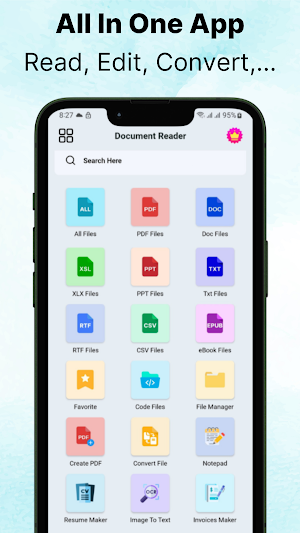
Effortlessly manage and organize your files with the ability to view, rename, delete, share, and search for documents. Gain complete control over your files and easily access them whenever you need.
Supported File Formats:
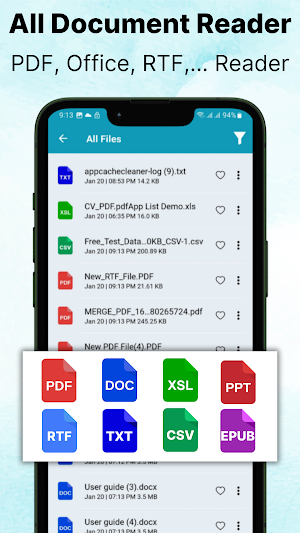
Read and handle a wide range of file formats, including PDF, Word, Excel, PowerPoint, Text, CSV, RTF, eBooks, and code files such as HTML, Java, C++, XML, and YAML. With All Reader you can conveniently open and interact with all your important documents within a single app.
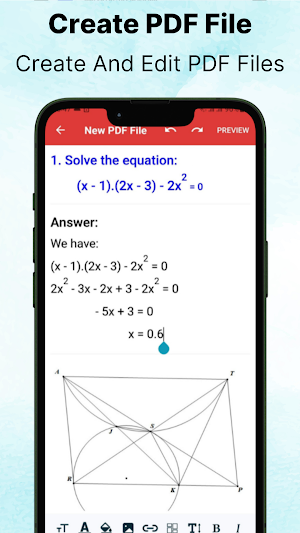
PDF Creation and Editing:
Create new PDFs on the go with the built-in PDF creation feature. Edit existing PDF files by adding, deleting, or modifying text, images, and annotations. Enjoy seamless and efficient PDF editing right from your Android device.
Convert Files:
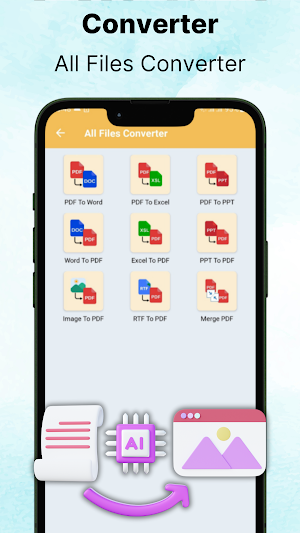
Convert files between various formats with ease. Whether you need to convert PDF to Word, Excel, PowerPoint, or vice versa, this app has got you covered. Convert images to PDF, merge PDF files, and perform a range of other file format conversions effortlessly.
Note Taking and Diary:
Stay organized with the integrated note-taking and diary feature. Create private notes and diaries with the option to set a password for added privacy. Keep your thoughts, ideas, and important information securely stored within the app.
Summary and CV Creation:
Effortlessly generate summaries and professional CVs with multiple templates to choose from. Customize the layout, add your personal details, and create impressive summaries and CVs to showcase your skills and qualifications.
Text Extraction from Images:
Utilize the powerful OCR (Optical Character Recognition) technology to extract text from images. Simply scan any document or image, and the app will convert the text into editable format. Copy the extracted text or export it as PDF or text files for further use.
Efficient Invoicing:
Streamline your invoicing process with the quick and comprehensive invoice creation feature. Generate detailed invoices in no time, ensuring accuracy and professionalism in your financial transactions.
Discover the convenience and versatility of All Reader: Read All Documents. Simplify your document management, editing, conversion, and note-taking tasks with this all-in-one app for your Android device. Take control of your documents, save time, and enhance your productivity today!
File Management:
Effortlessly manage and organize your files with the ability to view, rename, delete, share, and search for documents. Gain complete control over your files and easily access them whenever you need.
Supported File Formats:
Read and handle a wide range of file formats, including PDF, Word, Excel, PowerPoint, Text, CSV, RTF, eBooks, and code files such as HTML, Java, C++, XML, and YAML. With All Reader you can conveniently open and interact with all your important documents within a single app.
PDF Creation and Editing:
Create new PDFs on the go with the built-in PDF creation feature. Edit existing PDF files by adding, deleting, or modifying text, images, and annotations. Enjoy seamless and efficient PDF editing right from your Android device.
Convert Files:
Convert files between various formats with ease. Whether you need to convert PDF to Word, Excel, PowerPoint, or vice versa, this app has got you covered. Convert images to PDF, merge PDF files, and perform a range of other file format conversions effortlessly.
Note Taking and Diary:
Stay organized with the integrated note-taking and diary feature. Create private notes and diaries with the option to set a password for added privacy. Keep your thoughts, ideas, and important information securely stored within the app.
Summary and CV Creation:
Effortlessly generate summaries and professional CVs with multiple templates to choose from. Customize the layout, add your personal details, and create impressive summaries and CVs to showcase your skills and qualifications.
Text Extraction from Images:
Utilize the powerful OCR (Optical Character Recognition) technology to extract text from images. Simply scan any document or image, and the app will convert the text into editable format. Copy the extracted text or export it as PDF or text files for further use.
Efficient Invoicing:
Streamline your invoicing process with the quick and comprehensive invoice creation feature. Generate detailed invoices in no time, ensuring accuracy and professionalism in your financial transactions.
Discover the convenience and versatility of All Reader: Read All Documents. Simplify your document management, editing, conversion, and note-taking tasks with this all-in-one app for your Android device. Take control of your documents, save time, and enhance your productivity today!
What’s new
Version 5.0 · Updated July 21, 2023
Fix some bugs
User reviews

Overall, this app has exceeded my expectations and become an integral part of my daily workflow. Its consistent updates and responsive support further solidify its position as a top-notch document management tool on Android.

An excellent document management app with a user-friendly interface and powerful features. It simplifies tasks like reading, editing, and converting files, saving time and improving productivity. The ability to extract text from images is a standout feature, making it a valuable tool for dealing with scanned documen...

From professional tasks to personal projects, this app's versatility and seamless performance make it an indispensable tool for staying organized and productive on the go.

An impressive app that streamlines document management, reading, editing, and conversion with a user-friendly interface and powerful features. The text extraction from images is a game-changer, saving valuable time when dealing with scanned documents.

All in all, All Document Reader offers a comprehensive and feature-rich solution that exceeds my expectations. It has undoubtedly become an essential tool I rely on daily.

Whether for work or personal use, this app has become my reliable companion, providing a seamless and efficient experience for all my document-related tasks. Highly satisfied with its capabilities
Alternatives to All Reader: Read All Documents
Looking for apps like All Reader: Read All Documents? Here are 5 similar Android apps on Google Play. All of them are free to download.
-
Split Screen & MultiScreen
-
Piart: Photo Editor & Collage
-
Find my phone by Clap, Whistle
-
Women Workout Fitness At Home
-
Fitness & Gym Workout
| App | Rating | Price | Installs | Last updated | Compare |
|---|---|---|---|---|---|
| All Reader: Read All Documents | 4.7 / 5 | Free | 1,000+ | Jul 21, 2023 | |
| Split Screen & MultiScreen | – | Free | 100,000+ | Oct 11, 2025 | Compare |
| Piart: Photo Editor & Collage | – | Free | 100+ | Nov 24, 2022 | Compare |
| Find my phone by Clap, Whistle | – | Free | 1,000+ | Jun 22, 2023 | Compare |
| Women Workout Fitness At Home | – | Free | 100+ | Sep 20, 2022 | Compare |
| Fitness & Gym Workout | – | Free | 1,000+ | Jul 14, 2023 | Compare |