
AirActions
Drake Justice Tools
Control your device with custom hover gestures.
- Downloads
- 10+
- on Google Play
- Price
- $1.00
- No in-app purchases
- Updated
- Feb 9
- 2016 · v1.0
Screenshots
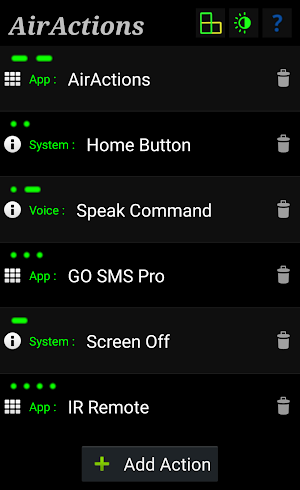

About AirActions
No touch "magic wand" hand gestures.
Custom hover control ('air') actions .
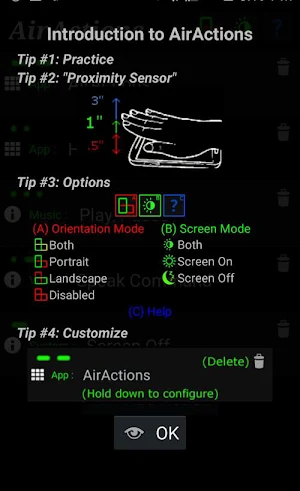
Uses the "proximity sensor", a tiny dot usually located near the speaker or along the top edge of the device. Sometimes the sensor is invisible. Sometimes protective cases cover the sensor.
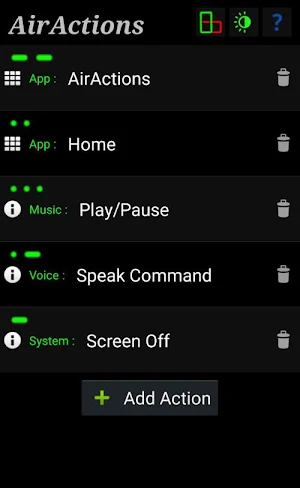
Launch any app with a custom sequence of quick and slow waves. (Morse-code style)
Also shortcuts: (to be expanded...)
Control audio playback (Play/Pause, Next Track, etc.)
Turn the screen off (lock) or on
Call or message someone directly
Voice Command
Toggle WiFi
'HOME' Button
'POWER' Button
'MENU' Button
etc.
Use the device without looking or while the screen is off.
Just a simple wave or series of waves of the paintbrush, thumb or palm.
Any number of any length gestures.
Usually waves must be within 1" - 2" of the sensor.
Devices differ, some work better than others.
Device MUST have a proximity sensor.
Some sensors are useless and i cannot test every hardware myself. If you do find bugs, please e-mail me your debug data (long press "?" twice) before uninstalling.
Useful for...
Dirty hands - cleaning, cooking, eating, etc.
Cracked screen - operate the device without the touchscreen,
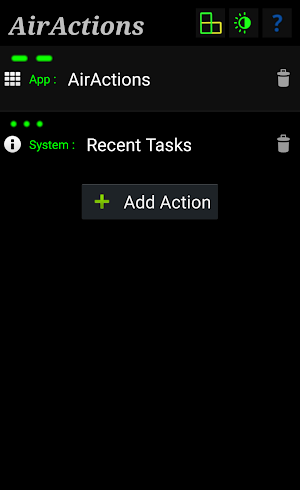
Button replacement - Power/Home/Recent Tasks,etc
While driving - Launch GPS or Direct Call / Message, etc
etc. etc.
Custom hover control ('air') actions .
Uses the "proximity sensor", a tiny dot usually located near the speaker or along the top edge of the device. Sometimes the sensor is invisible. Sometimes protective cases cover the sensor.
Launch any app with a custom sequence of quick and slow waves. (Morse-code style)
Also shortcuts: (to be expanded...)
Control audio playback (Play/Pause, Next Track, etc.)
Turn the screen off (lock) or on
Call or message someone directly
Voice Command
Toggle WiFi
'HOME' Button
'POWER' Button
'MENU' Button
etc.
Use the device without looking or while the screen is off.
Just a simple wave or series of waves of the paintbrush, thumb or palm.
Any number of any length gestures.
Usually waves must be within 1" - 2" of the sensor.
Devices differ, some work better than others.
Device MUST have a proximity sensor.
Some sensors are useless and i cannot test every hardware myself. If you do find bugs, please e-mail me your debug data (long press "?" twice) before uninstalling.
Useful for...
Dirty hands - cleaning, cooking, eating, etc.
Cracked screen - operate the device without the touchscreen,
Button replacement - Power/Home/Recent Tasks,etc
While driving - Launch GPS or Direct Call / Message, etc
etc. etc.
What’s new
Version 1.0 · Updated February 9, 2016
added toggle (wifi) shortcut
Alternatives to AirActions
Looking for apps like AirActions? Here are 3 similar Android apps on Google Play. The highest rated is SIGNL4 – Mobile Alerting (4.6/5), and all 3 are free to download.

| App | Rating | Price | Installs | Last updated | Compare |
|---|---|---|---|---|---|
| AirActions | – | $1.00 | 10+ | Feb 9, 2016 | |
| SIGNL4 – Mobile Alerting | 4.6 / 5 | Free | 10,000+ | Oct 13, 2026 | Compare |
| Robot Calibration by SprutCAM | – | Free | 100+ | Dec 20, 2022 | Compare |
| TAP Kiln Control Mobile | 3.5 / 5 | Free | 5,000+ | Oct 22, 2026 | Compare |
Compare AirActions with the top alternatives: ratings, updates, ASO score and keyword gaps →