

mPass - Secure Password Manager
DevCrux Solutions Productivity Contains ads
A new way to manage your passwords, logins, notes and other credentials.
- Rating
- 4.0
- 73 ratings
- Downloads
- 5K+
- on Google Play
- Price
- Free
- No in-app purchases
- Updated
- Oct 17
- 2020 · v2.2.11
Screenshots



About mPass - Secure Password Manager
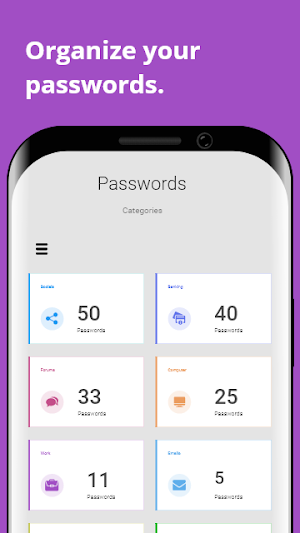
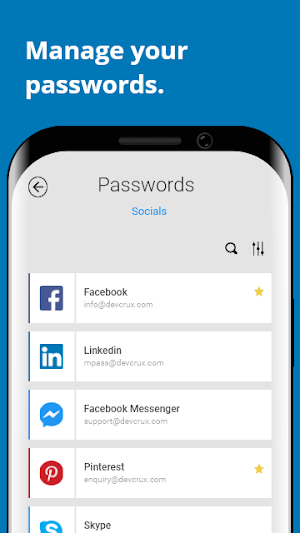
mPass is a password manager app that allows you to keep and manage passwords, logins, and other private info safe and secure in one encrypted database and access them anywhere on any device.
One unique feature of mPass password manager is the ability to help you retrieve all your passwords, logins, notes and other credentials even if you lose your phone. You can never be stranded as you can access your account securely on multiple devices on any platform.
Another unique feature that make it the best password to use is a dashboard that shows your password health as well as information about any weak, vulnerable, reused or compromised passwords. With this you can easily change those passwords in order to stay safe.
mPass serves as a secure password locker, password safe and password vault that uses the best industrial standard encryption protocol to keep your password safe and constantly updates with the latest safety standards to keep it as the best password manager.
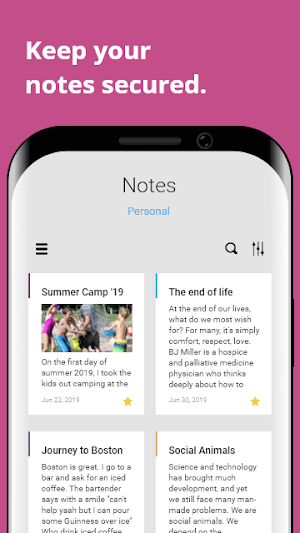
mPass is also a note management app. All your notes are secured and encrypted with the same level of security provided for all your passwords. You can also access all your notes on multiple devices on any platform.
Key features include:
STRONG ENCRYPTION
Your data is always encrypted with a strong multi-level Advanced Encryption Standard (AES). Your data will only be revealed to you when you request for it, other than that, it stays encrypted and secured.
CLOUD SYNCHRONIZATION
You can easily restore your entire account to a new phone or computer (in case of a loss or an upgrade). If you like to you multiple devices to access your data, your phone, tablet or computer automatically synchronized with the latest copy of your data.
LOGIN WITH FINGERPRINT
You can instantly unlock your account with a fingerprint on devices with a fingerprint sensor. This feature is available on devices with Android 6.0 or higher and all Samsung devices.
PASSWORD STRENGTH ANALYSIS
Analyze your password to know the strength of your password. The strength indicator displays the password with corresponding color sign for weak, vulnerable and compromised.
PASSWORD GENERATOR
The password generator helps you generating random and extra strong password of any desirable length up to 128 characters.
CROSS PLATFORM
Access your account on multiple platforms (iOS, Windows, and Android) and different device factors (Phones, Tablets and Desktops).
Keep your passwords safe by dowloading mPass - Secure Password Manager today!
We are always listening, contact us at [email protected] for feedback and suggestions on way to keep mPass as the best and secure password management app.
One unique feature of mPass password manager is the ability to help you retrieve all your passwords, logins, notes and other credentials even if you lose your phone. You can never be stranded as you can access your account securely on multiple devices on any platform.
Another unique feature that make it the best password to use is a dashboard that shows your password health as well as information about any weak, vulnerable, reused or compromised passwords. With this you can easily change those passwords in order to stay safe.
mPass serves as a secure password locker, password safe and password vault that uses the best industrial standard encryption protocol to keep your password safe and constantly updates with the latest safety standards to keep it as the best password manager.
mPass is also a note management app. All your notes are secured and encrypted with the same level of security provided for all your passwords. You can also access all your notes on multiple devices on any platform.
Key features include:
STRONG ENCRYPTION
Your data is always encrypted with a strong multi-level Advanced Encryption Standard (AES). Your data will only be revealed to you when you request for it, other than that, it stays encrypted and secured.
CLOUD SYNCHRONIZATION
You can easily restore your entire account to a new phone or computer (in case of a loss or an upgrade). If you like to you multiple devices to access your data, your phone, tablet or computer automatically synchronized with the latest copy of your data.
LOGIN WITH FINGERPRINT
You can instantly unlock your account with a fingerprint on devices with a fingerprint sensor. This feature is available on devices with Android 6.0 or higher and all Samsung devices.
PASSWORD STRENGTH ANALYSIS
Analyze your password to know the strength of your password. The strength indicator displays the password with corresponding color sign for weak, vulnerable and compromised.
PASSWORD GENERATOR
The password generator helps you generating random and extra strong password of any desirable length up to 128 characters.
CROSS PLATFORM
Access your account on multiple platforms (iOS, Windows, and Android) and different device factors (Phones, Tablets and Desktops).
Keep your passwords safe by dowloading mPass - Secure Password Manager today!
We are always listening, contact us at [email protected] for feedback and suggestions on way to keep mPass as the best and secure password management app.
What’s new
Version 2.2.11 · Updated October 17, 2020
Bug Fixes
User reviews

This app has saved me from having to constantly reset my passwords. It categorizes and securely stores all my log-in info. Easy to use.

The team deserve their 5th star back because if you experience any issues with the application. They are willing to listen. The support team did resolve the problem. Thank you guys/gals. Update after my subscription renewal stop working on my phone and computer. Pity!!! Very nice password app. All apps promise you t...

mPass is one of the best password management apps out there. No doubt about it. It's being constantly improved and the support is very good.

I had an issue with renewing my subscription and I contacted the mPass support team, they sent me a quick response with a possible solution. The first solution was not effective so they kept working on the issue and within 24 hours they came up with a solution that worked. I highly recommend this app.

Very good idea

Excellent program with great support! I recently had an issue, which turned out to a problem with my phone, and DrvCrux spend many hours working g with me to resolve if. MPass has enable me to set strong passwords and still have easy access to my computer accounts. Thanks DevCrux for a great product! Tim
Alternatives to mPass - Secure Password Manager
Looking for apps like mPass - Secure Password Manager? Here are 6 similar Android apps on Google Play. The highest rated is eWallet - Password Manager (4.9/5), and 5 of the 6 are free to download.
-
AuthPass – Password Manager 4.0
-
Password Boss Password Manager 4.1
-
Privacy Monitor by Osano 4.7
-
eWallet - Password Manager 4.9
-
AltoPass Password Manager 4.5
-
First Source 4.5
| App | Rating | Price | Installs | Last updated | Compare |
|---|---|---|---|---|---|
| mPass - Secure Password Manager | 4.0 / 5 | Free | 5,000+ | Oct 17, 2020 | |
| AuthPass – Password Manager | 4.1 / 5 | Free | 10,000+ | Feb 4, 2024 | Compare |
| Password Boss Password Manager | 4.1 / 5 | Free | 50,000+ | Sep 7, 2026 | Compare |
| Privacy Monitor by Osano | 4.7 / 5 | Free | 5,000+ | Mar 5, 2019 | Compare |
| eWallet - Password Manager | 4.9 / 5 | 9.99 USD | 50,000+ | Aug 21, 2026 | Compare |
| AltoPass Password Manager | 4.5 / 5 | Free | 100+ | Feb 17, 2021 | Compare |
| First Source | 4.5 / 5 | Free | 10,000+ | Sep 17, 2026 | Compare |