

Dev Control: Developer Options
Abhishek Gupta Apps Tools
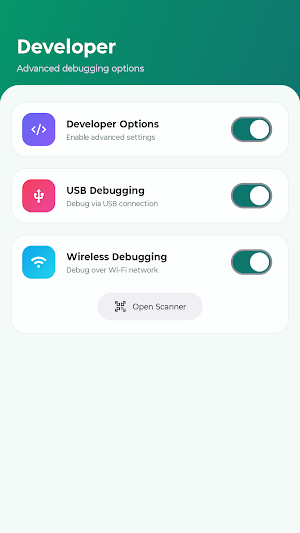
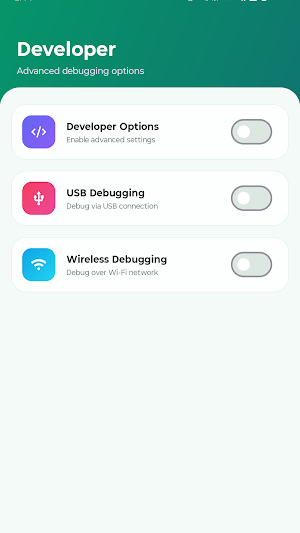
Quickly enable or disable Developer Options, USB and Wireless Debugging.
- Downloads
- 126+
- on Google Play
- Price
- Free
- No in-app purchases
- Updated
- Sep 11
- 2026 · v1.0.4
Screenshots
About Dev Control: Developer Options
Dev Control is a powerful Android developer utility designed for developers, testers, and advanced users to quickly access and manage Developer Options, USB Debugging, Wireless Debugging, and other Android development settings.
Stop wasting time navigating through multiple system menus or repeatedly tapping Build Number to enable Developer Mode. Dev Control provides a simple and faster way to access developer settings with a clean and easy-to-use interface.
Whether you need to enable Developer Options for Android development, disable debugging settings for security-sensitive apps, or quickly switch between development modes, Dev Control helps simplify the process.
Key Features:
• Quickly enable or disable Developer Options
• Manage USB Debugging settings
• Manage Wireless Debugging settings
• Quick access to Android Developer Mode
• Avoid repeated navigation through Android Settings
• Clean and minimal developer-focused UI
• Useful for Android developers, testers, and device enthusiasts
** One-Time Setup Required:
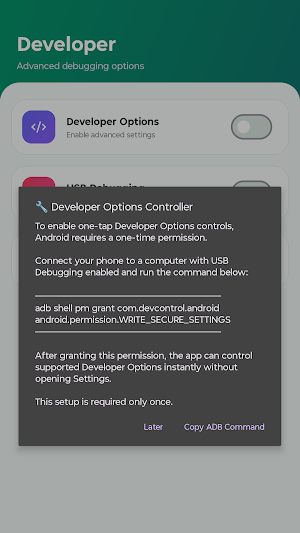
Dev Control requires a one-time ADB permission setup to manage secure Android settings.
Run this command once:
adb shell pm grant com.devcontrol.android android.permission.WRITE_SECURE_SETTINGS
After completing the setup, you can easily control supported developer settings without repeating the permission process.
Why Use Dev Control?
• Save time while developing and testing Android applications
• Quickly switch Developer Options on or off when required
• Simplify device setup for Android development workflows
• Convenient alternative to manually searching through system settings
• Designed for developers using ADB and debugging tools
Many security-focused applications and services may require certain developer settings to be disabled. Instead of manually opening settings and changing options repeatedly, Dev Control provides a faster way to manage your development environment.
Perfect for:
• Android Developers
• App Testers
• QA Engineers
• ADB Users
• Android Enthusiasts
Note:
• Device compatibility may vary depending on Android version and manufacturer restrictions.
• Some Android system features cannot be modified due to device security limitations.
• Dev Control does not bypass application security restrictions.
Dev Control makes Android development and device management easier by providing quick access to essential developer features in one simple application.
Stop wasting time navigating through multiple system menus or repeatedly tapping Build Number to enable Developer Mode. Dev Control provides a simple and faster way to access developer settings with a clean and easy-to-use interface.
Whether you need to enable Developer Options for Android development, disable debugging settings for security-sensitive apps, or quickly switch between development modes, Dev Control helps simplify the process.
Key Features:
• Quickly enable or disable Developer Options
• Manage USB Debugging settings
• Manage Wireless Debugging settings
• Quick access to Android Developer Mode
• Avoid repeated navigation through Android Settings
• Clean and minimal developer-focused UI
• Useful for Android developers, testers, and device enthusiasts
** One-Time Setup Required:
Dev Control requires a one-time ADB permission setup to manage secure Android settings.
Run this command once:
adb shell pm grant com.devcontrol.android android.permission.WRITE_SECURE_SETTINGS
After completing the setup, you can easily control supported developer settings without repeating the permission process.
Why Use Dev Control?
• Save time while developing and testing Android applications
• Quickly switch Developer Options on or off when required
• Simplify device setup for Android development workflows
• Convenient alternative to manually searching through system settings
• Designed for developers using ADB and debugging tools
Many security-focused applications and services may require certain developer settings to be disabled. Instead of manually opening settings and changing options repeatedly, Dev Control provides a faster way to manage your development environment.
Perfect for:
• Android Developers
• App Testers
• QA Engineers
• ADB Users
• Android Enthusiasts
Note:
• Device compatibility may vary depending on Android version and manufacturer restrictions.
• Some Android system features cannot be modified due to device security limitations.
• Dev Control does not bypass application security restrictions.
Dev Control makes Android development and device management easier by providing quick access to essential developer features in one simple application.
Alternatives to Dev Control: Developer Options
Looking for apps like Dev Control: Developer Options? Here are 6 similar Android apps on Google Play. The highest rated is OnePageCRM - Simple CRM System (4.3/5), and all 6 are free to download.
-
AppDash: App Manager & Backup
-
Android System WebView Dev 4.1
-
Accessibility Scanner 4.0
-
OnePageCRM - Simple CRM System 4.3
-
TAP Kiln Control Mobile 4.1
-
Action Launcher: Pixel Edition 3.7
| App | Rating | Price | Installs | Last updated | Compare |
|---|---|---|---|---|---|
| Dev Control: Developer Options | – | Free | 100+ | Sep 11, 2026 | |
| AppDash: App Manager & Backup | – | Free | 100,000+ | Oct 21, 2026 | Compare |
| Android System WebView Dev | 4.1 / 5 | Free | 1,000,000+ | Nov 6, 2026 | Compare |
| Accessibility Scanner | 4.0 / 5 | Free | 1,000,000+ | Apr 15, 2026 | Compare |
| OnePageCRM - Simple CRM System | 4.3 / 5 | Free | 10,000+ | Oct 27, 2026 | Compare |
| TAP Kiln Control Mobile | 4.1 / 5 | Free | 5,000+ | Oct 22, 2026 | Compare |
| Action Launcher: Pixel Edition | 3.7 / 5 | Free | 10,000,000+ | Oct 11, 2026 | Compare |
Similar apps on Google Play
- AppDash: App Manager & Backup
- Android System WebView Dev
- Accessibility Scanner
- OnePageCRM - Simple CRM System
- TAP Kiln Control Mobile
- Action Launcher: Pixel Edition
- Autosync - File Sync & Backup
- ISO Today
- Building Tools
- Google Automotive Keyboard
- Castro Premium - system info
- RepairSolutionsPRO
- DevCheck Device & System Info
- Home Assistant
- Scientific Calculator Pro
- Coast: Native Work Order CMMS
- IFTTT - Automate work and home