

Screenshot Organizer SnapSense
Productivity In-app purchases Contains ads
Auto-organize, search & clean duplicate screenshots with on-device AI.
- Downloads
- 170+
- on Google Play
- Price
- Free
- In-app purchases
- Updated
- Oct 1
- 2026 · v1.0.5
Screenshots

About Screenshot Organizer SnapSense
Take a screenshot. SnapSense does the rest.
SnapSense is an AI-powered screenshot organizer that automatically reads, categorizes, and searches every screenshot on your Android device — using only on-device AI. No cloud. No account. No privacy risk.
Whether you have 100 screenshots or 10,000, SnapSense turns your chaotic gallery into an intelligent, searchable library in minutes.
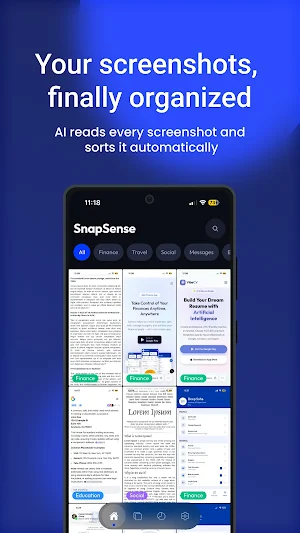
Every screenshot you take is instantly analyzed by on-device AI. SnapSense reads the text inside (OCR), detects objects visible in the image, and sorts it into the right category automatically.
Built-in categories:
▸ Finance — bank statements, UPI payments, receipts, invoices, transaction history
▸ Travel — flight tickets, boarding passes, hotel bookings, trip itineraries
▸ Messages — WhatsApp, Telegram, Instagram DMs, SMS chats
▸ Shopping — Amazon, Flipkart, Meesho, delivery tracking, order confirmations
▸ Food — Swiggy, Zomato, recipes, restaurant menus, calorie screenshots
▸ Work — Slack, Jira, Figma, meeting notes, deadlines, project screenshots
▸ Entertainment — Netflix, YouTube, Spotify, memes, reels
▸ Utility — Wi-Fi passwords, OTPs, settings, error screens
Plus, SnapSense learns your personal habits and creates discovered categories specific to you — like "Swiggy Orders", "HDFC Bank", "Zoom Meetings", or even "Cats" — once you have 30+ screenshots processed.
Stop scrolling. Just type what you remember.
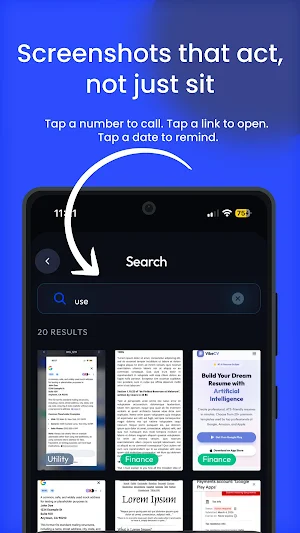
SnapSense uses full-text search across all OCR-extracted text to find the exact screenshot you need, instantly.
No folders. No manual tagging. No scrolling through hundreds of images. Results appear in under a second.
Can't remember the text? Search by what's in the image.
SnapSense's on-device image AI (EfficientNet) identifies objects visible inside screenshots and makes them searchable by name.
No other screenshot organizer app for Android does this.
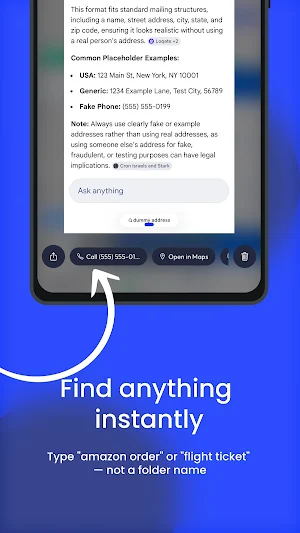
SnapSense reads the content of your screenshots and suggests the right action automatically.
Detected content → Suggested action:
▸ Phone number → Call or Save Contact
▸ Website URL → Open in Browser
▸ Email address → Compose Email
▸ Physical address → Open in Google Maps
▸ Date or deadline → Create Calendar Reminder
▸ QR code → Scan QR Code instantly
No more manually copying phone numbers from screenshots. No more typing out URLs. SnapSense detects them and gives you a one-tap action button.
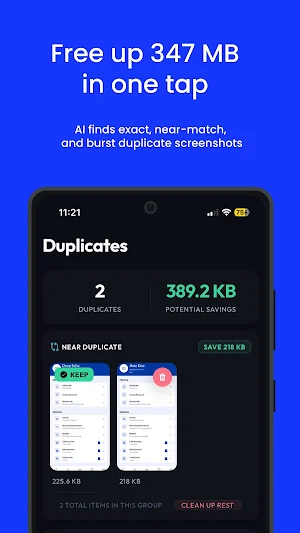
Your storage is full because of duplicate and near-duplicate screenshots. SnapSense finds them all.
Three types of duplicates detected:
▸ Exact duplicates — pixel-perfect identical screenshots
▸ Near duplicates — screenshots taken within seconds of each other
▸ Burst screenshots — rapid-fire captures of the same moment
See side-by-side comparisons, choose which to keep, and delete the rest in one tap. Users typically free up 200–500 MB in the first cleanup session.
Understand your screenshot habits at a glance.
▸ Total screenshots organized
▸ Storage used by category
▸ Most active screenshot days (calendar heatmap)
▸ Storage saved from duplicate cleanup
▸ Smart tips based on your patterns
All AI processing runs directly on your Android device. Your screenshots never leave your phone.
▸ No account or sign-up required
▸ No cloud upload, ever
▸ No internet connection needed for AI features
▸ OCR, classification, search, and duplicate detection — all local
No setup needed. Works from first launch.
"Finally found my receipt screenshots without scrolling forever."
"The QR scanner suggestion saved me so much time."
"Freed 430 MB on day one from duplicate screenshots."
SnapSense is perfect for:
- Students organizing study and note screenshots
- Professionals managing work and meeting screenshots
- Online shoppers tracking orders and receipts
- Travelers keeping boarding passes and hotel bookings organized
- Anyone whose phone gallery is drowning in screenshots
Download SnapSense free and organize your screenshots today.
SnapSense is an AI-powered screenshot organizer that automatically reads, categorizes, and searches every screenshot on your Android device — using only on-device AI. No cloud. No account. No privacy risk.
Whether you have 100 screenshots or 10,000, SnapSense turns your chaotic gallery into an intelligent, searchable library in minutes.
Every screenshot you take is instantly analyzed by on-device AI. SnapSense reads the text inside (OCR), detects objects visible in the image, and sorts it into the right category automatically.
Built-in categories:
▸ Finance — bank statements, UPI payments, receipts, invoices, transaction history
▸ Travel — flight tickets, boarding passes, hotel bookings, trip itineraries
▸ Messages — WhatsApp, Telegram, Instagram DMs, SMS chats
▸ Shopping — Amazon, Flipkart, Meesho, delivery tracking, order confirmations
▸ Food — Swiggy, Zomato, recipes, restaurant menus, calorie screenshots
▸ Work — Slack, Jira, Figma, meeting notes, deadlines, project screenshots
▸ Entertainment — Netflix, YouTube, Spotify, memes, reels
▸ Utility — Wi-Fi passwords, OTPs, settings, error screens
Plus, SnapSense learns your personal habits and creates discovered categories specific to you — like "Swiggy Orders", "HDFC Bank", "Zoom Meetings", or even "Cats" — once you have 30+ screenshots processed.
Stop scrolling. Just type what you remember.
SnapSense uses full-text search across all OCR-extracted text to find the exact screenshot you need, instantly.
No folders. No manual tagging. No scrolling through hundreds of images. Results appear in under a second.
Can't remember the text? Search by what's in the image.
SnapSense's on-device image AI (EfficientNet) identifies objects visible inside screenshots and makes them searchable by name.
No other screenshot organizer app for Android does this.
SnapSense reads the content of your screenshots and suggests the right action automatically.
Detected content → Suggested action:
▸ Phone number → Call or Save Contact
▸ Website URL → Open in Browser
▸ Email address → Compose Email
▸ Physical address → Open in Google Maps
▸ Date or deadline → Create Calendar Reminder
▸ QR code → Scan QR Code instantly
No more manually copying phone numbers from screenshots. No more typing out URLs. SnapSense detects them and gives you a one-tap action button.
Your storage is full because of duplicate and near-duplicate screenshots. SnapSense finds them all.
Three types of duplicates detected:
▸ Exact duplicates — pixel-perfect identical screenshots
▸ Near duplicates — screenshots taken within seconds of each other
▸ Burst screenshots — rapid-fire captures of the same moment
See side-by-side comparisons, choose which to keep, and delete the rest in one tap. Users typically free up 200–500 MB in the first cleanup session.
Understand your screenshot habits at a glance.
▸ Total screenshots organized
▸ Storage used by category
▸ Most active screenshot days (calendar heatmap)
▸ Storage saved from duplicate cleanup
▸ Smart tips based on your patterns
All AI processing runs directly on your Android device. Your screenshots never leave your phone.
▸ No account or sign-up required
▸ No cloud upload, ever
▸ No internet connection needed for AI features
▸ OCR, classification, search, and duplicate detection — all local
No setup needed. Works from first launch.
"Finally found my receipt screenshots without scrolling forever."
"The QR scanner suggestion saved me so much time."
"Freed 430 MB on day one from duplicate screenshots."
SnapSense is perfect for:
- Students organizing study and note screenshots
- Professionals managing work and meeting screenshots
- Online shoppers tracking orders and receipts
- Travelers keeping boarding passes and hotel bookings organized
- Anyone whose phone gallery is drowning in screenshots
Download SnapSense free and organize your screenshots today.
What’s new
Version 1.0.5 · Updated October 1, 2026
Improvement
Alternatives to Screenshot Organizer SnapSense
Looking for apps like Screenshot Organizer SnapSense? Here are 3 similar Android apps on Google Play. All of them are free to download.



| App | Rating | Price | Installs | Last updated | Compare |
|---|---|---|---|---|---|
| Screenshot Organizer SnapSense | – | Free | 100+ | Oct 1, 2026 | |
| Outfit Planner digital Closeta | – | Free | 500+ | – | Compare |
| ATS Resume Builder AI VibeCV | – | Free | 1,000+ | Oct 2, 2026 | Compare |
| AI Expense Tracker - Spenso | – | Free | 100+ | – | Compare |