

List Counter
Dash Fusion Tools Contains ads
Count anything offline: reps, scores, stock, prayers. Multiple counters.
- Downloads
- 45+
- on Google Play
- Price
- Free
- No in-app purchases
- Updated
- Sep 3
- 2026 · v1.3.1
Screenshots

About List Counter
button to count up, glance at the number, and get on with your day. No
sign-in, no clutter, works fully offline.
Whether you're counting reps at the gym, people through a door, stock on
a shelf, laps in a pool, prayers on a bead, birds in the sky, or score in
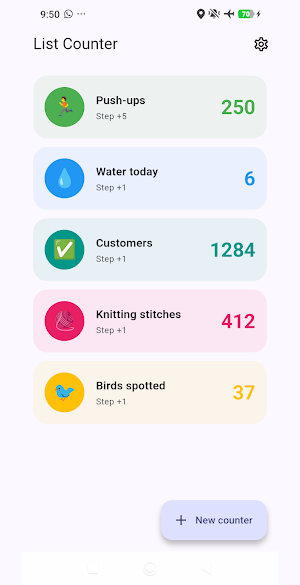
a card game — List Counter keeps a separate counter for each thing you
track.
WHY LIST COUNTER
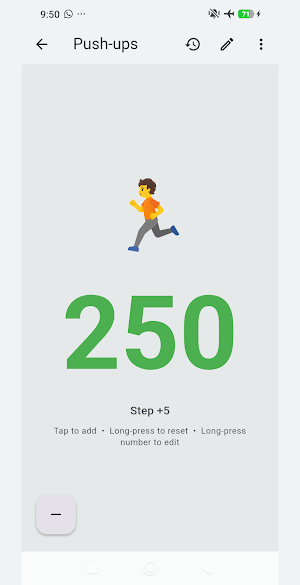
• Huge tap zone — the whole screen counts up, so you never miss-tap. No
squinting at a tiny + button.
• Unlimited counters — make one for every thing you track, each with its
own name, color, and emoji.
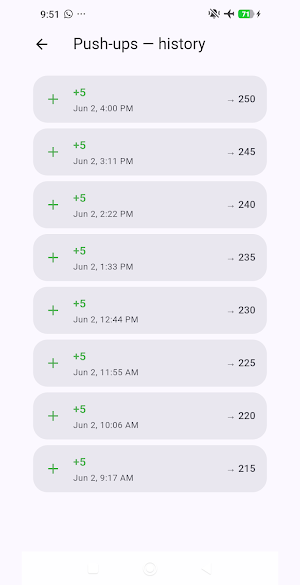
• Full history — every tap, decrement, edit, and reset is logged with a
timestamp, so you can always see how a count changed.
• Custom step size — count by 1, 5, 10, or any number you choose.
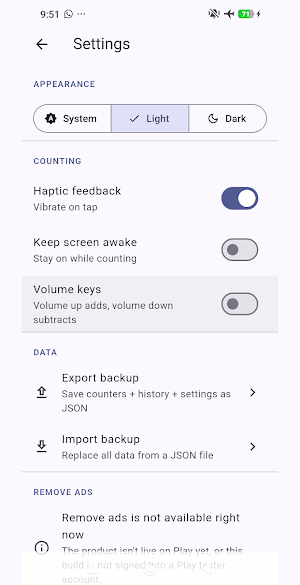
• Volume-button counting — press volume up/down to count without looking
at the screen (great for laps, reps, or counting in the dark).
• Keep-awake mode — the screen stays on during long counting sessions.
• Haptic feedback — feel a tap every time you count.
• Light & dark themes — match your system, or pick one.
• Backup & restore — export everything to a file and bring it back
anytime. Your data is yours.
PRIVATE BY DESIGN
List Counter has no accounts and no sign-in. Your counters and history
never leave your device. There's no cloud, no tracking, and the app works
completely offline (airplane mode included). The only thing that uses the
internet is ads.
PERFECT FOR
• Fitness — reps, sets, laps, steps
• Events & security — crowd, attendee, and headcount
• Retail & warehouse — inventory and stock counts
• Crafts — knitting and crochet stitch counting
• Faith — prayers, mantras, bead counting
• Hobbies — birdwatching, collections, tally games
• Anything else you'd use a clicker for
Download List Counter and start counting in seconds.
What’s new
Version 1.3.1 · Updated September 3, 2026
Three fixes, all found by driving the app on a real device. • Long-pressing a counter to set its value threw an error every single time the dialog closed - on Cancel, on Set, and on tapping outside. Setting a value this way now works as it always should have. • The counter screen no longer overflows when that dialog opens the keyboard. • The editor could save a step you were not looking at: typing a custom step of 0 quietly kept the previous one. Save now waits for a usable number.
Alternatives to List Counter
Looking for apps like List Counter? Here are 6 similar Android apps on Google Play. All of them are free to download.
-
Neon PingPong: 2 Player Game
-
List QR: QR Code Generator
-
Potion Sort: Color Puzzle 999
-
List Budget: Expense Tracker
-
List Notes - Notes & Tables
-
List Debt: Installment Tracker
| App | Rating | Price | Installs | Last updated | Compare |
|---|---|---|---|---|---|
| List Counter | – | Free | 10+ | Sep 3, 2026 | |
| Neon PingPong: 2 Player Game | – | Free | 50+ | Aug 27, 2026 | Compare |
| List QR: QR Code Generator | – | Free | 10+ | Sep 21, 2026 | Compare |
| Potion Sort: Color Puzzle 999 | – | Free | 10+ | Sep 8, 2026 | Compare |
| List Budget: Expense Tracker | – | Free | 10+ | – | Compare |
| List Notes - Notes & Tables | – | Free | 10+ | Sep 21, 2026 | Compare |
| List Debt: Installment Tracker | – | Free | 100+ | – | Compare |
Compare List Counter with the top alternatives: ratings, updates, ASO score and keyword gaps →
Similar apps on Google Play
- Neon PingPong: 2 Player Game
- List QR: QR Code Generator
- Potion Sort: Color Puzzle 999
- List Budget: Expense Tracker
- List Notes - Notes & Tables
- List Debt: Installment Tracker
- List Percent Calculator
- List Date – Date Calculator
- List Picker — Random Decider
- List Score: Score Keeper
- List Timer – Multi Timer
- List Calculator