
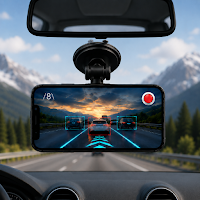
ADAS Drive - Dash Cam
Auto & Vehicles Contains ads
Smart DashCam & ADAS dash camera with GPS speed, lane assist and recording
- Downloads
- 2.2K+
- on Google Play
- Price
- Free
- No in-app purchases
- Updated
- Aug 11
- 2026 · v2
Screenshots
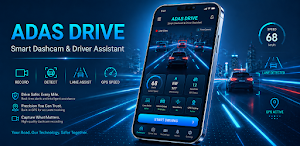
About ADAS Drive - Dash Cam
ADAS Drive turns your Android phone into a dash cam with trip recording and real-time driver assistance tools.
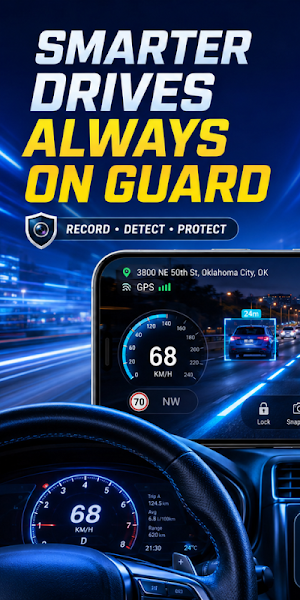
Record the road through your phone camera while viewing GPS speed, lane guidance and vehicle detection information. Voice alerts help you receive supported notifications while keeping your attention on the road.
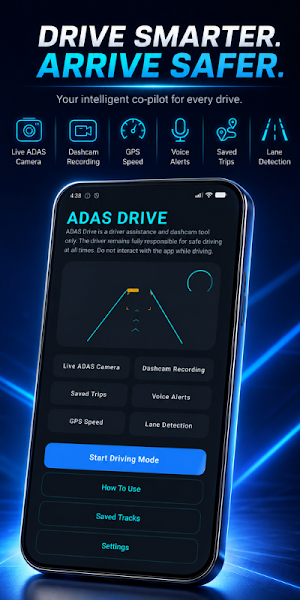
Dashcam Recording
Use your phone as a driving recorder for daily commutes, road trips and other journeys. Recorded videos are saved directly on your device for later access.
Live ADAS Camera
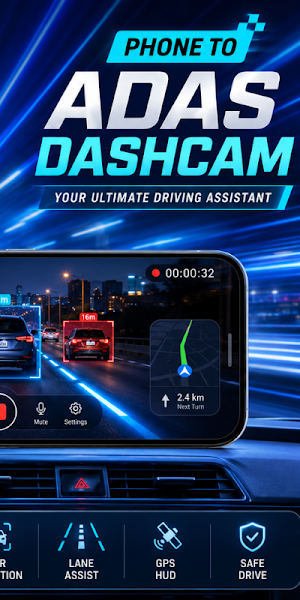
View the road through a live car camera interface with a driving HUD, recording controls, GPS information and visual detection indicators.
Vehicle Detection
ADAS Drive identifies supported vehicles visible through the camera and displays detection boxes on the live view. Detection accuracy may vary depending on lighting, weather, road conditions and phone position.
Lane Assist
View lane guidance visuals while driving on roads with visible lane markings. Lane detection can help with road awareness but does not replace careful observation.
GPS Speedometer
Display your current GPS-based speed in kilometres per hour while using the dash camera. Speed accuracy depends on your device and the availability of a GPS signal.
Voice Alerts
Receive voice notifications for supported driving events without needing to constantly check the screen.
Saved Trips
Access and manage your recorded driving videos from the saved trips section. Available recording space depends on your device storage.
Driving HUD
The interface includes lane visuals, vehicle indicators, GPS speed, recording status and camera controls in a clear driving layout.
Important Safety Information
ADAS Drive is a dash cam and driver assistant tool only. It does not replace attentive driving or the safety systems installed in your vehicle.
The driver remains fully responsible for controlling the vehicle and following local traffic laws. Mount your phone securely, make sure it does not block your view and do not interact with the app while driving.
Camera detection, lane guidance and GPS information may be delayed, incomplete or inaccurate in some conditions. Never rely on the app to avoid collisions or make driving decisions.
IMPORTANT SAFETY NOTE
ADAS Drive is a driver assistance and dashcam tool only. The driver remains fully responsible for safe driving at all times. Do not interact with the app while driving. Always follow local traffic laws and phone mounting rules.
Record the road through your phone camera while viewing GPS speed, lane guidance and vehicle detection information. Voice alerts help you receive supported notifications while keeping your attention on the road.
Dashcam Recording
Use your phone as a driving recorder for daily commutes, road trips and other journeys. Recorded videos are saved directly on your device for later access.
Live ADAS Camera
View the road through a live car camera interface with a driving HUD, recording controls, GPS information and visual detection indicators.
Vehicle Detection
ADAS Drive identifies supported vehicles visible through the camera and displays detection boxes on the live view. Detection accuracy may vary depending on lighting, weather, road conditions and phone position.
Lane Assist
View lane guidance visuals while driving on roads with visible lane markings. Lane detection can help with road awareness but does not replace careful observation.
GPS Speedometer
Display your current GPS-based speed in kilometres per hour while using the dash camera. Speed accuracy depends on your device and the availability of a GPS signal.
Voice Alerts
Receive voice notifications for supported driving events without needing to constantly check the screen.
Saved Trips
Access and manage your recorded driving videos from the saved trips section. Available recording space depends on your device storage.
Driving HUD
The interface includes lane visuals, vehicle indicators, GPS speed, recording status and camera controls in a clear driving layout.
Important Safety Information
ADAS Drive is a dash cam and driver assistant tool only. It does not replace attentive driving or the safety systems installed in your vehicle.
The driver remains fully responsible for controlling the vehicle and following local traffic laws. Mount your phone securely, make sure it does not block your view and do not interact with the app while driving.
Camera detection, lane guidance and GPS information may be delayed, incomplete or inaccurate in some conditions. Never rely on the app to avoid collisions or make driving decisions.
IMPORTANT SAFETY NOTE
ADAS Drive is a driver assistance and dashcam tool only. The driver remains fully responsible for safe driving at all times. Do not interact with the app while driving. Always follow local traffic laws and phone mounting rules.
Alternatives to ADAS Drive - Dash Cam
Looking for apps like ADAS Drive - Dash Cam? Here are 6 similar Android apps on Google Play. The highest rated is Carplay for Android (3.8/5), and all 6 are free to download.
-
Carplay for Android 3.8
-
Hisense TV remote
-
Fire TV Remote - FireStick
-
Privacy Display Filter
-
TCL TV Remote
-
Ac Remote Controller
| App | Rating | Price | Installs | Last updated | Compare |
|---|---|---|---|---|---|
| ADAS Drive - Dash Cam | – | Free | 1,000+ | Aug 11, 2026 | |
| Carplay for Android | 3.8 / 5 | Free | 50,000+ | Oct 6, 2026 | Compare |
| Hisense TV remote | – | Free | 1,000+ | Mar 3, 2026 | Compare |
| Fire TV Remote - FireStick | – | Free | 1,000+ | Mar 12, 2026 | Compare |
| Privacy Display Filter | – | Free | 1,000+ | – | Compare |
| TCL TV Remote | – | Free | 1,000+ | Feb 27, 2026 | Compare |
| Ac Remote Controller | – | Free | 1,000+ | Feb 23, 2026 | Compare |