
Document Scanner - PDF Creator
Productivity In-app purchases Contains ads
Free Mobile Document Scanner and PDF Creator App to scan documents on the fly
- Rating
- 4.7
- 2.9M ratings
- Downloads
- 98.2M+
- on Google Play
- Price
- Free
- In-app purchases
- Updated
- May 18
- 2026 · v6.9.9
Screenshots
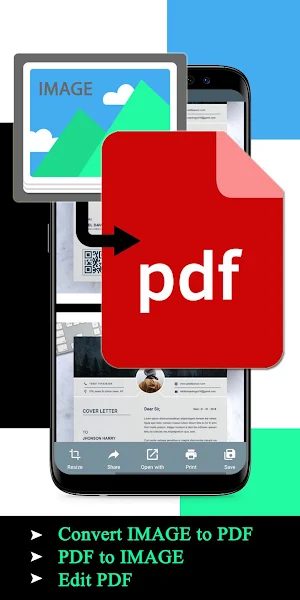


About Document Scanner - PDF Creator
To rescue you from that situation CV Infotech brings you a portable Doc Scanner. This Doc scanner you let you scan your documents anytime anywhere.
There are some additional features as well in the app which makes your document after scanning more professional and good to look at.
Let's take a tour of that attractive features::
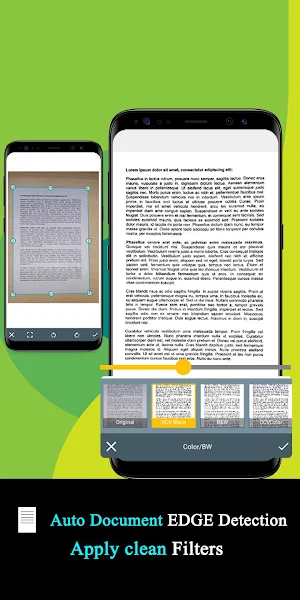
* Scan your document.
* Enhance the scan quality automatically/Manually.
* Enhancement includes smart cropping and many more.
* Optimize your PDF into modes like B/W, Lighten, Color and dark.
* Turn scans into clear and and sharp PDF.
* Arrange your doc in folder and sub folders.
* Share PDF/JPEG files.
* Print and fax the scanned doc directly from the app.
* Upload doc’s to the cloud like Google Drive, Dropbox etc.
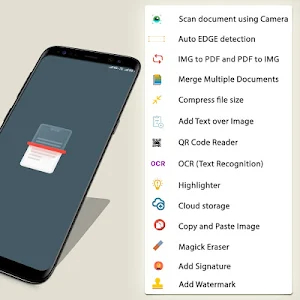
* Scan QR Code/Bar-code.
* Create QR Code.
* Share scanned QR Code.
* Turns your old documents into a clear and sharp one by removing the noise.
* Can create PDF in different sizes from A1 to A-6 and like Postcard, letter ,Note etc.
Help us to Translate the app
Your help with translation will be really appreciated.
Translation URL: http://cvinfotech.oneskyapp.com/collaboration/project?id=121989
Features at a glance :
- Best Document Scanner - It has all of the features that a scanner should have.
- Portable Document Scanner - By having this document scanner in your phone, you can save your time and efforts by quickly scanning anything on the fly.
- Paper Scanner - The app offers third party cloud storage(Drive,Photos) where you can scan papers and save on cloud storage.
- Best Document Scanner Lite - Scans are saved to your device in image or PDF format.
- PDF Document Scanner - Scans PDF with edge detection feature additionally.
- All type of Doc Scan - Scan in color, Grey, Sky Blue.
- Easy Scanner - Scan and Instant print out documents in any size like A1, A2,A3,A4… etc.
- Portable Scanner - The Doc scanner once installed can turn every smartphone into a portable scanners.
- PDF Creator - Convert scanned images to the best quality PDF file.
- QR Code Scanner - This app also have QR Code Scanner feature.
- Bar-code Scanner - Another great feature Bar-code scanner is also integrated in this app.
- OCR Text Recognition (Upcoming Feature in Next Update) - The OCR Text Recognition let you recognize text from images then edit texts or share text to other apps.
- High Quality Scans - The scan quality is of no match, You just get your documents digitally original.
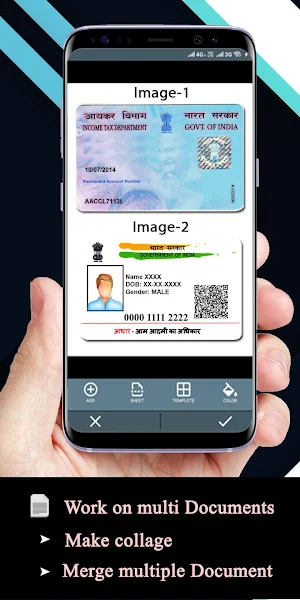
- Images to PDF Converter - You can select some image from Image Gallery and convert it into a PDF file as document.
- Cam Scanner - Take a picture of the whiteboard or blackboard and produce it exactly same with the help of Doc Scanner at home even if you're offline. No internet required for the app to function.
- Remove grain/noise from old document/picture - Remove Noise from old image Using various advanced filter techniques and make it more clear and sharp than before.
- Flashlight - This scanner app also have Flash light feature that helps you in taking scans in low-light environment.
- A+ Document Scanner - This App is rated A+ by users based upon multiple ratings and reviews.
What’s new
Version 6.9.9 · Updated May 18, 2026
• ✨ New premium document filters • ✂️ Smarter Split with advanced options • 📌 Pin documents for quick access • 🔍 Search Settings faster • 🕒 Improved date & time settings • 🖼️ New image watermark tool • 📂 Set a default folder for new scans • ⚡ Apply crop to all pages added. • ⚡ Improved crop performance and fixed related issues. • ⚡ Bug fixes and performance improvements
User reviews

1. please add page border options

Excellent quality and just like real scanner. Very useful during lockdown

This app works like magic. It is superb.

Very nice app better than cam scanner

Better than cam scanner

Its great app.....keep it up Vande matram
Alternatives to Document Scanner - PDF Creator
Looking for apps like Document Scanner - PDF Creator? Here are 6 similar Android apps on Google Play. The highest rated is PDF Scanner - Document Scanner (4.9/5), and all 6 are free to download.
-
Adobe Scan: PDF Scanner, OCR 4.8
-
Scanner App to PDF -TapScanner 4.6
-
Mobile Scanner App - Scan PDF 4.5
-
PDF Scanner - Document Scanner 4.9
-
vFlat Scan - PDF Scanner, OCR 4.8
-
CamScanner - PDF Scanner App 4.9
| App | Rating | Price | Installs | Last updated | Compare |
|---|---|---|---|---|---|
| Document Scanner - PDF Creator | 4.7 / 5 | Free | 50,000,000+ | May 18, 2026 | |
| Adobe Scan: PDF Scanner, OCR | 4.8 / 5 | Free | 100,000,000+ | Nov 3, 2026 | Compare |
| Scanner App to PDF -TapScanner | 4.6 / 5 | Free | 100,000,000+ | Oct 25, 2026 | Compare |
| Mobile Scanner App - Scan PDF | 4.5 / 5 | Free | 10,000,000+ | Sep 16, 2026 | Compare |
| PDF Scanner - Document Scanner | 4.9 / 5 | Free | 10,000,000+ | Sep 4, 2026 | Compare |
| vFlat Scan - PDF Scanner, OCR | 4.8 / 5 | Free | 10,000,000+ | Sep 30, 2026 | Compare |
| CamScanner - PDF Scanner App | 4.9 / 5 | Free | 500,000,000+ | Oct 29, 2026 | Compare |
Similar apps on Google Play
- Adobe Scan: PDF Scanner, OCR
- Scanner App to PDF -TapScanner
- Mobile Scanner App - Scan PDF
- PDF Scanner - Document Scanner
- vFlat Scan - PDF Scanner, OCR
- CamScanner - PDF Scanner App
- Microsoft Lens - PDF Scanner
- PDF Scanner Plus - Doc Scanner
- PDF Scanner App - AltaScanner
- Photo to PDF Maker & Converter
- Doc Scanner - Scan PDF
- PDF Pro: Edit, Sign & Fill PDF
- SCAN SHOT document scanner pdf
- iLovePDF: PDF Editor & Scanner
- airScan: Documents Scanner app
- Stack: PDF Scanner by Google A
- PDF Reader: Edit & Convert PDF
- Adobe Acrobat Reader: Edit PDF
- Smart Doc Scanner: Free PDF Sc
- signNow: Sign & Fill PDF Docs
- Scanner+ App: Scan Docs to PDF
- TurboScan: scan documents and
- Adobe Fill & Sign: Easy PDF Do
- WPS Office-PDF,Word,Excel,PPT
- TurboScan: scan documents & re