

Smart Doc Scanner: Free PDF Scanner App
Mobilicy Productivity In-app purchases
Capture and enhance documents with your camera and share/save them as PDF or DOC
- Rating
- 4.7
- 22.9K ratings
- Downloads
- 1M+
- on Google Play
- Price
- Free
- In-app purchases
- Updated
- May 4
- 2020 · v2.0.683
Screenshots


About Smart Doc Scanner: Free PDF Scanner App
Smart Doc Scanner comes with an intuitive and top of the line interface, rapid image processing and intelligent contrast modes to bring you the best image capture available.
MAJOR ADVANTAGES
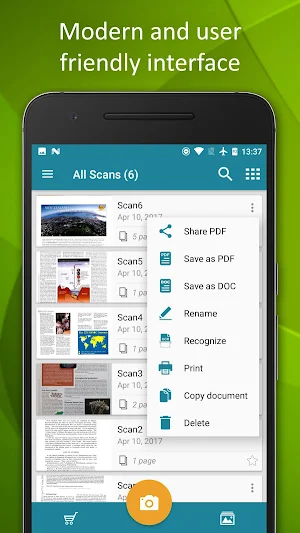
• Intuitive and flexible interface allows users to process images with just a few taps;
• The best edge detection in the market to easily set the frames of your documents in real-time;
• Ability to set advanced camera settings and complete output PDF file customization;
• Support for Optical Character Recognition(OCR) to convert from image to text in more than 40 languages;
• Save document to .DOC format;
• Smart Zoom feature for fast and convenient viewing of processed documents;
TOP-NOTCH SCANNING FEATURES - turn your phone into a mobile scanner with a variety of features for the best scanning and image processing.
• Modern and user friendly interface that allows the user to do rapid scanning;
• Intelligent detection of your documents’ frame in real time;
• Batch-scanning mode for multi-page documents;
• Cropping and zooming features to better set scanned pages;
• Ability to capture images in both landscape and portrait modes;
• Advanced scene and focusing technologies for clearer images;
• Intelligently detects and preserves the pictures while enhancing the text areas with Smart Doc Scanner’s top of the line Magic mode filter.
IMPORT OF IMAGES FROM EXTERNAL SOURCES – easily add external images and import them into scanned PDFs.
• Seamless integration with File Commander for easy and fast file import and export;
• Ability to save all shots as image files;
• Support for all popular image formats – JPEG, PNG, BMP, GIFF and WEBP;
• Easily import images from internal and external device storage and convert them to PDF format;
• Intelligent integration with DropBox, Google Drive and other cloud storage options;
DOCUMENT EXPORT AND PDF CUSTOMIZATION – Use the powerful image processing features of this app to get the best PDF scan.
• Enhanced document digitization by using top of the line Optical Character Recognition(OCR);
• OCR Support for multi-page documents;
• Spell checking and text correction of OCR results;
• Keep your data safe with automatic backup and restore from cloud accounts such as Google Drive;
• Ability to set page size, such as A4, letter and more;
• Set a page thumbnail as a cover page for your document;
• Custom PDF creation - copy, move, add or delete pages from your documents;
• Extract a page from your document and save it as a separate image;
• Ability to set custom document properties such as resolution, margins, formats, etc. for the entire document or for a single page;
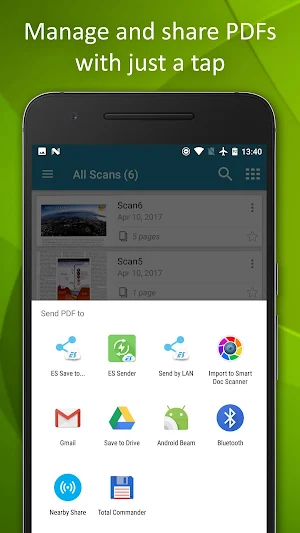
MANAGE AND SHARE PDFS WITH JUST A TAP – easily share your PDFs.
• Print the document via any network and cloud printers;
• Set Favorite locations for easy access to your docs;
• Easily sort your documents by name, size, page number, etc.;
• Ability to search for a document by name and content;
• Easily share your documents via your email, cloud storage, Bluetooth, Wi-fi Direct and Social Networks;
What’s new
Version 2.0.683 · Updated May 4, 2020
Version 2.0.683: • Android 10 ready • Backup/Restore to/from Google Drive • Intuitive and flexible interface allows users to process images with just a few taps • The best edge detection in the market to easily set the frames of your documents in real-time • Ability to set advanced camera settings and complete output PDF file customization • Support for OCR to convert from image to text in more than 40 languages • Save document to PDF/DOC format • Batch-scanning mode for multi-page documents
User reviews

Good and fast app

easy to use and very helpful...

Great app and so easy to use, create a multi pages folder or just a single page this app brilliant

Nice....

Easy to use

Best app for scaning, to create pdf files
Alternatives to Smart Doc Scanner: Free PDF Scanner App
Looking for apps like Smart Doc Scanner: Free PDF Scanner App? Here are 6 similar Android apps on Google Play. The highest rated is TurboScan: scan documents & re (4.8/5), and all 6 are free to download.
-
SCAN SHOT document scanner pdf 4.3
-
Scanner App to PDF -TapScanner 4.7
-
Mobile Scanner App - Scan PDF 4.4
-
iScanner - PDF Scanner App 4.6
-
TurboScan: scan documents & re 4.8
-
Doc Scanner - Scan PDF 4.0
| App | Rating | Price | Installs | Last updated | Compare |
|---|---|---|---|---|---|
| Smart Doc Scanner: Free PDF Scanner App | 4.7 / 5 | Free | 1,000,000+ | May 4, 2020 | |
| SCAN SHOT document scanner pdf | 4.3 / 5 | Free | 1,000,000+ | Sep 29, 2026 | Compare |
| Scanner App to PDF -TapScanner | 4.7 / 5 | Free | 100,000,000+ | Oct 25, 2026 | Compare |
| Mobile Scanner App - Scan PDF | 4.4 / 5 | Free | 10,000,000+ | Sep 16, 2026 | Compare |
| iScanner - PDF Scanner App | 4.6 / 5 | Free | 10,000,000+ | Oct 23, 2026 | Compare |
| TurboScan: scan documents & re | 4.8 / 5 | Free | 1,000,000+ | Apr 18, 2026 | Compare |
| Doc Scanner - Scan PDF | 4.0 / 5 | Free | 500,000+ | Oct 20, 2026 | Compare |
Similar apps on Google Play
- SCAN SHOT document scanner pdf
- Scanner App to PDF -TapScanner
- Mobile Scanner App - Scan PDF
- iScanner - PDF Scanner App
- TurboScan: scan documents & re
- Doc Scanner - Scan PDF
- Scanner+ App: Scan Docs to PDF
- PDF Scanner - Document Scanner
- TurboScan: scan documents and
- airScan: Documents Scanner app
- Photo to PDF Maker & Converter
- PDF Scanner Plus - Doc Scanner
- Scannable
- iLovePDF: PDF Editor & Scanner
- CamScanner - PDF Scanner App
- Stack: PDF Scanner by Google A
- Genius Scan Enterprise