

고객노트 - 고객관리·일정관리
RichChoi_Studio Business
Conveniently manage customer contacts, consultation notes, appointments, and follow-up schedules all in one place.
- Downloads
- 5+
- on Google Play
- Price
- Free
- No in-app purchases
- Updated
- Sep 20
- 2026 · v1.0.11
Screenshots
About 고객노트 - 고객관리·일정관리
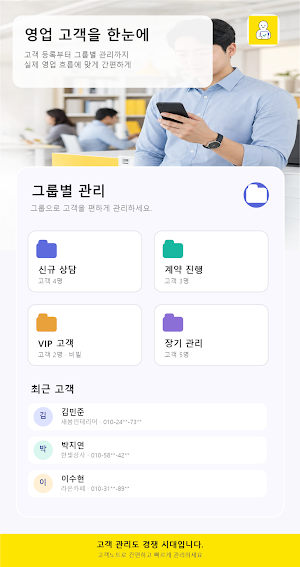
Customer Note is a customer management app that allows you to conveniently record and manage communication details and important schedules with customers.
It was designed to help those who need to maintain continuous contact with customers—such as those in sales, consulting, insurance, real estate, and self-employment—quickly access the information they need.
Key Features
• Select and register only the customers you want from your phone contacts
• Manage customer names, phone numbers, emails, birthdays, and notes
• Record consultation details and necessary information via customer-specific notes
• Direct connection to phone and text messaging apps
• Support for standard groups and password-protected secret groups
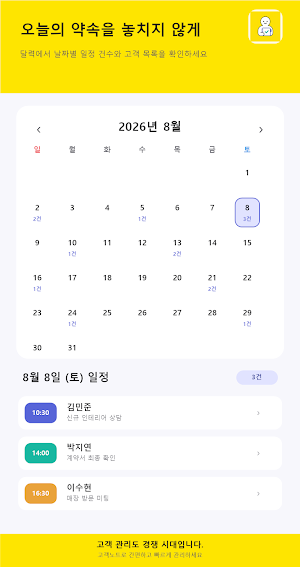
• View appointments and schedules by date on the calendar
• Set reminders before appointment times
• Manage follow-up schedules to ensure you don't miss customers you need to contact again
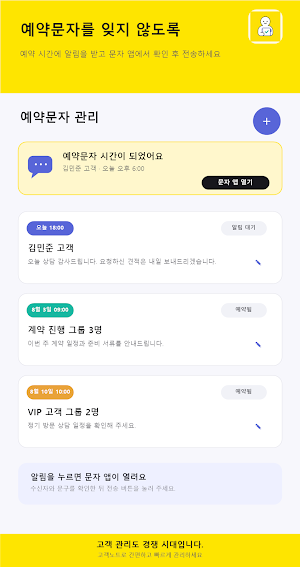
• Receive notifications when scheduled text messages are ready
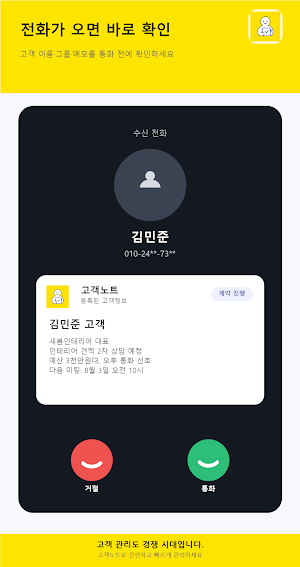
• Display registered customer information when receiving calls on supported devices
• Dark mode and notification sound settings
• Back up and restore customer information using a Google account
Don't miss appointments and follow-up contacts with customers
Register customers you need to contact again after a consultation or important appointments so you can check them when needed. Customer notes and schedules are managed together, making it convenient to retrieve past consultation details.
**Scheduled Text Message Usage Guide**
Scheduled text messages are not sent automatically at the set time. A notification is sent when the sending time arrives, and the user must manually send the message after checking the content in the messaging app.
**Saving and Backing Up Customer Information**
If you are not logged into a Google account, customer information is stored on your mobile phone. By using the backup feature, you can restore customer information using the same Google account even after changing phones or reinstalling the app.
**Start for Free**
The free version allows you to register up to 10 customers and 2 groups. To manage more customers and groups, you can purchase a subscription within the app.
If complex CRMs feel overwhelming, start by managing your essential customer information simply.
Manage customer management, consultation notes, appointment schedules, and follow-up contacts all in one place with Customer Notes.
What’s new
Version 1.0.11 · Updated September 20, 2026
• 연락처 선택 화면에 스크롤바와 ㄱ~ㅎ 초성 빠른 이동을 추가했습니다. • 이름·초성·전화번호 검색을 개선하고, 검색어를 바꿔도 선택한 연락처가 유지되도록 했습니다. • 이미 등록된 전화번호의 중복 선택을 방지합니다. • 고객노트에서 개별 전화·문자 후 돌아오면 연락 완료 여부를 확인할 수 있습니다. • ‘완료 기록’을 선택하면 마지막 연락일·연락 유형·연락 횟수가 함께 업데이트됩니다. • 새로 가져온 고객을 재연락 관리의 ‘연락 기록 없음’에서 확인할 수 있습니다. • 화면 안내와 사용설명서에 연락처 탐색 및 재연락 기록 방법을 추가했습니다.
Alternatives to 고객노트 - 고객관리·일정관리
Looking for apps like 고객노트 - 고객관리·일정관리? Here are 6 similar Android apps on Google Play. All of them are free to download.






| App | Rating | Price | Installs | Last updated | Compare |
|---|---|---|---|---|---|
| 고객노트 - 고객관리·일정관리 | – | Free | 5+ | Sep 20, 2026 | |
| FreightLite | – | Free | 1+ | Aug 25, 2026 | Compare |
| Matronics Bills | – | Free | 10+ | Sep 18, 2026 | Compare |
| Insura | – | Free | 10+ | Jul 8, 2026 | Compare |
| fibertime expenses | – | Free | 1,000+ | – | Compare |
| Allana Processed Food Divison | – | Free | 1,000+ | – | Compare |
| D&Y | – | Free | 10+ | Jul 10, 2026 | Compare |
Compare 고객노트 - 고객관리·일정관리 with the top alternatives: ratings, updates, ASO score and keyword gaps →
Similar apps on Google Play
- FreightLite
- Matronics Bills
- Insura
- fibertime expenses
- Allana Processed Food Divison
- D&Y
- Dailkaro
- Tamween Plus
- بلديات
- NAFP Conference
- Al-Mansah RMS
- UETrack™ - OT
- KOOPMALL
- Crewmarshall: Crew & Time
- Motor Maalik
- Grab My Stone
- My UniMe
- GreenMag
- Plan-K
- eSQUAREvNext
- EntryMate
- ODeliver Driver
- InsideTech
- Dubadu Studio
- Construction Baron Services