
ScreenCapture Pro
Tools In-app purchases
Record your screen & capture screenshots with one tap. Free & Pro versions.
- Downloads
- 129+
- on Google Play
- Price
- Free
- In-app purchases
- Updated
- Oct 20
- 2026 · v1.0.3
Screenshots
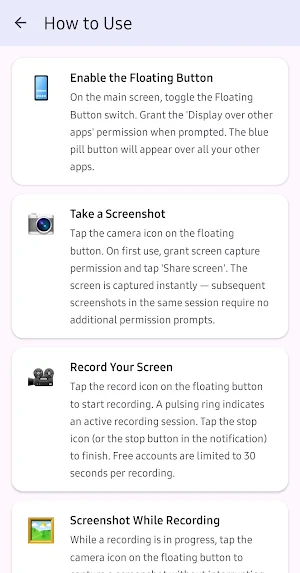
About ScreenCapture Pro
ScreenCapture Pro is the easiest way to record your Android screen and capture screenshots — all from a single floating button that stays on top of every app.
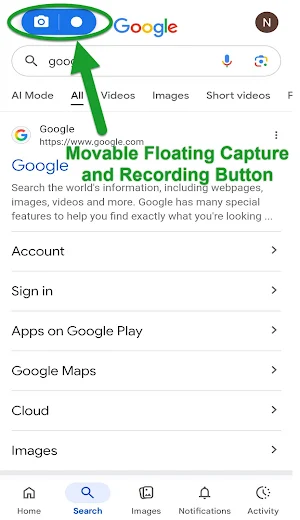
No more jumping through menus or settings. Just tap the floating button wherever you are and instantly start recording or snap a screenshot. The button stays out of your way until you need it, and you can drag it anywhere on the screen.
⭐ FLOATING BUTTON OVERLAY
A sleek, draggable button floats over every app on your device. One tap to record, one tap to screenshot — without ever leaving what you're doing.
🎥 SCREEN RECORDING
Record everything happening on your screen in crystal-clear quality. Perfect for creating tutorials, capturing gameplay, recording video calls, saving moments from streaming apps, or documenting anything on your screen.
📸 SCREENSHOTS
Capture exactly what's on your screen in an instant. Screenshots are saved in full resolution directly to your gallery.
🖼️ BUILT-IN GALLERY
All your recordings and screenshots are organized in one place. View, share, or delete your captures right inside the app. Tap any recording to play it back instantly.
⚙️ CUSTOMIZABLE SETTINGS
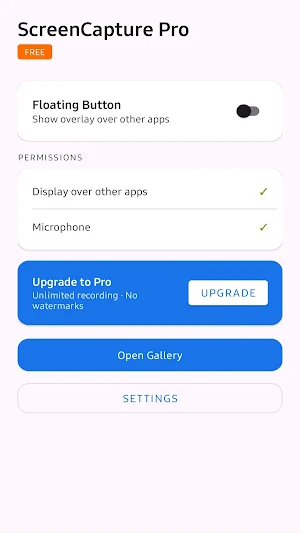
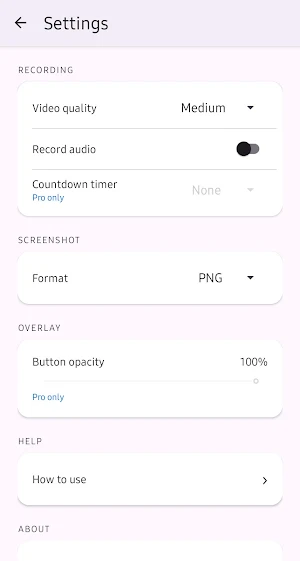
Choose your video quality, audio source, screenshot format, and more. Everything is adjustable to match your needs.
━━━━━━━━━━━━━━━━━━━━━━━━━━━
🆓 FREE VERSION INCLUDES:
- Screen recording (up to 30 seconds)
- Unlimited screenshots
- Built-in media gallery
- Draggable floating button
👑 PRO VERSION UNLOCKS:
- Unlimited recording length
- Clean screenshots with no watermarks
- High & Lossless video quality
- Additional audio source options
- Countdown timer before recording
- Adjustable button opacity
- No ads — ever
- One-time purchase, no subscription
Upgrade to Pro with a single one-time payment and unlock the full ScreenCapture Pro experience forever.
━━━━━━━━━━━━━━━━━━━━━━━━━━━
📱 WORKS EVERYWHERE
ScreenCapture Pro works over all your apps — social media, streaming services, games, browsers, and more. The floating button is always accessible no matter what you're doing.
🔒 PRIVACY FIRST
Your recordings and screenshots stay on your device. Nothing is uploaded or shared without your explicit action.
Compatible with Android 8.0 and above.
Questions or feedback? We'd love to hear from you.
No more jumping through menus or settings. Just tap the floating button wherever you are and instantly start recording or snap a screenshot. The button stays out of your way until you need it, and you can drag it anywhere on the screen.
⭐ FLOATING BUTTON OVERLAY
A sleek, draggable button floats over every app on your device. One tap to record, one tap to screenshot — without ever leaving what you're doing.
🎥 SCREEN RECORDING
Record everything happening on your screen in crystal-clear quality. Perfect for creating tutorials, capturing gameplay, recording video calls, saving moments from streaming apps, or documenting anything on your screen.
📸 SCREENSHOTS
Capture exactly what's on your screen in an instant. Screenshots are saved in full resolution directly to your gallery.
🖼️ BUILT-IN GALLERY
All your recordings and screenshots are organized in one place. View, share, or delete your captures right inside the app. Tap any recording to play it back instantly.
⚙️ CUSTOMIZABLE SETTINGS
Choose your video quality, audio source, screenshot format, and more. Everything is adjustable to match your needs.
━━━━━━━━━━━━━━━━━━━━━━━━━━━
🆓 FREE VERSION INCLUDES:
- Screen recording (up to 30 seconds)
- Unlimited screenshots
- Built-in media gallery
- Draggable floating button
👑 PRO VERSION UNLOCKS:
- Unlimited recording length
- Clean screenshots with no watermarks
- High & Lossless video quality
- Additional audio source options
- Countdown timer before recording
- Adjustable button opacity
- No ads — ever
- One-time purchase, no subscription
Upgrade to Pro with a single one-time payment and unlock the full ScreenCapture Pro experience forever.
━━━━━━━━━━━━━━━━━━━━━━━━━━━
📱 WORKS EVERYWHERE
ScreenCapture Pro works over all your apps — social media, streaming services, games, browsers, and more. The floating button is always accessible no matter what you're doing.
🔒 PRIVACY FIRST
Your recordings and screenshots stay on your device. Nothing is uploaded or shared without your explicit action.
Compatible with Android 8.0 and above.
Questions or feedback? We'd love to hear from you.
What’s new
Version 1.0.3 · Updated October 20, 2026
Misc Google compliance updates.
Alternatives to ScreenCapture Pro
Looking for apps like ScreenCapture Pro? Here are 6 similar Android apps on Google Play. 5 of the 6 are free to download.
-
Puzzle Pantry - Word Search
-
LoreWeaver
-
True Heading Compass
-
Android Info Master
-
Neon Sudoku — Glow Puzzle Game
-
Figures Finder: Number Search
| App | Rating | Price | Installs | Last updated | Compare |
|---|---|---|---|---|---|
| ScreenCapture Pro | – | Free | 100+ | Oct 20, 2026 | |
| Puzzle Pantry - Word Search | – | Free | 10+ | Aug 9, 2026 | Compare |
| LoreWeaver | – | Free | 100+ | Aug 12, 2026 | Compare |
| True Heading Compass | – | 1.99 USD | 10+ | Aug 31, 2026 | Compare |
| Android Info Master | – | Free | 10+ | Apr 30, 2026 | Compare |
| Neon Sudoku — Glow Puzzle Game | – | Free | 10+ | Aug 30, 2026 | Compare |
| Figures Finder: Number Search | – | Free | 10+ | Jul 23, 2026 | Compare |
Compare ScreenCapture Pro with the top alternatives: ratings, updates, ASO score and keyword gaps →