
ScanCrypt - PDF Scanner & OCR
CryptonStudio Apps Productivity In-app purchases Contains ads
Document scanner, PDF editor & OCR. Scan to PDF offline — no document cloud.
- Downloads
- 100+
- on Google Play
- Price
- Free
- In-app purchases
- Updated
- Sep 6
- 2026 · v1.1.3
Screenshots
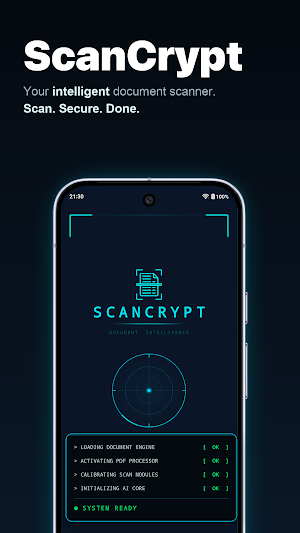


About ScanCrypt - PDF Scanner & OCR
📷 SCAN & CONVERT
• Scan documents to PDF with auto-edge detection
• Batch scan multi-page documents in one go
• Import photos or existing PDFs from your gallery
• Web to PDF — save any webpage as a document
• ID card, ID photo, and business card capture
• Deskew, sharpen, and clean up scanned pages
📝 EDIT & ANNOTATE
• PDF editor — add text, shapes, and highlights
• Draw signatures or use saved signature presets
• Freehand doodle on any document
• Watermarks, stamps, page numbers, headers, footers, Bates numbering
• Crop, rotate, resize, and reorder pages instantly
• Find and replace text, blur areas, flatten forms
• Fill and create interactive PDF forms
• Edit or strip PDF metadata; remove annotations and backgrounds
🔍 OCR & EXTRACT
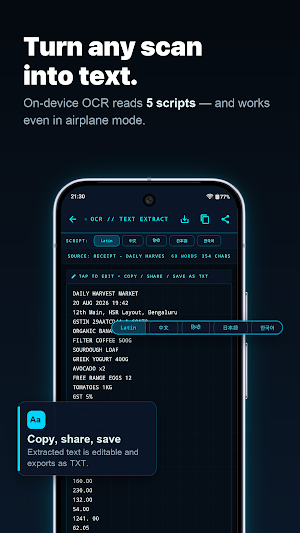
• OCR scanner — extract text from any scanned document
• Convert PDF to Word, Excel, PowerPoint, HTML, or plain text
• Export PDFs as high-quality JPG images
• Extract embedded images from PDFs
• Read Aloud — have any document read back to you
🔒 PROTECT & SECURE
• Password-protect PDFs with AES encryption
• Unlock password-protected PDFs
• Redact confidential information permanently
• Biometric vault — fingerprint-locked and encrypted on device
• Lock any folder with its own PIN
• Verify a document has not been altered since you scanned it
📁 ORGANIZE & COMPRESS
• Smart folders with tags and automatic file naming
• Compress PDF files without quality loss
• Merge PDFs; split by page range, file size, or bookmarks
• Remove unwanted pages, add PDF bookmarks
• N-up layout, alternate mix, split in half
• Batch export, plus backup and restore your library
• Repair damaged PDF files
📤 SHARE & PRINT
• Compress and send to WhatsApp in one tap
• Print directly from the app
• Export to your own WebDAV server — your server, your control
📐 TEMPLATES & TOOLS
• Generate blank, lined, grid, or dot-grid PDFs
• QR and barcode scanner (EAN, UPC, Code128) plus QR generator
• Collage layout for combining images
• Home-screen widget for one-tap scanning
🛡️ PRIVATE BY DESIGN — AND HONEST ABOUT THE REST
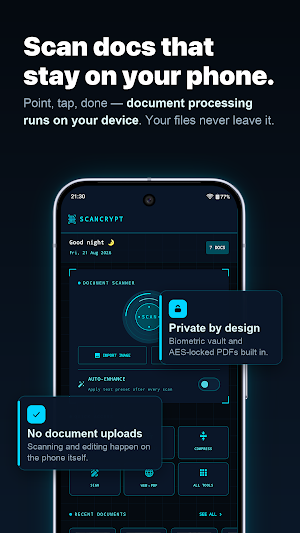
Your documents stay on your device. Scanning, OCR, and every PDF and image tool
run entirely on your phone — we have no document cloud, no account, and ScanCrypt
never uploads what you scan. A document leaves your device only when you share or
export it yourself. Turn on airplane mode and the document tools work exactly the
same. That is the test.
What the app DOES send, so you are not surprised:
• Ads on the free tier (Google AdMob), including the advertising ID
• Crash reports and anonymous usage analytics (Firebase) — analytics can be
switched off in Settings → Privacy & Data
• Feature flags and pricing (Firebase Remote Config)
That is the complete list. No document content leaves your device at all — not
for ads, not for crash reporting, not for analytics, and not to any AI service.
⭐ WHY SCANCRYPT?
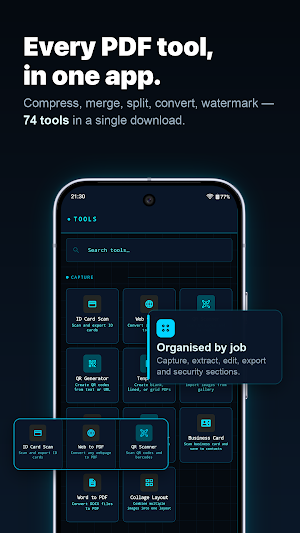
✅ 70+ tools in one PDF scanner app
✅ Document tools work offline — scan, OCR, edit with no connection
✅ No account, no sign-up — install and scan instantly
✅ Built for phones and tablets
✅ Available in 15 languages
✅ Clean, fast, modern interface
✅ Lightweight, no bloatware
📋 PERFECT FOR
Students, professionals, and anyone who scans notes, contracts, receipts,
invoices, IDs, bills, and certificates.
🏆 SCANCRYPT PRO
19 tools stay free forever — scanning, folders, signatures, annotation, doodle,
barcode scanning, Read Aloud, backup and more. Pro unlocks the other 55,
including OCR, encryption, compression, merging, file conversion and every
advanced PDF editor tool. One-time lifetime purchase or annual plan — no
subscription traps. Pro also removes all ads.
Download ScanCrypt — the offline document scanner and PDF editor built for privacy.
What’s new
Version 1.1.3 · Updated September 6, 2026
OCR is now free for everyone — scan anything and get real, selectable text. • Search your library by what's inside your documents • Searchable PDF export, with tilted pages straightened • Pinch to zoom in the PDF viewer • Signatures: ink colour, stroke width and an eraser • Read Aloud can seek through a document • Pin the tools you use most • Vault documents are encrypted at rest Plus fixes to OCR output, compression, folder deletion and navigation.
User reviews

Great app for scanning documents and lots of crazy tools available at such a low lifetime pricing.

excellent

Very useful app for scanning documents. The quality is clear, easy to use, and saves a lot of time. Highly recommended

I’m not very tech-savvy, but ScanCrypt is so easy to use. It turns my paper documents into clear digital files in seconds, and the feature that turns pictures into editable text is amazing it saves me so much typing! It’s simple, fast, and doesn't feel complicated at all. A great tool for anyone who just wants to ge...

Super solid app. The scans are crystal clear and the text recognition is surprisingly spot-on. It’s fast, simple, and does exactly what it says.

Super convenient and easy to use. I have been using this app now to scan my documents and this is so good.
Alternatives to ScanCrypt - PDF Scanner & OCR
Looking for apps like ScanCrypt - PDF Scanner & OCR? Here are 6 similar Android apps on Google Play. 5 of the 6 are free to download.
-
Voce în Text: Transcriere AI
-
Referd
-
PV Generator
-
Sales & Inventory Accountant
-
HoofHandoff
-
Browser XProxy Pro
| App | Rating | Price | Installs | Last updated | Compare |
|---|---|---|---|---|---|
| ScanCrypt - PDF Scanner & OCR | – | Free | 100+ | Sep 6, 2026 | |
| Voce în Text: Transcriere AI | – | Free | 1+ | – | Compare |
| Referd | – | Free | 50+ | Aug 15, 2026 | Compare |
| PV Generator | – | Free | 5+ | – | Compare |
| Sales & Inventory Accountant | – | 0.89 USD | 0+ | – | Compare |
| HoofHandoff | – | Free | 0+ | – | Compare |
| Browser XProxy Pro | – | Free | 10,000+ | Sep 12, 2026 | Compare |
Similar apps on Google Play
- Voce în Text: Transcriere AI
- Referd
- PV Generator
- Sales & Inventory Accountant
- HoofHandoff
- Browser XProxy Pro
- Note2Me
- Trascrivere Audio in Testo AI
- MPDA Employees
- FastMask – Fastmail Masks
- Seaman Log
- MeetPlan: Group Planner
- Vox: Voice to Text Anywhere
- LinceHOME
- Goalify Goalo – Goal Tracker
- Be Focused: App, Site Blocker
- All Languages Translate App
- doku: Your Smart ID Locker
- Go Get Hired
- Modus: Private Mood Tracker
- HiringCensus Remote Job Alerts
- BuildCAD pro
- Relix by Saint-Gobain
- ETH Miner : ETH Cloud Mining
- AI Object Counter by Camera