

Vox: Voice to Text Anywhere
Fanilo Productivity
Voice to text dictation — speak in any app, instant transcription, no typing
- Downloads
- 342+
- on Google Play
- Price
- Free
- No in-app purchases
- Updated
- May 26
- 2026 · v0.5.5
Screenshots
About Vox: Voice to Text Anywhere
Stop typing. Start dictating. Vox is the fastest way to turn speech into text on Android.
---
HOW VOX WORKS
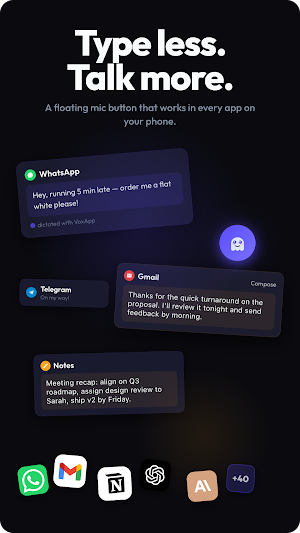
The Vox floating button lives over your screen at all times, one thumb-tap away. When you want to dictate, tap it, speak naturally, and Vox injects the transcription directly into whatever text field you're focused on. Tap once to start, tap again to stop. That's the entire workflow.
Voice typing has never been this seamless. Unlike traditional speech to text keyboards that replace your keyboard, Vox floats above it — so you can switch between typing and dictation in avsingle tap. Keep the keyboard you love. Add voice on top.
---
VOICE TO TEXT IN EVERY APP
Vox works everywhere your cursor goes — every text field, every app, every language:
• WhatsApp, Telegram, Signal — dictate full messages hands-free
• Gmail, Outlook, and email clients — draft and reply with your voice
• Google Docs, Notion, Keep — write faster than you can type
• Browser search bars — voice search without lifting a finger
• Slack, Discord, Teams — speak DMs and channel messages
• Any Android app with a text field — universal voice dictation
---
KEY FEATURES
• Floating mic button — always one tap from voice dictation
• Auto-hide overlay — disappears when no text field is focused
• Append or Replace — voice input adds to or replaces existing text
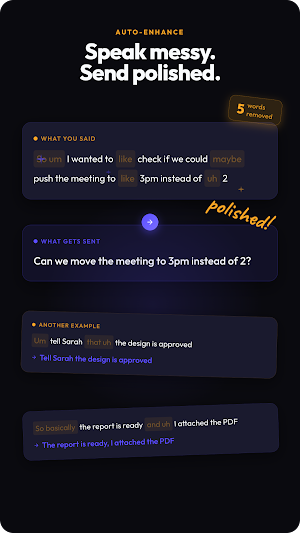
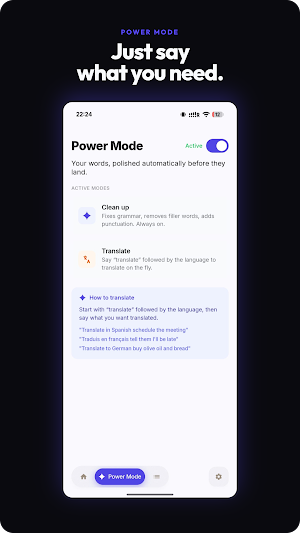
• Power Mode — AI cleanup for email and document dictation (removes filler words, fixes punctuation, adds structure)
• 40+ language speech recognition — dictate in your language, translate on demand
• Transcription history — every voice note saved, searchable, tap to re-use or copy
• No account required — start dictating in seconds
---
WHO USES VOX
• Writers and journalists — dictate drafts faster than typing
• Busy professionals — voice-reply to email and Slack on the go
• Students — speech to text for notes and essays
• Anyone with wrist pain or RSI — give your hands a break
• Multilingual users — dictate in 40+ languages, translate on demand
---
HOW IT WORKS UNDER THE HOOD
Vox captures your voice, sends it to a fast cloud transcription engine (Mistral Voxtral), and injects the result into the focused field using Android's accessibility framework. End-to-end transcription typically takes 1–3 seconds. No account, no signup, no friction.
---
PERMISSIONS
Microphone — required to capture your voice for transcription.
Accessibility Service — required to detect focused text fields and inject transcribed text into other apps. This is the core purpose of Vox; the accessibility service is used only for voice-to-text injection and nothing else.
Your voice audio is sent to a third-party speech recognition service (Mistral Voxtral) over HTTPS and is not stored on our servers. Anonymous usage analytics are collected via PostHog to help improve the app.
What’s new
Version 0.5.5 · Updated May 26, 2026
Welcome to VoxApp — talk instead of type, anywhere. Tap the floating mic button, speak, and your words land at the cursor in any app: messages, email, notes, chat. In this first release: • One-tap voice dictation in any app • Optional grammar & filler-word cleanup • Voice-triggered translation ("translate in Spanish…") • Full dictation history • Light & dark themes No account needed — bring your own API key. Improve transcription
Alternatives to Vox: Voice to Text Anywhere
Looking for apps like Vox: Voice to Text Anywhere? Here are 4 similar Android apps on Google Play. The highest rated is Studdy: AI Homework Helper (4.6/5), and all 4 are free to download.
-
UpStudy - Camera Math Solver 4.5
-
Studdy: AI Homework Helper 4.6
-
Tutor AI - math solver 4.5
-
Help AI: Your Homework With AI 4.4
| App | Rating | Price | Installs | Last updated | Compare |
|---|---|---|---|---|---|
| Vox: Voice to Text Anywhere | – | Free | 100+ | May 26, 2026 | |
| UpStudy - Camera Math Solver | 4.5 / 5 | Free | 5,000,000+ | Aug 14, 2026 | Compare |
| Studdy: AI Homework Helper | 4.6 / 5 | Free | 50,000+ | Jan 14, 2026 | Compare |
| Tutor AI - math solver | 4.5 / 5 | Free | 50,000+ | Aug 10, 2026 | Compare |
| Help AI: Your Homework With AI | 4.4 / 5 | Free | 5,000,000+ | Oct 30, 2025 | Compare |