CosmoRemote: AI Coding
Code, build and test on your Mac - from your phone. Claude Code, Codex & more
About CosmoRemote: AI Coding
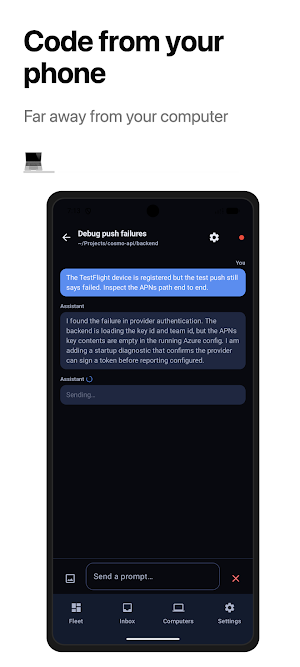
Your AI coding agents, in your pocket. CosmoRemote streams Claude Code, Codex and Cursor - plus a full terminal - running on your Mac straight to your phone, so a long build or a running agent never has to wait for you to get back to your desk.
EVERYTHING ON ONE SCREEN
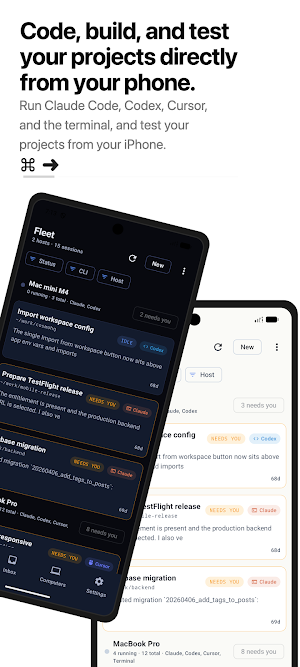
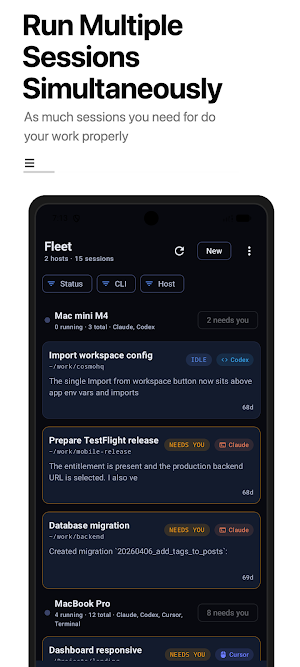
The Fleet dashboard brings every session across every Mac into a single view, filtered by CLI, host and status - running, idle, needs you, or errored - so you always know exactly what needs your attention.
PICK UP WHERE YOUR MAC LEFT OFF
Continue a conversation you started at your desk and the whole transcript comes with it. Claude Code, Codex and Cursor sessions open on your phone already filled in, so you carry the context instead of explaining it again.
CODE, BUILD AND TEST - FROM YOUR PHONE
The Tests tab builds your app on a Mac simulator and live-streams the screen to your device, with tap-to-interact. Watch it launch, click through it, and catch issues without ever touching your laptop.
HOW IT WORKS
1. Install the bridge on your Mac: "brew install matheusjkweber/tap/cosmoremote" (or "npm install -g cosmoremote").
2. Run "cosmoremote start" inside your project. A QR code and a 4-digit code appear in the terminal.
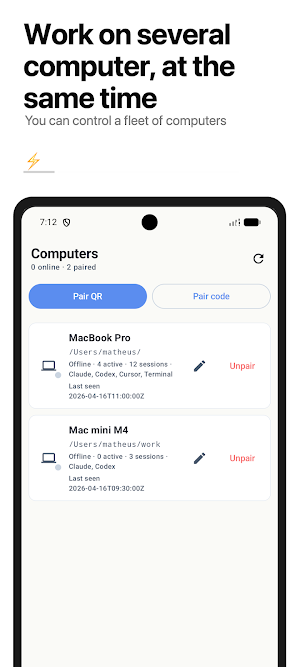
3. Scan the QR in the app, type the 4-digit code, or ask for a pairing link by email.
4. Your open sessions appear instantly and stream token by token. Open a new CLI or terminal session whenever you like.
WHAT YOU GET
- Real-time streaming of Claude Code, Codex and Cursor, with syntax-highlighted code blocks
- Fleet dashboard across all your Macs, filtered by CLI, host and status
- Continue a desktop conversation with its history already loaded
- Full terminal sessions on your Mac, right from your phone
- Build and live-stream your app on a Mac simulator, with tap-to-interact
- Push notifications when a turn finishes or a session needs you
- Quick project and CLI switching before every prompt
- Favorite folders and saved projects for one-tap access
- Session history synced across devices - and readable offline
- Select several sessions at once to clean up the list
- Copy a single code block or the entire session with one tap
- Pairing by QR code, 4-digit code, or an email link
- No message limits, on any plan
WORKS WHEREVER YOU ARE
On the same Wi-Fi, your phone connects to your Mac directly. Step out and a secure, encrypted relay bridges the gap - keep sending prompts and receiving responses with your Mac back home or at the office.
FREE AND PRO
Free covers one paired Mac and two sessions at a time, with no cap on messages. Pro raises that to as many Macs as you like and up to ten sessions at once, and adds pairing by email link plus build-and-test streaming while you are away from your Mac's network.
PRIVATE BY DESIGN
Your prompts run on your own Mac, with your own account and API keys. CosmoRemote's backend only relays between your phone and Mac when you're away from your local network - and every connection is encrypted over TLS.
WHO IT'S FOR
- Developers who live in Claude Code, Codex or Cursor and want to keep working away from the desk
- Anyone who needs to review diffs, run long commands, or supervise AI tasks on the go
REQUIREMENTS
- A Mac running macOS 12 or later with the CosmoRemote bridge
- A free CosmoRemote account
- An internet connection (Wi-Fi or mobile data)
Questions, ideas or bugs: [email protected]
Terms of Use (EULA): https://cosmoremote.com/terms/
Privacy Policy: https://cosmoremote.com/privacy/
Similar Apps

Sensi
Remote control your home comfort. Anytime, anywhere.

Learn Blockchain Programming
Learn Blockchain Programming & Cryptocurrency Technology - Build Blockchain apps
Learn HTML & Web Development
Master web development with HTML, CSS, JavaScript & real projects!
Learn HTML
Learn HTML website development with HTML5 programming tags, editor & viewer
CodeGym: learn Java
Learn Java programming online

Learn Java
Java Programming lessons, tutorials, programs - Learn Java coding
