

Bulk Messages from Excel/CSV
Communication In-app purchases
Fast, reliable SMS app. Send and receive SMS easily, with bulk messaging options
- Rating
- 1.6
- 30 ratings
- Downloads
- 5.5K+
- on Google Play
- Price
- Free
- In-app purchases
- Updated
- Oct 5
- 2026 · v3.5.1
Screenshots


About Bulk Messages from Excel/CSV
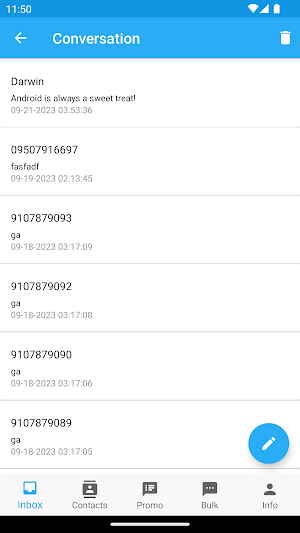
Default SMS Handler: Use the app to send, receive, and manage all your SMS messages effortlessly. View conversations, reply to messages, and organize your SMS inbox in both Light and Dark Mode seamlessly.
Instant Messaging: Instantly communicate with friends and family by sending and receiving SMS directly within the app.
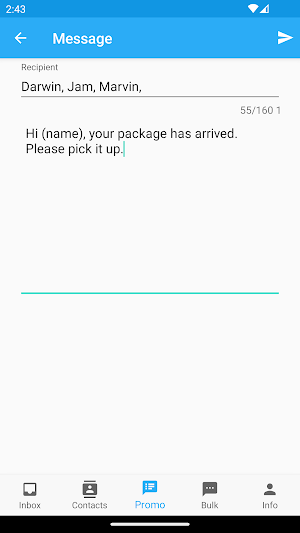
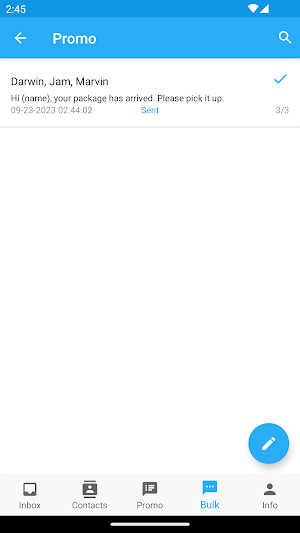
Bulk SMS Messaging: Additionally, the app allows you to send bulk SMS messages to multiple contacts efficiently, making it ideal for both personal and professional use.
Effortlessly Send Promotional and Marketing SMS Messages with our Bulk SMS Sender tool, directly from your SIM card and Excel/CSV files.
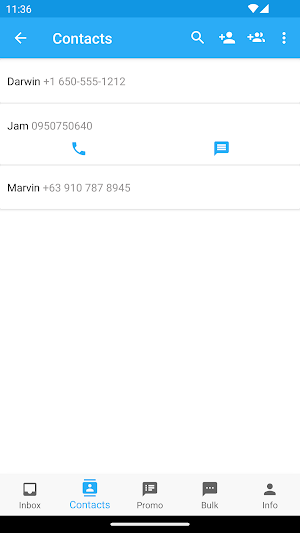
Easily import your Messages and Contacts from Excel/CSV and utilize your mobile device for seamless sending.
Harness the power of dynamic placeholders like (name) and set your own placeholders to automatically personalize your messages with client-specific details upon sending.
• Retrieve messages from Excel/CSV and effortlessly send them using your mobile device.
• Streamline the process by sending personalized messages to multiple recipients automatically.
• Effortlessly configure recipient/client details such as names, payment amounts, due dates, and more for bulk messaging.
• Send SMS messages in bulk with just a few simple clicks.
• Send Bulk SMS even when your screen is off.
• Average Sending Speed of 1 SMS/second.
Light and Dark Mode:
Toggle between light and dark modes effortlessly to match your preference or environment. Whether you're working during the day or night, the app ensures a smooth and adaptive experience.
App Demo link: https://youtu.be/R0no9XPufqI
📱 Step-by-Step Instructions for Sending Bulk SMS
1. Tap “Info” in the Navigation Bar.
2. Select “Set Defaults.”
3. Choose your default SIM (either SIM 1 or SIM 2).
4. Go back or tap “Info” again in the Navigation Bar.
5. Tap “Get Format (CSV/XLSX)” – this will generate a file named bulk_sms_format.xlsx or bulk_sms_format.csv and send it to your email.
6. Once received, open the CSV/XLSX file and begin editing.
🔔 Notes:
• Retain all original headers from the generated file.
• Always use (name) as the placeholder for the Name field.
• These three headers must not be changed:
Contact Number, Message, name.
• Your file should follow this format:
Contact Number, Message, name, col1, col2, ..., col10.
• The column names col1 to col10 in bulk_sms_format.xlsx or bulk_sms_format.csv must match the placeholders used in columns 1 to 10 in the app.
💾 Saving Your File:
• After editing, click Save As.
• For CSV format, choose CSV (Comma delimited) (*.csv).
📤 Uploading and Sending:
• Go to Bulk in the Navigation Bar.
• Click the three-dot menu (⋮).
• Select UPLOAD from Excel/CSV file.
• Once uploaded, click Send or Send All to send your SMS.
Instant Messaging: Instantly communicate with friends and family by sending and receiving SMS directly within the app.
Bulk SMS Messaging: Additionally, the app allows you to send bulk SMS messages to multiple contacts efficiently, making it ideal for both personal and professional use.
Effortlessly Send Promotional and Marketing SMS Messages with our Bulk SMS Sender tool, directly from your SIM card and Excel/CSV files.
Easily import your Messages and Contacts from Excel/CSV and utilize your mobile device for seamless sending.
Harness the power of dynamic placeholders like (name) and set your own placeholders to automatically personalize your messages with client-specific details upon sending.
• Retrieve messages from Excel/CSV and effortlessly send them using your mobile device.
• Streamline the process by sending personalized messages to multiple recipients automatically.
• Effortlessly configure recipient/client details such as names, payment amounts, due dates, and more for bulk messaging.
• Send SMS messages in bulk with just a few simple clicks.
• Send Bulk SMS even when your screen is off.
• Average Sending Speed of 1 SMS/second.
Light and Dark Mode:
Toggle between light and dark modes effortlessly to match your preference or environment. Whether you're working during the day or night, the app ensures a smooth and adaptive experience.
App Demo link: https://youtu.be/R0no9XPufqI
📱 Step-by-Step Instructions for Sending Bulk SMS
1. Tap “Info” in the Navigation Bar.
2. Select “Set Defaults.”
3. Choose your default SIM (either SIM 1 or SIM 2).
4. Go back or tap “Info” again in the Navigation Bar.
5. Tap “Get Format (CSV/XLSX)” – this will generate a file named bulk_sms_format.xlsx or bulk_sms_format.csv and send it to your email.
6. Once received, open the CSV/XLSX file and begin editing.
🔔 Notes:
• Retain all original headers from the generated file.
• Always use (name) as the placeholder for the Name field.
• These three headers must not be changed:
Contact Number, Message, name.
• Your file should follow this format:
Contact Number, Message, name, col1, col2, ..., col10.
• The column names col1 to col10 in bulk_sms_format.xlsx or bulk_sms_format.csv must match the placeholders used in columns 1 to 10 in the app.
💾 Saving Your File:
• After editing, click Save As.
• For CSV format, choose CSV (Comma delimited) (*.csv).
📤 Uploading and Sending:
• Go to Bulk in the Navigation Bar.
• Click the three-dot menu (⋮).
• Select UPLOAD from Excel/CSV file.
• Once uploaded, click Send or Send All to send your SMS.
What’s new
Version 3.5.1 · Updated October 5, 2026
Fixed bugs and added a customizable sending delay for improved message delivery.
User reviews

Extremely nice and fast

Great app. Easy ang user friendly too. Excited for future updates!

efficient and user-friendly.

Nice and helpful app, easy to use and working smoothly. Love it.
Alternatives to Bulk Messages from Excel/CSV
Looking for apps like Bulk Messages from Excel/CSV? Here are 4 similar Android apps on Google Play. All of them are free to download.




| App | Rating | Price | Installs | Last updated | Compare |
|---|---|---|---|---|---|
| Bulk Messages from Excel/CSV | 1.6 / 5 | Free | 5,000+ | Oct 5, 2026 | |
| KageWise - Expense Tracker | – | Free | 10+ | May 2, 2025 | Compare |
| FloatingClock | – | Free | 500+ | Apr 8, 2026 | Compare |
| Nyan Puzzle | – | Free | 10+ | Nov 11, 2024 | Compare |
| MoneyEx Money Changer Manager | – | Free | 10+ | Aug 18, 2024 | Compare |