
Control Center: Simple Control
Spot Light Apps Productivity Contains ads
Control all apps with Simple Control Center. Easy & simple Control Center app.
- Downloads
- 1K+
- on Google Play
- Price
- Free
- No in-app purchases
- Updated
- Feb 12
- 2025
Screenshots
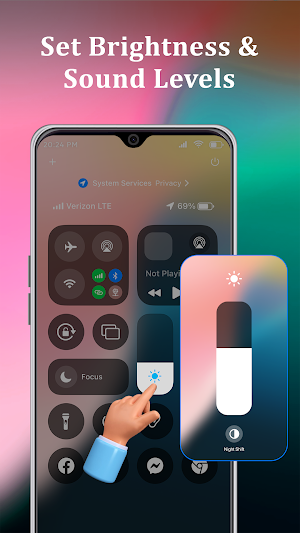


About Control Center: Simple Control
Control Center: Simple Control - Your Device's Command Center
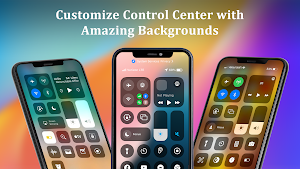
Effortlessly manage your device with this intuitive and user-friendly control center app. Access essential features with a single tap, including:
• Sound & Brightness: Easily adjust volume and brightness instantly with simple controls.
• Dark Mode: Switch between light and dark modes effortlessly using control center.
• Wi-Fi & Bluetooth: Quickly connect to Wi-Fi networks and Bluetooth devices.
• Do Not Disturb & Airplane Mode: Activate with a single tap for focused time or travel.
• Flashlight: Turn on/off the flashlight instantly with control center iOS 15.
• Screen Recording & Screenshots: Capture your screen effortlessly using Control Center OS.
Personalize Your Experience Using Control Center: Simple Control
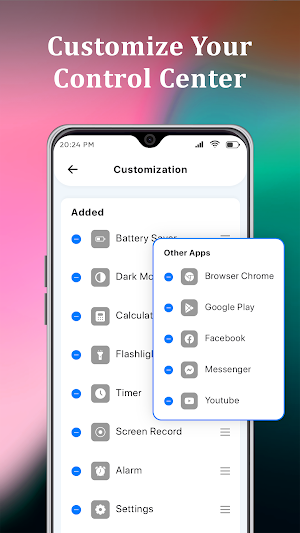
• Customize Shortcuts: Add your favorite apps as quick-access shortcuts in simple panel.
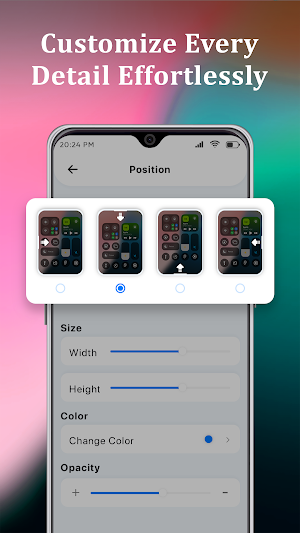
• Tailor the Look: Adjust the color, height, and width of the control center to match your style.
Download Control Center: Simple Control today and experience the convenience of effortless device management with simple controls.
Purpose of Accessibility API Usage:
The Accessibility API is used solely to enable a customizable Quick Settings panel that provides users with fast access to common system settings (e.g., Wi-Fi, Bluetooth, brightness) and app shortcuts. This enhances user convenience by providing a floating panel that can be accessed from anywhere on the device.
Data Access and Privacy:
The app does not collect, store, or share any user data through the Accessibility API. It does not access screen content, input data, or personal information. The Accessibility API is only used to detect specific system UI states required to display the Quick Settings panel.
Why is the Accessibility API Necessary?
The Accessibility API is necessary to enable the floating Quick Settings panel functionality, which can be accessed globally across the device. This feature relies on accessibility permissions to ensure it can overlay the interface while maintaining user control and visibility.
How is Accessibility API Usage Limited?
The app does not use the Accessibility API to monitor user activity or retrieve sensitive information.
The app strictly adheres to Google's policies and only uses accessibility permissions for its declared purpose (UI enhancement).
The app does not alter system settings or interfere with user interactions outside of enabling the Quick Settings panel.
Effortlessly manage your device with this intuitive and user-friendly control center app. Access essential features with a single tap, including:
• Sound & Brightness: Easily adjust volume and brightness instantly with simple controls.
• Dark Mode: Switch between light and dark modes effortlessly using control center.
• Wi-Fi & Bluetooth: Quickly connect to Wi-Fi networks and Bluetooth devices.
• Do Not Disturb & Airplane Mode: Activate with a single tap for focused time or travel.
• Flashlight: Turn on/off the flashlight instantly with control center iOS 15.
• Screen Recording & Screenshots: Capture your screen effortlessly using Control Center OS.
Personalize Your Experience Using Control Center: Simple Control
• Customize Shortcuts: Add your favorite apps as quick-access shortcuts in simple panel.
• Tailor the Look: Adjust the color, height, and width of the control center to match your style.
Download Control Center: Simple Control today and experience the convenience of effortless device management with simple controls.
Purpose of Accessibility API Usage:
The Accessibility API is used solely to enable a customizable Quick Settings panel that provides users with fast access to common system settings (e.g., Wi-Fi, Bluetooth, brightness) and app shortcuts. This enhances user convenience by providing a floating panel that can be accessed from anywhere on the device.
Data Access and Privacy:
The app does not collect, store, or share any user data through the Accessibility API. It does not access screen content, input data, or personal information. The Accessibility API is only used to detect specific system UI states required to display the Quick Settings panel.
Why is the Accessibility API Necessary?
The Accessibility API is necessary to enable the floating Quick Settings panel functionality, which can be accessed globally across the device. This feature relies on accessibility permissions to ensure it can overlay the interface while maintaining user control and visibility.
How is Accessibility API Usage Limited?
The app does not use the Accessibility API to monitor user activity or retrieve sensitive information.
The app strictly adheres to Google's policies and only uses accessibility permissions for its declared purpose (UI enhancement).
The app does not alter system settings or interfere with user interactions outside of enabling the Quick Settings panel.
What’s new
Updated February 12, 2025
Control Center iOS gives you instant access to the Camera, Clock, Record the screen & many more functions.
Alternatives to Control Center: Simple Control
Looking for apps like Control Center: Simple Control? Here are 6 similar Android apps on Google Play. The highest rated is WiFi Password Show: Key Master (4.3/5), and all 6 are free to download.
-
WiFi Password Show: Key Master 4.3
-
Smart Switch: Copy My Data
-
Time Warp Scan : Face Scanner 2.4
-
Battery Charging Animation App
-
Edge Lighting: LED BorderLight
-
True Mirror App: Beauty Mirror
| App | Rating | Price | Installs | Last updated | Compare |
|---|---|---|---|---|---|
| Control Center: Simple Control | – | Free | 1,000+ | Feb 12, 2025 | |
| WiFi Password Show: Key Master | 4.3 / 5 | Free | 100,000+ | Jun 26, 2024 | Compare |
| Smart Switch: Copy My Data | – | Free | 1,000,000+ | Dec 5, 2024 | Compare |
| Time Warp Scan : Face Scanner | 2.4 / 5 | Free | 100,000+ | Jul 4, 2024 | Compare |
| Battery Charging Animation App | – | Free | 50,000+ | Jul 9, 2024 | Compare |
| Edge Lighting: LED BorderLight | – | Free | 100,000+ | Jul 21, 2024 | Compare |
| True Mirror App: Beauty Mirror | – | Free | 5,000+ | Jan 30, 2025 | Compare |