
Dibuja Firma A PNG
Productivity Contains ads
Easy Digital Signature – Save your signature in PNG or JPG to share or use.
- Downloads
- 150+
- on Google Play
- Price
- Free
- No in-app purchases
- Updated
- Aug 15
- 2026 · v1.1.0
Screenshots
About Dibuja Firma A PNG
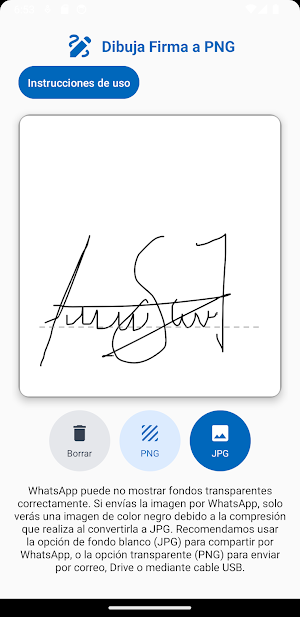
Draw Signature to PNG is a simple and practical app for creating your digital or electronic signature directly from your phone. Draw with your finger or stylus on the canvas, adjusted to the style of a real sheet of paper, and save your signature ready to use on documents, forms, or contracts.
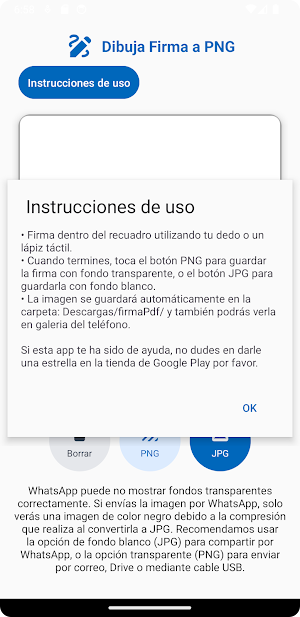
You can save your signature in PNG format with a transparent background—perfect for adding it to PDF, Word, or image files—or in JPG with a white background, ideal for sharing via WhatsApp, email, or social media without the black background showing due to JPG compression.
It includes useful tools such as:
• Signature canvas with a fluid stroke and realistic ink-like line.
• Option to easily erase and re-sign.
• Automatic saving in the Downloads/PDFSignature/ folder.
• Clean and modern interface inspired by digital sheet design.
With Draw Signature to PNG, create your digital signature in seconds and share it hassle-free, in the quality and format you need.
You can save your signature in PNG format with a transparent background—perfect for adding it to PDF, Word, or image files—or in JPG with a white background, ideal for sharing via WhatsApp, email, or social media without the black background showing due to JPG compression.
It includes useful tools such as:
• Signature canvas with a fluid stroke and realistic ink-like line.
• Option to easily erase and re-sign.
• Automatic saving in the Downloads/PDFSignature/ folder.
• Clean and modern interface inspired by digital sheet design.
With Draw Signature to PNG, create your digital signature in seconds and share it hassle-free, in the quality and format you need.
What’s new
Version 1.1.0 · Updated August 15, 2026
Descarga ahora Dibuja Firma a PNG! Obtén tu firma en formato imagen PNG (Fondo transparente) o JPG (Fongo blanco) de forma facil y rápida.
Alternatives to Dibuja Firma A PNG
Looking for apps like Dibuja Firma A PNG? Here are 5 similar Android apps on Google Play. All of them are free to download.
-
Regiomontuna Stereo 88.7 FM
-
Mi Radio Nariño - En Vivo
-
Busetas San Gil - Rutas
-
Especies Invasoras Encuestas
-
Busetas Tunja - Rutas
| App | Rating | Price | Installs | Last updated | Compare |
|---|---|---|---|---|---|
| Dibuja Firma A PNG | – | Free | 100+ | Aug 15, 2026 | |
| Regiomontuna Stereo 88.7 FM | – | Free | 500+ | Aug 5, 2026 | Compare |
| Mi Radio Nariño - En Vivo | – | Free | 100+ | Aug 16, 2026 | Compare |
| Busetas San Gil - Rutas | – | Free | 10+ | Aug 16, 2026 | Compare |
| Especies Invasoras Encuestas | – | Free | 10+ | Aug 16, 2026 | Compare |
| Busetas Tunja - Rutas | – | Free | 1,000+ | Oct 15, 2026 | Compare |
Compare Dibuja Firma A PNG with the top alternatives: ratings, updates, ASO score and keyword gaps →