
QuickTools
Tools
Password backup, QR tools, file sharing, flashlight, speed, tasks & more.
- Downloads
- 500+
- on Google Play
- Price
- Free
- No in-app purchases
- Updated
- Jun 27
- 2026 · v1.1.13
Screenshots


About QuickTools
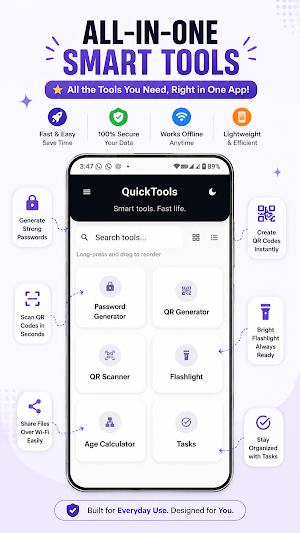
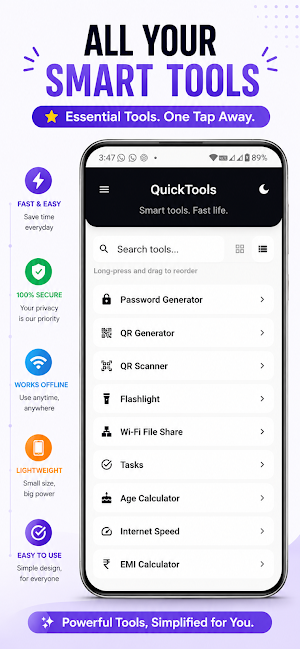
QuickTools is a fast, clean, and useful all-in-one utility app built for everyday needs, with a powerful Password Tool at its core.
Securely generate, save, and manage strong passwords, along with many other smart tools in one lightweight app.
Main Highlight:
• Password Generator & Secure Backup
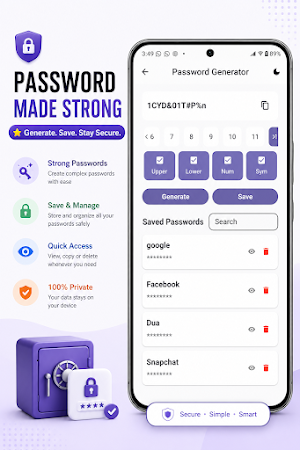
Create strong passwords using uppercase letters, lowercase letters, numbers, symbols, and custom length options. Save passwords locally on your device, enable optional sign-in, and use secure cloud backup to keep your password vault protected.
Password Tool Features:
• Strong password generation
• Local password saving
• Optional Google Sign-In
• Secure cloud backup
• Cloud Sync support
• Cloud Trash support
• Restore support
• Delete Account support with local vault preservation
• Clean and simple password management experience
More Tools:
• Tasks Manager
Create, manage, complete, and delete tasks easily with a clean and simple interface.
• QR Code Scanner
Scan QR codes quickly using your camera or scan QR codes from gallery images.
• QR Code Generator
Generate QR codes from text, save them as images, and share them easily.
• Flashlight Tool
Instantly access your flashlight from the app, home screen widget, or Quick Settings tile.
• Internet Speed Monitor
View live upload and download speed. You can also enable a persistent notification speed meter.
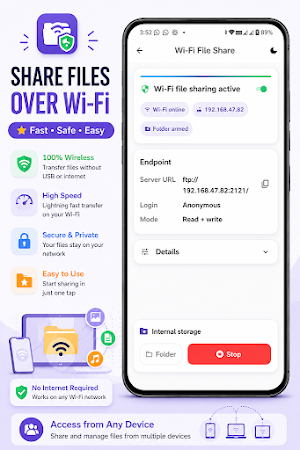
• Wi-Fi File Server
Transfer files between your phone and computer over the same Wi-Fi network using a simple file server.
• Tap to Lock
Quickly lock your phone using the app, home screen shortcut, or Quick Settings tile.
• Age Calculator
Calculate your exact age using day, month, and year selection. Includes birthday greeting support.
• EMI Calculator
Calculate monthly EMI easily for better loan planning.
Why QuickTools?
• Password-focused utility app
• Clean and modern UI
• Dark and light theme support
• Fast and lightweight
• Useful home screen widgets
• Quick Settings tile support
• Works offline for most tools
• Local storage for your data
• Optional sign-in for cloud backup
• Smooth and simple experience
More useful tools and improvements will be added in future updates.
Download QuickTools and simplify your daily tasks.
Securely generate, save, and manage strong passwords, along with many other smart tools in one lightweight app.
Main Highlight:
• Password Generator & Secure Backup
Create strong passwords using uppercase letters, lowercase letters, numbers, symbols, and custom length options. Save passwords locally on your device, enable optional sign-in, and use secure cloud backup to keep your password vault protected.
Password Tool Features:
• Strong password generation
• Local password saving
• Optional Google Sign-In
• Secure cloud backup
• Cloud Sync support
• Cloud Trash support
• Restore support
• Delete Account support with local vault preservation
• Clean and simple password management experience
More Tools:
• Tasks Manager
Create, manage, complete, and delete tasks easily with a clean and simple interface.
• QR Code Scanner
Scan QR codes quickly using your camera or scan QR codes from gallery images.
• QR Code Generator
Generate QR codes from text, save them as images, and share them easily.
• Flashlight Tool
Instantly access your flashlight from the app, home screen widget, or Quick Settings tile.
• Internet Speed Monitor
View live upload and download speed. You can also enable a persistent notification speed meter.
• Wi-Fi File Server
Transfer files between your phone and computer over the same Wi-Fi network using a simple file server.
• Tap to Lock
Quickly lock your phone using the app, home screen shortcut, or Quick Settings tile.
• Age Calculator
Calculate your exact age using day, month, and year selection. Includes birthday greeting support.
• EMI Calculator
Calculate monthly EMI easily for better loan planning.
Why QuickTools?
• Password-focused utility app
• Clean and modern UI
• Dark and light theme support
• Fast and lightweight
• Useful home screen widgets
• Quick Settings tile support
• Works offline for most tools
• Local storage for your data
• Optional sign-in for cloud backup
• Smooth and simple experience
More useful tools and improvements will be added in future updates.
Download QuickTools and simplify your daily tasks.
What’s new
Version 1.1.13 · Updated June 27, 2026
Added secure Password Backup with Sign-In, Tap to Lock, Quick Settings Tiles, Home Shortcuts, Hide Tool option, improved Favorites drag-and-drop, bug fixes, performance improvements, and build warning fixes.
User reviews

Very useful for managing passwords. qr scanner and lock widget is very much useful. please add a short messaging tool for secure chat.
Alternatives to QuickTools
Looking for apps like QuickTools? Here is 1 similar Android app on Google Play.

| App | Rating | Price | Installs | Compare |
|---|---|---|---|---|
| QuickTools | – | Free | 500+ | |
| MR Car: Traffic Racing | – | Free | 100+ | Compare |
Compare QuickTools with the top alternatives: ratings, updates, ASO score and keyword gaps →