
Grid Method for Drawing
Grid Method Lab Art & Design Contains ads
The offline grid drawing tool for artists. Art with perfect proportions.
- Downloads
- 70.5K+
- on Google Play
- Price
- Free
- No in-app purchases
- Updated
- Aug 18
- 2026 · v1.0.6
Screenshots
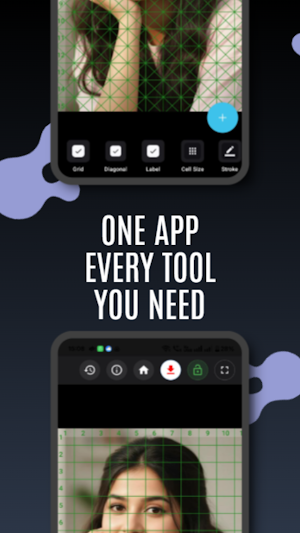


About Grid Method for Drawing
Master the Art of Proportion with Grid Method.
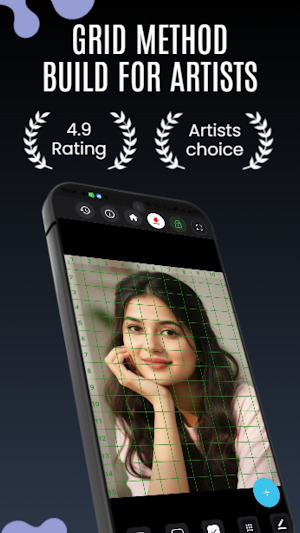
Whether you are a beginner learning to sketch or a professional painter working on a realistic portrait, accurate proportions are the foundation of great art. Grid Method is a lightweight, precision-focused tool designed to help you overlay customizable grids on your reference photos — making the centuries-old grid technique faster, smarter, and easier than ever before.
Why the Grid Method?
The grid method is a technique used by masters from Da Vinci to modern hyper-realists. By breaking a complex image into manageable squares and transferring them one by one, you achieve accurate proportions and perfect scale — without the struggle, without the guesswork.
Key Features
🎨 Smart Reference Cropping
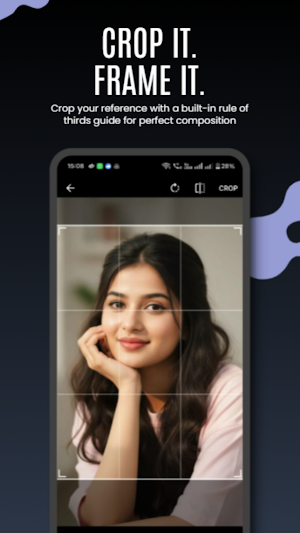
Crop your photo before gridding with a built-in rule-of-thirds guide. Focus on exactly what you want to draw — nothing more, nothing less.
📐 Any Size. Any Orientation.
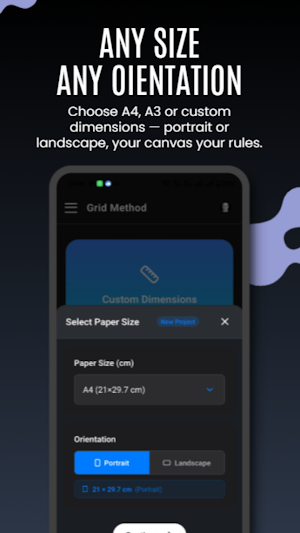
Choose from standard presets — A0, A1, A2, A3, A4, A5 — or set fully custom paper dimensions. Switch between portrait and landscape orientation to perfectly match your physical canvas.
⊞ Powerful Grid Controls
Toggle standard grid, diagonal crosshatch lines, and numbered labels independently. See your image broken down exactly the way you need it.
📏 Pixel-Perfect Cell Size
Set your grid cell size to the exact centimeter. Use the default square grid or go advanced with custom width and height dimensions — your grid matches your paper, not the other way around.
🖊️ Full Stroke Customization
Adjust line thickness in pixels. Choose from preset colors or pick any custom color with the built-in color picker — full visibility on dark or light reference photos.
⬛ Black & White Mode
Switch your reference to grayscale instantly. See values and tones the way your pencil will — distraction-free, contrast-focused drawing reference.
🕘 Project History
Every grid you create is automatically saved locally on your device. Browse your full history, see paper size, cell size and stroke details at a glance, and jump back into any project instantly.
🔒 Completely Offline & Private
All image processing happens locally on your device. No internet connection required. No account needed. We never collect, upload or store your photos.
✨ Clean, Minimal Interface
No clutter, no complicated menus. Open the app, load your image, set your grid, and start drawing. Built for artists, not for engineers.
How It Works
Open the app and tap Create New Grid
Choose your paper size and orientation
Select your reference photo from the gallery
Crop and frame your reference using the built-in crop tool
Customize your grid — square cell, diagonal cell, labels, cell size, stroke color, stroke width, effect
Draw a matching grid on your paper or canvas
zoom in image without any quality loss, sharp and clear grid lines
download image to your device
Return to any project anytime from History
Perfect For
✏️ Portrait Artists — Get eyes, nose and facial features exactly right every time
🖌️ Realism Painters — Break down complex textures, lighting and fine detail
🏙️ Urban Sketchers — Quickly capture perspective, scale and architecture
🎓 Art Students — Train your eye to see shapes, proportions and composition
🖼️ Hobbyists — Anyone who wants to draw accurately without years of practice
Take the guesswork out of your drawing process. Download Grid Method today and start creating your masterpiece — one square at a time.
Whether you are a beginner learning to sketch or a professional painter working on a realistic portrait, accurate proportions are the foundation of great art. Grid Method is a lightweight, precision-focused tool designed to help you overlay customizable grids on your reference photos — making the centuries-old grid technique faster, smarter, and easier than ever before.
Why the Grid Method?
The grid method is a technique used by masters from Da Vinci to modern hyper-realists. By breaking a complex image into manageable squares and transferring them one by one, you achieve accurate proportions and perfect scale — without the struggle, without the guesswork.
Key Features
🎨 Smart Reference Cropping
Crop your photo before gridding with a built-in rule-of-thirds guide. Focus on exactly what you want to draw — nothing more, nothing less.
📐 Any Size. Any Orientation.
Choose from standard presets — A0, A1, A2, A3, A4, A5 — or set fully custom paper dimensions. Switch between portrait and landscape orientation to perfectly match your physical canvas.
⊞ Powerful Grid Controls
Toggle standard grid, diagonal crosshatch lines, and numbered labels independently. See your image broken down exactly the way you need it.
📏 Pixel-Perfect Cell Size
Set your grid cell size to the exact centimeter. Use the default square grid or go advanced with custom width and height dimensions — your grid matches your paper, not the other way around.
🖊️ Full Stroke Customization
Adjust line thickness in pixels. Choose from preset colors or pick any custom color with the built-in color picker — full visibility on dark or light reference photos.
⬛ Black & White Mode
Switch your reference to grayscale instantly. See values and tones the way your pencil will — distraction-free, contrast-focused drawing reference.
🕘 Project History
Every grid you create is automatically saved locally on your device. Browse your full history, see paper size, cell size and stroke details at a glance, and jump back into any project instantly.
🔒 Completely Offline & Private
All image processing happens locally on your device. No internet connection required. No account needed. We never collect, upload or store your photos.
✨ Clean, Minimal Interface
No clutter, no complicated menus. Open the app, load your image, set your grid, and start drawing. Built for artists, not for engineers.
How It Works
Open the app and tap Create New Grid
Choose your paper size and orientation
Select your reference photo from the gallery
Crop and frame your reference using the built-in crop tool
Customize your grid — square cell, diagonal cell, labels, cell size, stroke color, stroke width, effect
Draw a matching grid on your paper or canvas
zoom in image without any quality loss, sharp and clear grid lines
download image to your device
Return to any project anytime from History
Perfect For
✏️ Portrait Artists — Get eyes, nose and facial features exactly right every time
🖌️ Realism Painters — Break down complex textures, lighting and fine detail
🏙️ Urban Sketchers — Quickly capture perspective, scale and architecture
🎓 Art Students — Train your eye to see shapes, proportions and composition
🖼️ Hobbyists — Anyone who wants to draw accurately without years of practice
Take the guesswork out of your drawing process. Download Grid Method today and start creating your masterpiece — one square at a time.
What’s new
Version 1.0.6 · Updated August 18, 2026
What's New in Version 1.0.6 Horizontal Scroll: New horizontal scroll bar at bottom tools section. Full Responsiveness Update: Experience perfect layouts across all screen sizes and tablets. Performance Enhancements: Smoother navigation and minor bug fixes for a flawless experience.
User reviews

its really good 👍

this app was amazing this is created by somnath khatu art channel

Best app for drawing 🎨 Easy, accurate & super helpful for sketches 🔥 Highly recommended 💯"
really nice app i subscribe ur youtube channel

This is very good app 💯

I used it to draw, it turned out 98.6% realistic. thanks somnath
Alternatives to Grid Method for Drawing
Looking for apps like Grid Method for Drawing? Here are 6 similar Android apps on Google Play. The highest rated is GreyForge - Painting assistant (5.0/5), and all 6 are free to download.
-
Bike Stickers
-
khatu Shyam Wallpaper Ringtone
-
GreyForge - Painting assistant 5.0
-
Editai
-
Neon Doodle Art
-
FootBall Stickers
| App | Rating | Price | Installs | Last updated | Compare |
|---|---|---|---|---|---|
| Grid Method for Drawing | – | Free | 50,000+ | Aug 18, 2026 | |
| Bike Stickers | – | Free | 0+ | May 11, 2026 | Compare |
| khatu Shyam Wallpaper Ringtone | – | Free | 5,000+ | – | Compare |
| GreyForge - Painting assistant | 5.0 / 5 | Free | 5,000+ | Oct 2, 2026 | Compare |
| Editai | – | Free | 500+ | – | Compare |
| Neon Doodle Art | – | Free | 50+ | May 14, 2026 | Compare |
| FootBall Stickers | – | Free | 1+ | May 12, 2026 | Compare |
Similar apps on Google Play
- Bike Stickers
- khatu Shyam Wallpaper Ringtone
- GreyForge - Painting assistant
- Editai
- Neon Doodle Art
- FootBall Stickers
- SurfaBeam - Pro Projection Map
- Food Stickers
- ToonPhoto: AI Photo Generator
- Car Stickers
- SPARKIT
- Grid Method for Drawing
- Cluj Street Art
- MangAI: Comics AR Sketch Maker
- Programmer Watch Face
- Sketch Logo AI - Logo Maker
- Barbie Magic Style Studio
- Tracit - AR Drawing & Tracing
- Artwall: album art wallpaper
- StitchPic - Long Screenshot
- Vaelara: AI Video, Art & Chat
- The Flower Studio
- Photoleap :Photo, Video Editor
- Tempus Aqua Android Watch Face
- SkinEmotes & FFFF Diamond Tips