

Neat Calendar Widget
Productivity In-app purchases
Simple and clean agenda widget
- Rating
- 3.5
- 1.4K ratings
- Downloads
- 100K+
- on Google Play
- Price
- Free
- In-app purchases
- Updated
- Jan 6
- 2014 · v1.32
Screenshots
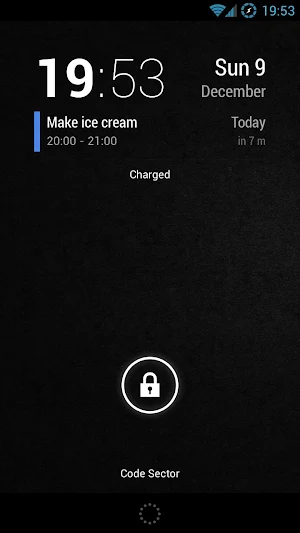
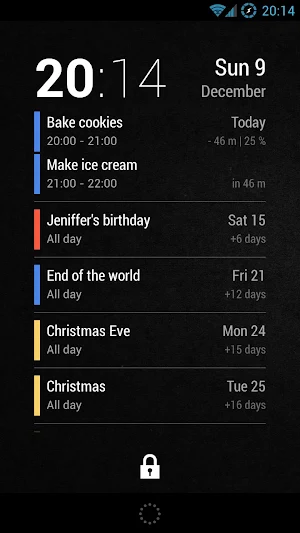
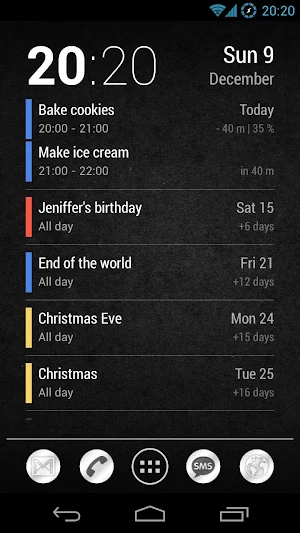
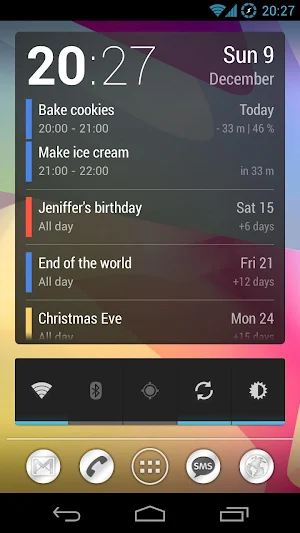

About Neat Calendar Widget
• Resizable and scrollable.
• Shows number of days/minutes to events.
• Tap on time to launch Clock app.
• Tap on date to open Google Calendar.
• Tap between clock and date to display a month view.
Month view:
• Shows events on a hours grid.
• Tap and hold on a day to display context menu.
To change a calendar color:
1. Go to http://www.google.com/calendar on your desktop.
2. Select the color in the left sidebar.
To add to the lockscreen (Android 4.2 only):
1. Swipe lockscreen to the left until you see a big [+] icon.
2. Tap on the icon and select 'Neat Calendar'.
3. Tap and hold on the widget and move it to the left of the camera screen.
To add to the home screen:
1. Open widgets list in the app drawer.
2. Tap and hold to place widget on the desktop.
How to display birthdays:
Go to Google Calendar on the web and click on
Other calendars > Browse Interesting Calendars > More > Contacts' birthdays and events > Subscribe.
Then go to Calendar app, tap menu icon and select Calendars to display > Calendars to sync.
What’s new
Version 1.32 · Updated January 6, 2014
• Option to choose between popup menu and month view. • Added languages: Japanesse, Italian, Dutch, Portuguese. 1.27 • Month calendar view. • Individual event's colors. 1.25 • Date and time format options [Pro]. • Display month if it differs from the current one. 1.21 • Tap between clock and date to add a new event. 1.20 • Display event location [Pro]. • Compact header. • Small text size. • Bugfixes. 1.17 • Color settings added. • Corrected multi-day events.
User reviews

Excellent

my first calendar widget! nostalgic so no bad review!

Excellent

Good apps

One of the few compact-view agenda widgets that makes great use of space. Pity that it's no longer updated.

On screen reminder is perfect. Don't have to open my calendar to see upcoming events! Had this app many years and many features do not work any more. Seems to have been abandonded. Hasn't been updated since 2013, regardless it still gives me simple brief descriptions on screen for upcoming events. Easily resizeable ...
Alternatives to Neat Calendar Widget
Looking for apps like Neat Calendar Widget? Here are 6 similar Android apps on Google Play. The highest rated is SpeedView Pro (4.3/5), and 5 of the 6 are free to download.
-
Maverick: GPS Navigation 4.0
-
SpeedView: Legacy Edition 3.5
-
SpeedView: GPS Speedometer 3.7
-
Nomad Watch Face
-
AudioField: MP3 Voice Recorder 3.5
-
SpeedView Pro 4.3
| App | Rating | Price | Installs | Last updated | Compare |
|---|---|---|---|---|---|
| Neat Calendar Widget | 3.5 / 5 | Free | 100,000+ | Jan 6, 2014 | |
| Maverick: GPS Navigation | 4.0 / 5 | Free | 5,000,000+ | Feb 16, 2017 | Compare |
| SpeedView: Legacy Edition | 3.5 / 5 | Free | 1,000,000+ | Jun 21, 2022 | Compare |
| SpeedView: GPS Speedometer | 3.7 / 5 | Free | 10,000+ | – | Compare |
| Nomad Watch Face | – | Free | 500+ | Jul 2, 2020 | Compare |
| AudioField: MP3 Voice Recorder | 3.5 / 5 | Free | 50,000+ | Feb 23, 2016 | Compare |
| SpeedView Pro | 4.3 / 5 | 1.99 USD | 10,000+ | Sep 6, 2016 | Compare |