
Sketch AI - Drawing to Art
Art & Design In-app purchases Contains ads
Transform your sketches into stunning artwork through the power of AI!
- Rating
- 3.3
- 16 ratings
- Downloads
- 1K+
- on Google Play
- Price
- Free
- In-app purchases
- Updated
- Apr 3
- 2025 · v1.0.3
Screenshots
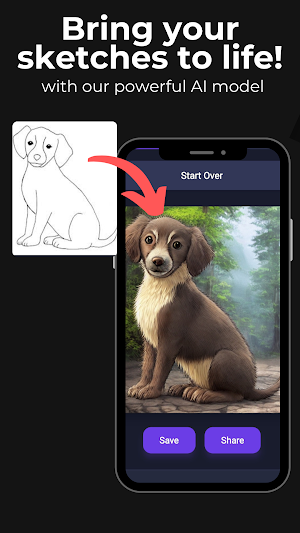


About Sketch AI - Drawing to Art
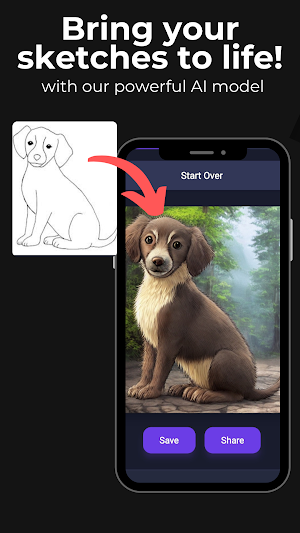
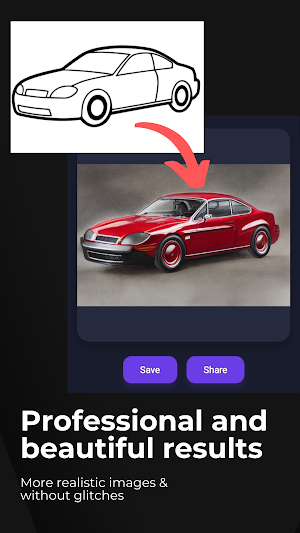
Turn your sketches into stunning, high-quality images with Sketch AI - Drawing to Image! Whether you’re a professional artist, hobbyist, or someone who loves to doodle, our advanced AI-powered tool transforms your rough sketches into visually captivating artwork in seconds.
Key Features:
- **AI-Powered Image Generation** – Instantly convert your hand-drawn sketches into detailed images using cutting-edge artificial intelligence.
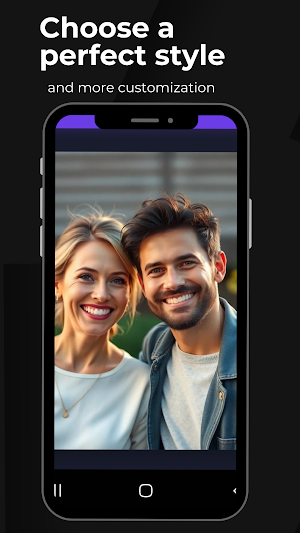
- **Multiple Art Styles** – Choose from a wide range of styles, including realistic, watercolor, anime, digital painting, and more to bring your vision to life.
- **User-Friendly Interface** – Simple and intuitive design that makes it easy for anyone to use—no technical skills required!
- **Fast Processing** – Get high-quality results within seconds. Watch your drawings evolve into beautiful images instantly!
- **Customizable Effects** – Adjust details like colors, textures, and depth to refine the final output.
- **Save & Share** – Download high-resolution images and share them on social media, print them, or use them in your projects.
- **Works with Any Sketch** – Whether it’s a rough doodle or a carefully outlined drawing, Sketch AI enhances and refines it effortlessly.
How It Works:
1. Draw or Upload – Create a sketch directly in the app or upload an existing one.
2. Select a Style – Pick from a variety of artistic styles or let AI enhance it automatically.
3. Generate & Customize – Let AI transform your drawing and adjust it to your liking.
4. Save & Share – Download your AI-generated artwork and showcase your creativity!
Who Is This For?
- **Artists & Designers** – Quickly experiment with new ideas and enhance sketches with AI.
- **Content Creators** – Create unique AI-generated visuals for digital content.
- **Students & Educators** – Use AI-generated images for creative projects.
- **Game Developers** – Generate concept art effortlessly.
- **Anyone Who Loves Art** – Bring your drawings to life, no matter your skill level!
Why Choose Sketch AI?
- **AI-Powered Precision** – Our advanced algorithms ensure high-quality results.
- **No Artistic Skills Needed** – Anyone can create stunning images with just a simple sketch.
- **Continuous Updates** – We’re constantly improving the app with new features and enhancements.
- **Completely Free to Try** – Get started today and experience the magic of AI-generated art!
Unleash your creativity with Sketch AI - Drawing to Image and watch your sketches come to life!
Download now and transform your drawings with AI!
Key Features:
- **AI-Powered Image Generation** – Instantly convert your hand-drawn sketches into detailed images using cutting-edge artificial intelligence.
- **Multiple Art Styles** – Choose from a wide range of styles, including realistic, watercolor, anime, digital painting, and more to bring your vision to life.
- **User-Friendly Interface** – Simple and intuitive design that makes it easy for anyone to use—no technical skills required!
- **Fast Processing** – Get high-quality results within seconds. Watch your drawings evolve into beautiful images instantly!
- **Customizable Effects** – Adjust details like colors, textures, and depth to refine the final output.
- **Save & Share** – Download high-resolution images and share them on social media, print them, or use them in your projects.
- **Works with Any Sketch** – Whether it’s a rough doodle or a carefully outlined drawing, Sketch AI enhances and refines it effortlessly.
How It Works:
1. Draw or Upload – Create a sketch directly in the app or upload an existing one.
2. Select a Style – Pick from a variety of artistic styles or let AI enhance it automatically.
3. Generate & Customize – Let AI transform your drawing and adjust it to your liking.
4. Save & Share – Download your AI-generated artwork and showcase your creativity!
Who Is This For?
- **Artists & Designers** – Quickly experiment with new ideas and enhance sketches with AI.
- **Content Creators** – Create unique AI-generated visuals for digital content.
- **Students & Educators** – Use AI-generated images for creative projects.
- **Game Developers** – Generate concept art effortlessly.
- **Anyone Who Loves Art** – Bring your drawings to life, no matter your skill level!
Why Choose Sketch AI?
- **AI-Powered Precision** – Our advanced algorithms ensure high-quality results.
- **No Artistic Skills Needed** – Anyone can create stunning images with just a simple sketch.
- **Continuous Updates** – We’re constantly improving the app with new features and enhancements.
- **Completely Free to Try** – Get started today and experience the magic of AI-generated art!
Unleash your creativity with Sketch AI - Drawing to Image and watch your sketches come to life!
Download now and transform your drawings with AI!
What’s new
Version 1.0.3 · Updated April 3, 2025
Bug fixes and report functionality
User reviews

Excellent!

I love it 😍❤️❤️💓💓💓
Alternatives to Sketch AI - Drawing to Art
Looking for apps like Sketch AI - Drawing to Art? Here are 6 similar Android apps on Google Play. The highest rated is AI Proposal Writer (4.9/5), and all 6 are free to download.
-
Nano Banana AI Photo Editor 4.7
-
AI Song Lyrics Generator 4.8
-
WorldGuessr-Unlimited Geoguess 4.5
-
AI Proposal Writer 4.9
-
CPS Test Pro- Click Speed Test 3.9
-
AI Short Story Generator 4.4
| App | Rating | Price | Installs | Last updated | Compare |
|---|---|---|---|---|---|
| Sketch AI - Drawing to Art | 3.3 / 5 | Free | 1,000+ | Apr 3, 2025 | |
| Nano Banana AI Photo Editor | 4.7 / 5 | Free | 10,000+ | Aug 31, 2025 | Compare |
| AI Song Lyrics Generator | 4.8 / 5 | Free | 100,000+ | – | Compare |
| WorldGuessr-Unlimited Geoguess | 4.5 / 5 | Free | 100,000+ | Sep 8, 2026 | Compare |
| AI Proposal Writer | 4.9 / 5 | Free | 10,000+ | Jul 11, 2024 | Compare |
| CPS Test Pro- Click Speed Test | 3.9 / 5 | Free | 50,000+ | – | Compare |
| AI Short Story Generator | 4.4 / 5 | Free | 1,000+ | Apr 17, 2024 | Compare |