

CromaGen ASE Palette Export
Cherubyns Art & Design
Extract color palettes from images and export as ASE files for Photoshop
- Downloads
- 30+
- on Google Play
- Price
- Free
- No in-app purchases
- Updated
- Apr 28
- 2026 · v1.0.2
Screenshots

About CromaGen ASE Palette Export
**CromaGen - Professional Palette Extractor**
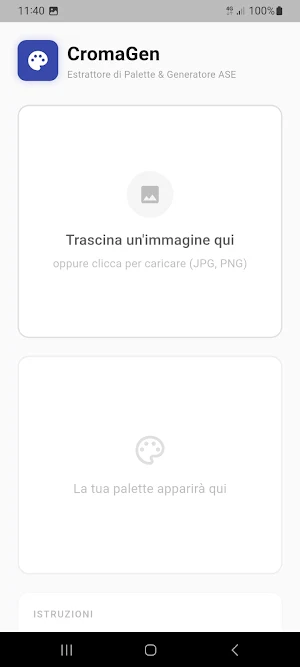
Transform your images into perfect color palettes with CromaGen, the professional app for designers, graphic artists, and creatives who want to extract dominant colors from their photos and convert them into ready-to-use palettes.
---
**✨ KEY FEATURES**
**🎯 Automatic Color Extraction**
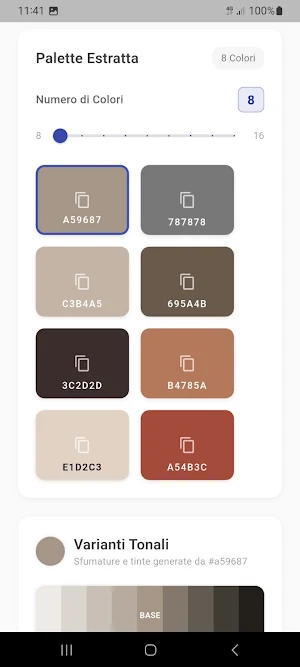
Load any image and CromaGen automatically extracts the dominant colors using advanced analysis algorithms. The app identifies up to 16 distinct colors, ensuring precise and professional results.
**🎚️ Total Control**
Adjust the number of extracted colors from 8 to 16 with an intuitive slider. See results update in real time as you tweak the settings, letting you find the perfect balance for every project.
**🌈 Smart Tonal Variants**
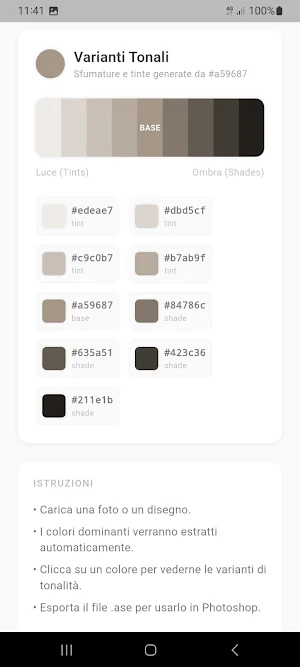
Tap any extracted color to instantly see its tonal variants:
• Tints — for bright, lighter shades
• Base — the original color
• Shades — for depth and contrast
Every variant is ready to copy with a single tap.
**📤 Professional Export**
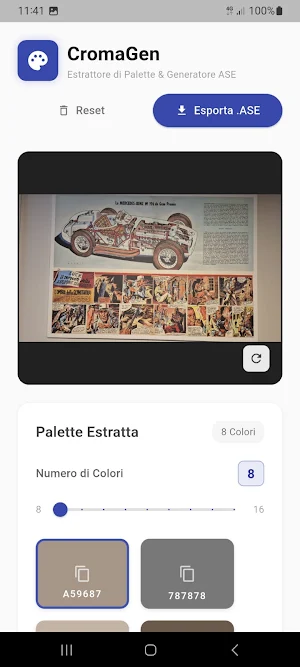
Export your palettes in Adobe Swatch Exchange (.ASE) format, the industry standard for Photoshop, Illustrator, and other Adobe Creative Suite applications. Your palettes are ready to use immediately in your professional projects.
**📋 Quick Copy**
Copy any hex color code to your clipboard with a single tap. Perfect for sharing colors with colleagues or using them in other applications.
**🌍 Multilingual**
CromaGen automatically supports Italian and English, adapting to your device's language settings.
---
**💼 WHO IS CROMAGEN FOR?**
• Graphic Designers — create consistent palettes from your moodboards
• Web Designers — extract colors from websites or reference images
• Photographers — identify the dominant colors in your photos
• Digital Artists — find inspiration from image colors
• Brand Designers — analyze existing color palettes
• Design Students — learn to work with professional palettes
---
**🚀 HOW IT WORKS**
1. Load an image from your gallery
2. CromaGen automatically extracts the dominant colors
3. Adjust the number of colors with the slider (8–16)
4. Explore the tonal variants of each color
5. Export the palette in .ASE format or share it
---
**📱 COMPATIBILITY**
• Supports JPG and PNG images
• Works on smartphones and tablets
• Interface optimized for every screen size
• Built-in file sharing with other apps
---
**🔒 PRIVACY**
CromaGen respects your privacy:
• Images are processed locally on your device only
• No data is sent to external servers
• No internet connection required for color extraction
• Your images stay private and secure
---
**🎨 PERFECT FOR**
✓ Creating color palettes from moodboards
✓ Analyzing existing brand colors
✓ Extracting colors from photographs
✓ Preparing palettes for graphic projects
✓ Studying color combinations
✓ Working with Photoshop and Illustrator
---
Download CromaGen today and transform your images into professional color palettes!
Transform your images into perfect color palettes with CromaGen, the professional app for designers, graphic artists, and creatives who want to extract dominant colors from their photos and convert them into ready-to-use palettes.
---
**✨ KEY FEATURES**
**🎯 Automatic Color Extraction**
Load any image and CromaGen automatically extracts the dominant colors using advanced analysis algorithms. The app identifies up to 16 distinct colors, ensuring precise and professional results.
**🎚️ Total Control**
Adjust the number of extracted colors from 8 to 16 with an intuitive slider. See results update in real time as you tweak the settings, letting you find the perfect balance for every project.
**🌈 Smart Tonal Variants**
Tap any extracted color to instantly see its tonal variants:
• Tints — for bright, lighter shades
• Base — the original color
• Shades — for depth and contrast
Every variant is ready to copy with a single tap.
**📤 Professional Export**
Export your palettes in Adobe Swatch Exchange (.ASE) format, the industry standard for Photoshop, Illustrator, and other Adobe Creative Suite applications. Your palettes are ready to use immediately in your professional projects.
**📋 Quick Copy**
Copy any hex color code to your clipboard with a single tap. Perfect for sharing colors with colleagues or using them in other applications.
**🌍 Multilingual**
CromaGen automatically supports Italian and English, adapting to your device's language settings.
---
**💼 WHO IS CROMAGEN FOR?**
• Graphic Designers — create consistent palettes from your moodboards
• Web Designers — extract colors from websites or reference images
• Photographers — identify the dominant colors in your photos
• Digital Artists — find inspiration from image colors
• Brand Designers — analyze existing color palettes
• Design Students — learn to work with professional palettes
---
**🚀 HOW IT WORKS**
1. Load an image from your gallery
2. CromaGen automatically extracts the dominant colors
3. Adjust the number of colors with the slider (8–16)
4. Explore the tonal variants of each color
5. Export the palette in .ASE format or share it
---
**📱 COMPATIBILITY**
• Supports JPG and PNG images
• Works on smartphones and tablets
• Interface optimized for every screen size
• Built-in file sharing with other apps
---
**🔒 PRIVACY**
CromaGen respects your privacy:
• Images are processed locally on your device only
• No data is sent to external servers
• No internet connection required for color extraction
• Your images stay private and secure
---
**🎨 PERFECT FOR**
✓ Creating color palettes from moodboards
✓ Analyzing existing brand colors
✓ Extracting colors from photographs
✓ Preparing palettes for graphic projects
✓ Studying color combinations
✓ Working with Photoshop and Illustrator
---
Download CromaGen today and transform your images into professional color palettes!
What’s new
Version 1.0.2 · Updated April 28, 2026
- localization update
Alternatives to CromaGen ASE Palette Export
Looking for apps like CromaGen ASE Palette Export? Here are 6 similar Android apps on Google Play. All of them are free to download.
-
Reading Today's News
-
Trova la mia auto-ma non solo
-
Dot Gain Simulation
-
Color Lab Studio
-
Wucius Wong Design Lab
-
Event Time Logger
| App | Rating | Price | Installs | Last updated | Compare |
|---|---|---|---|---|---|
| CromaGen ASE Palette Export | – | Free | 10+ | Apr 28, 2026 | |
| Reading Today's News | – | Free | 1+ | – | Compare |
| Trova la mia auto-ma non solo | – | Free | 10+ | – | Compare |
| Dot Gain Simulation | – | Free | 10+ | – | Compare |
| Color Lab Studio | – | Free | 50+ | – | Compare |
| Wucius Wong Design Lab | – | Free | 5+ | Jan 2, 2026 | Compare |
| Event Time Logger | – | Free | 50+ | Feb 28, 2026 | Compare |