
Mask Shot
Productivity In-app purchases
Clean screenshots before sharing. Hide sensitive text on your device only.
- Downloads
- 73+
- on Google Play
- Price
- Free
- In-app purchases
- Updated
- Apr 17
- 2026 · v1.4.0
Screenshots
About Mask Shot
Clean screenshots before you share.
MaskShot helps you share screenshots safely by automatically detecting and redacting sensitive text—tokens, emails, URLs, API keys, and more. Everything happens on your device. Nothing is sent to the cloud.
WHY MASKSHOT
Screenshots often contain secrets: API keys, tokens, emails, connection strings. Sharing them as-is can leak sensitive data. MaskShot analyzes your screenshot on your device, detects sensitive text, and lets you add redaction areas so you can save or share with confidence.
HOW IT WORKS
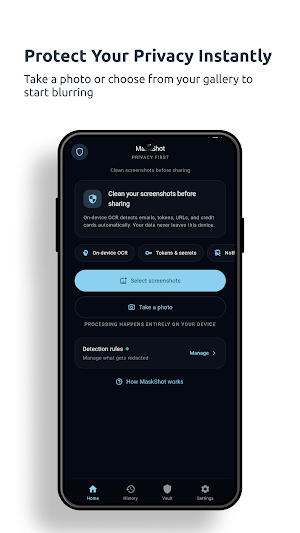
1. Pick or capture — Choose screenshots from your gallery or take a new one.
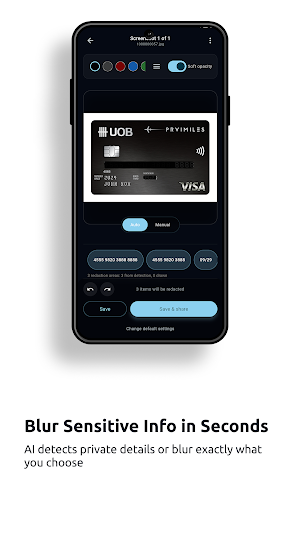
2. Review & edit — See what’s detected; add manual redaction areas, change colors, zoom to inspect.
3. Save or share — Save to gallery, share only, or both. Your choice.
KEY FEATURES
• Privacy first — All detection and redaction happens on your device. Your images and text never leave your phone.
• On-device OCR — Detects emails, tokens, URLs, credit cards, and many common secret patterns automatically.
• Built-in patterns — Tokens, API keys, Bearer tokens, JWTs, AWS keys, GitHub/Google/Stripe/Slack tokens, private keys, and more. Premium adds custom regex patterns.
• Editor — Rectangle and oval redaction; move, resize, undo. Multiple colors including black, grey, red, blue, green, or custom.
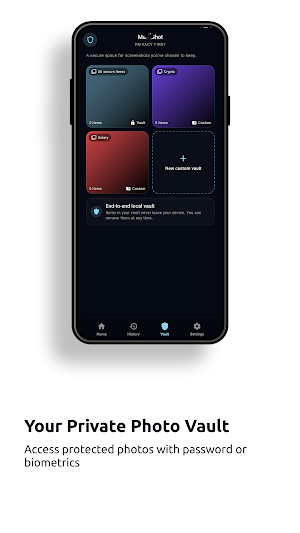
• Secure vault — Keep sensitive screenshots in a PIN- or biometric-protected space. Free: up to 5 images; Premium: unlimited and custom vaults.
• Export — Save to gallery, share only, or save and share. Set your default in Settings.
FREE VS PREMIUM
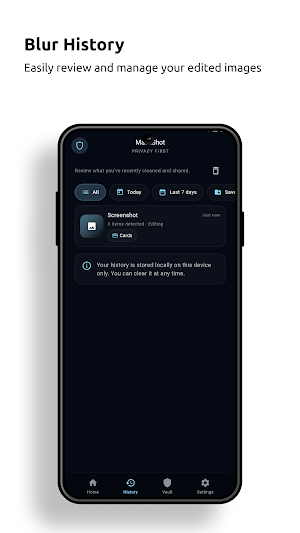
• Free: Core redaction, built-in patterns, secure vault (up to 5 images), history.
• Premium: Custom detection patterns, unlimited vault images, custom vaults, batch (multi-image) editing.
MaskShot does not use AI to process your data. Processing is entirely on-device. For full details, see our Privacy Policy and Terms in the app or at maskshot.chuongle.dev.
MaskShot helps you share screenshots safely by automatically detecting and redacting sensitive text—tokens, emails, URLs, API keys, and more. Everything happens on your device. Nothing is sent to the cloud.
WHY MASKSHOT
Screenshots often contain secrets: API keys, tokens, emails, connection strings. Sharing them as-is can leak sensitive data. MaskShot analyzes your screenshot on your device, detects sensitive text, and lets you add redaction areas so you can save or share with confidence.
HOW IT WORKS
1. Pick or capture — Choose screenshots from your gallery or take a new one.
2. Review & edit — See what’s detected; add manual redaction areas, change colors, zoom to inspect.
3. Save or share — Save to gallery, share only, or both. Your choice.
KEY FEATURES
• Privacy first — All detection and redaction happens on your device. Your images and text never leave your phone.
• On-device OCR — Detects emails, tokens, URLs, credit cards, and many common secret patterns automatically.
• Built-in patterns — Tokens, API keys, Bearer tokens, JWTs, AWS keys, GitHub/Google/Stripe/Slack tokens, private keys, and more. Premium adds custom regex patterns.
• Editor — Rectangle and oval redaction; move, resize, undo. Multiple colors including black, grey, red, blue, green, or custom.
• Secure vault — Keep sensitive screenshots in a PIN- or biometric-protected space. Free: up to 5 images; Premium: unlimited and custom vaults.
• Export — Save to gallery, share only, or save and share. Set your default in Settings.
FREE VS PREMIUM
• Free: Core redaction, built-in patterns, secure vault (up to 5 images), history.
• Premium: Custom detection patterns, unlimited vault images, custom vaults, batch (multi-image) editing.
MaskShot does not use AI to process your data. Processing is entirely on-device. For full details, see our Privacy Policy and Terms in the app or at maskshot.chuongle.dev.
What’s new
Version 1.4.0 · Updated April 17, 2026
- Save image with correct ratio with origin
Alternatives to Mask Shot
Looking for apps like Mask Shot? Here are 6 similar Android apps on Google Play. The highest rated is Lucky Wheel - Random Choices (3.6/5), and all 6 are free to download.
-
Lucky Wheel - Random Choices 3.6
-
SubKit - Renewals Tracker
-
Radio Global - Everywhere
-
WealthFy - Gold Portfolio
-
Daily Quote - Spiritual Quotes
-
Skor - All in One
| App | Rating | Price | Installs | Last updated | Compare |
|---|---|---|---|---|---|
| Mask Shot | – | Free | 50+ | Apr 17, 2026 | |
| Lucky Wheel - Random Choices | 3.6 / 5 | Free | 100,000+ | Jul 7, 2026 | Compare |
| SubKit - Renewals Tracker | – | Free | 500+ | Aug 4, 2026 | Compare |
| Radio Global - Everywhere | – | Free | 100+ | Mar 1, 2026 | Compare |
| WealthFy - Gold Portfolio | – | Free | 10+ | Feb 5, 2026 | Compare |
| Daily Quote - Spiritual Quotes | – | Free | 500+ | Sep 21, 2026 | Compare |
| Skor - All in One | – | Free | 500+ | Aug 2, 2026 | Compare |
Compare Mask Shot with the top alternatives: ratings, updates, ASO score and keyword gaps →