
CropFlow: Photo Crop & Resize
CarrySo Photography Contains ads
Fast offline photo cropping, aspect ratio presets, image rotation, and sharing.
- Downloads
- 271+
- on Google Play
- Price
- Free
- No in-app purchases
- Updated
- Oct 8
- 2026 · v1.3.1
Screenshots

About CropFlow: Photo Crop & Resize
Looking for a fast, simple, and offline app to crop and resize your photos?
Meet **CropFlow**—the ultimate lightweight photo cropping tool designed for speed, precision, and ease of use. Whether you want to crop images for social media, rotate photos, straighten tilted angles, or change aspect ratios, CropFlow helps you do it in seconds.
No complex tools, no annoying watermarks, and no mandatory account sign-ups. Just open the app, edit your image, and save!
---
### Why Choose CropFlow?
📸 **Fast Single-Image Workflow**
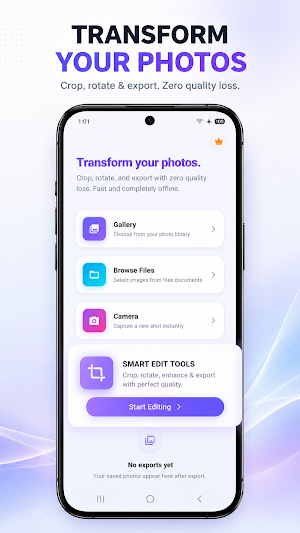
Import photos instantly from your device's Camera, Photo Gallery, or Files. Edit, crop, preview, and export in a single screen. Ideal for quick, daily edits.
📐 **Aspect Ratio Presets for Social Media**
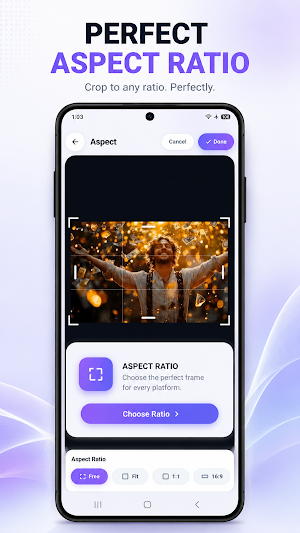
Quickly resize photos to fit perfectly on any platform with our pre-set cropping ratios:
• 1:1 (Square for Instagram Profile Pictures & Posts)
• 9:16 (For Instagram Stories, TikTok, and YouTube Shorts)
• 16:9 (For YouTube Thumbnails and Landscape displays)
• 4:5, 3:4, 2:3, and custom freeform cropping!
🔄 **Rotate, Flip & Straighten**
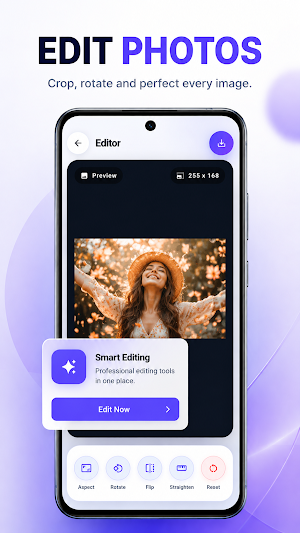
• Rotate photos 90, 180, or 270 degrees in one tap.
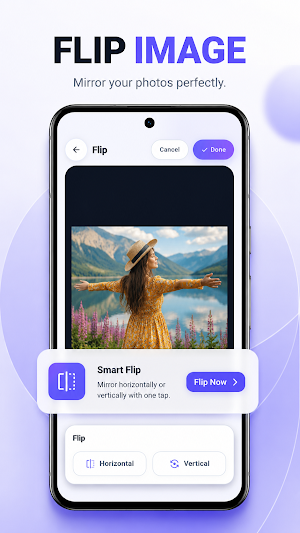
• Flip images horizontally or vertically.
• Use the precision straightening slider to correct crooked horizons and tilted pictures.
💾 **Flexible Saving & Export Options**
• Save directly to your phone's Photo Gallery.
• Download and export images to a custom, user-selected folder.
• Share edited images instantly via Instagram, WhatsApp, Facebook, email, or system share sheets.
• High-resolution exports ensure you never lose image quality!
🔌 **100% Offline and Private**
CropFlow operates entirely on your device. We do not upload your images to external servers. Edit your photos anytime, anywhere, without an active internet connection.
🚀 **Ad-Supported but Lightweight**
With an ultra-small download size, CropFlow saves space on your device. We use clean, non-intrusive placements so you can crop photos smoothly without disruptive flow.
---
### Key Features at a Glance:
• Simple, modern, and beautiful user interface.
• Instant image cropping (Freeform or Aspect Ratios).
• Interactive crop canvas with smooth zoom and pan controls.
• Horizon straightening and fine angle adjustments.
• Undo and Redo options to easily fix mistakes.
• Fast processing engine using local image libraries.
• View your recent exports directly from the home screen.
• Zero watermarks on your final photos.
---
### How to use CropFlow:
1. Tap "Import Image" and select a photo from your gallery, camera, or files.
2. Select your desired aspect ratio (like 1:1, 16:9) or crop freeform.
3. Use the slider to straighten, rotate, or flip your image if needed.
4. Preview the cropped image in the export screen.
5. Tap "Save to Gallery", "Download", or "Share" to export your high-quality photo!
CropFlow is the ultimate image cropper and photo resizing tool for your everyday mobile utility needs. Clean, secure, and incredibly fast.
Download CropFlow today and make cropping images simple and easy!
Meet **CropFlow**—the ultimate lightweight photo cropping tool designed for speed, precision, and ease of use. Whether you want to crop images for social media, rotate photos, straighten tilted angles, or change aspect ratios, CropFlow helps you do it in seconds.
No complex tools, no annoying watermarks, and no mandatory account sign-ups. Just open the app, edit your image, and save!
---
### Why Choose CropFlow?
📸 **Fast Single-Image Workflow**
Import photos instantly from your device's Camera, Photo Gallery, or Files. Edit, crop, preview, and export in a single screen. Ideal for quick, daily edits.
📐 **Aspect Ratio Presets for Social Media**
Quickly resize photos to fit perfectly on any platform with our pre-set cropping ratios:
• 1:1 (Square for Instagram Profile Pictures & Posts)
• 9:16 (For Instagram Stories, TikTok, and YouTube Shorts)
• 16:9 (For YouTube Thumbnails and Landscape displays)
• 4:5, 3:4, 2:3, and custom freeform cropping!
🔄 **Rotate, Flip & Straighten**
• Rotate photos 90, 180, or 270 degrees in one tap.
• Flip images horizontally or vertically.
• Use the precision straightening slider to correct crooked horizons and tilted pictures.
💾 **Flexible Saving & Export Options**
• Save directly to your phone's Photo Gallery.
• Download and export images to a custom, user-selected folder.
• Share edited images instantly via Instagram, WhatsApp, Facebook, email, or system share sheets.
• High-resolution exports ensure you never lose image quality!
🔌 **100% Offline and Private**
CropFlow operates entirely on your device. We do not upload your images to external servers. Edit your photos anytime, anywhere, without an active internet connection.
🚀 **Ad-Supported but Lightweight**
With an ultra-small download size, CropFlow saves space on your device. We use clean, non-intrusive placements so you can crop photos smoothly without disruptive flow.
---
### Key Features at a Glance:
• Simple, modern, and beautiful user interface.
• Instant image cropping (Freeform or Aspect Ratios).
• Interactive crop canvas with smooth zoom and pan controls.
• Horizon straightening and fine angle adjustments.
• Undo and Redo options to easily fix mistakes.
• Fast processing engine using local image libraries.
• View your recent exports directly from the home screen.
• Zero watermarks on your final photos.
---
### How to use CropFlow:
1. Tap "Import Image" and select a photo from your gallery, camera, or files.
2. Select your desired aspect ratio (like 1:1, 16:9) or crop freeform.
3. Use the slider to straighten, rotate, or flip your image if needed.
4. Preview the cropped image in the export screen.
5. Tap "Save to Gallery", "Download", or "Share" to export your high-quality photo!
CropFlow is the ultimate image cropper and photo resizing tool for your everyday mobile utility needs. Clean, secure, and incredibly fast.
Download CropFlow today and make cropping images simple and easy!
What’s new
Version 1.3.1 · Updated October 8, 2026
🛠️ Performance & Stability Update: • Fixed an issue where saving photos to the gallery could cause an unexpected crash when storage permissions were disabled. • Added seamless permission alerts with direct access to Settings so you never lose your edits. • Optimized image saving and export reliability for a smoother editing experience. • General bug fixes and background stability improvements.
Alternatives to CropFlow: Photo Crop & Resize
Looking for apps like CropFlow: Photo Crop & Resize? Here are 5 similar Android apps on Google Play. All of them are free to download.
-
Photo EXIF Remover: MetaClean
-
GIF Maker: Video to GIF Editor
-
HEIC to JPG Converter Pro
-
BG Remover AI: Offline Cutout
-
Photo Compressor, Resizer: KB
| App | Rating | Price | Installs | Last updated | Compare |
|---|---|---|---|---|---|
| CropFlow: Photo Crop & Resize | – | Free | 100+ | Oct 8, 2026 | |
| Photo EXIF Remover: MetaClean | – | Free | 10+ | Oct 8, 2026 | Compare |
| GIF Maker: Video to GIF Editor | – | Free | 500+ | Sep 21, 2026 | Compare |
| HEIC to JPG Converter Pro | – | Free | 50+ | – | Compare |
| BG Remover AI: Offline Cutout | – | Free | 100+ | Oct 7, 2026 | Compare |
| Photo Compressor, Resizer: KB | – | Free | 1,000+ | Oct 23, 2026 | Compare |