
Passport Photo Maker – IDReady
Photography In-app purchases Contains ads
Create compliant passport & visa photos at home—auto crop & clean.
- Downloads
- 1.6K+
- on Google Play
- Price
- Free
- In-app purchases
- Updated
- Aug 20
- 2026 · v5.0.1
Screenshots
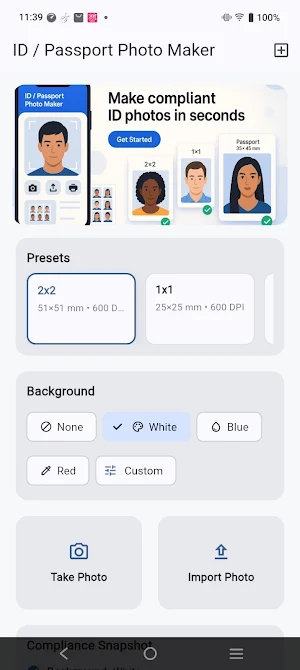
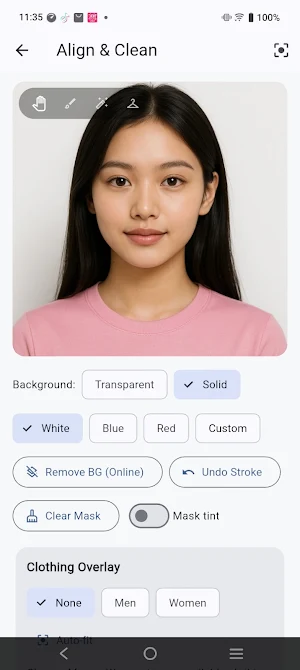
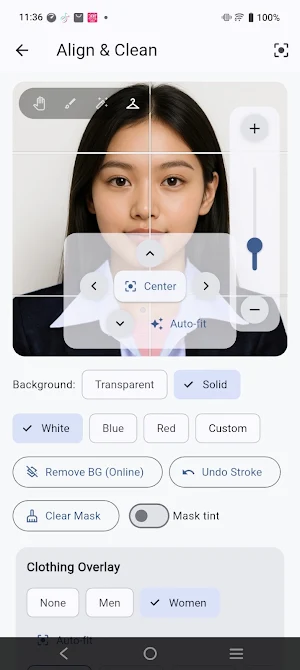


About Passport Photo Maker – IDReady
Make official-looking passport, visa, and ID photos on your phone in minutes.
IDReady gives you smart background removal, alignment guides, clothing overlays, and exact-DPI export—so you can create photos that match common size requirements at home.
Why IDReady?
Correct sizes & templates – Popular formats like 2×2 in and 35×45 mm (plus many more country presets).
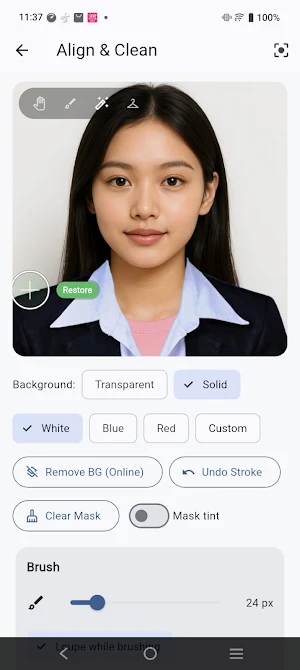
Smart background remover – Clean, even backgrounds in one tap.
Alignment guides – Center and scale the face to typical biometric guidelines.
Clothing overlays – Add formal attire (men & women) when you don’t have it handy.
Precise tools – Pan/zoom, erase/restore brush with loupe, and snap-to guides.
Photo fixes – Exposure, brightness, contrast, saturation, shadows, sharpening, and gentle beautify.
Exact-DPI export – Save high-resolution images at the right inches/mm and DPI for printing or online submission.
Background color options – Transparent, white, blue, red and more.
Perfect for
Passport & visa applications, driver’s licenses, student/employee IDs, job portals, travel documents, and forms that need a compliant headshot.
How it works
Import a photo (or take one).
Remove/clean the background and align with the on-screen guides.
Optionally add a clothing overlay and fine-tune lighting.
Export at exact size & DPI ready for printing or upload.
Notes & disclaimer
• Requirements vary by country/authority. Always check the latest official photo rules before submitting.
• This app is not affiliated with any government or passport agency.
• Background removal uses an online service; other tools work offline.
• Free to use and supported by ads; optional rewarded ads may be offered.
If you need fast, clear, compliant photos without studio trips, Passport Photo Maker – IDReady is your best companion. Download now and get ID-ready in minutes!
IDReady gives you smart background removal, alignment guides, clothing overlays, and exact-DPI export—so you can create photos that match common size requirements at home.
Why IDReady?
Correct sizes & templates – Popular formats like 2×2 in and 35×45 mm (plus many more country presets).
Smart background remover – Clean, even backgrounds in one tap.
Alignment guides – Center and scale the face to typical biometric guidelines.
Clothing overlays – Add formal attire (men & women) when you don’t have it handy.
Precise tools – Pan/zoom, erase/restore brush with loupe, and snap-to guides.
Photo fixes – Exposure, brightness, contrast, saturation, shadows, sharpening, and gentle beautify.
Exact-DPI export – Save high-resolution images at the right inches/mm and DPI for printing or online submission.
Background color options – Transparent, white, blue, red and more.
Perfect for
Passport & visa applications, driver’s licenses, student/employee IDs, job portals, travel documents, and forms that need a compliant headshot.
How it works
Import a photo (or take one).
Remove/clean the background and align with the on-screen guides.
Optionally add a clothing overlay and fine-tune lighting.
Export at exact size & DPI ready for printing or upload.
Notes & disclaimer
• Requirements vary by country/authority. Always check the latest official photo rules before submitting.
• This app is not affiliated with any government or passport agency.
• Background removal uses an online service; other tools work offline.
• Free to use and supported by ads; optional rewarded ads may be offered.
If you need fast, clear, compliant photos without studio trips, Passport Photo Maker – IDReady is your best companion. Download now and get ID-ready in minutes!
User reviews

Great app

Just recently dis my passport photo here it was amazing!

This app is helpful and easy to use with different photo size options.

This app is amazing it is very helpful for those who want to make a passport ID picture or any valid ID picture because here you just put your picture, and it will automatically adjust to the size of the photo , etc. I recommend this app to everyone download it. this app is very useful.

It's a very useful app especially for those who need to edit their pictures with no hassle. Nice app to try!

Very easy to use and affordable. The app has ready templates for many countries and makes passport/ID photos quick to create. Background editing works well, though sometimes it needs a little adjustment. Overall, a convenient and reliable tool especially if you have a printing business.
Alternatives to Passport Photo Maker – IDReady
Looking for apps like Passport Photo Maker – IDReady? Here are 6 similar Android apps on Google Play. All of them are free to download.






| App | Rating | Price | Installs | Last updated | Compare |
|---|---|---|---|---|---|
| Passport Photo Maker – IDReady | – | Free | 1,000+ | Aug 20, 2026 | |
| MoneyBloom: Expense & Budget | – | Free | 5+ | Mar 20, 2026 | Compare |
| Scoreva | – | Free | 500+ | Aug 5, 2026 | Compare |
| SkyPulse Weather | – | Free | 500+ | Aug 21, 2026 | Compare |
| HeartNest | – | Free | 100+ | Dec 1, 2025 | Compare |
| How to Be Successful | – | Free | 100+ | Jul 23, 2025 | Compare |
| Journey 2 You | – | Free | 10+ | Oct 27, 2018 | Compare |