

BubbleCast: Cast to TV & DLNA
Remux Labs Video Players & Editors In-app purchases
Cast local video to TV with subtitles that actually work. Chromecast & DLNA.
- Downloads
- 98+
- on Google Play
- Price
- Free
- In-app purchases
- Updated
- Oct 16
- 2026 · v1.2.5
Screenshots



About BubbleCast: Cast to TV & DLNA
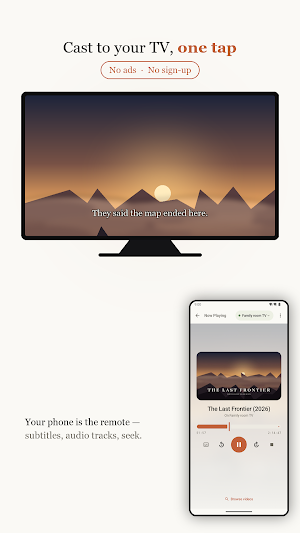
Cast to TV from your phone, with subtitles that actually show up. BubbleCast casts your local videos and photos to Chromecast and to DLNA smart TVs from Samsung, LG, Sony, Philips and more. Subtitle casting is the one thing most setups quietly drop; BubbleCast was built to get it right.
Demanding files (MKV, HEVC/x265, DTS audio, embedded subtitles) just play.
Subtitles, done properly
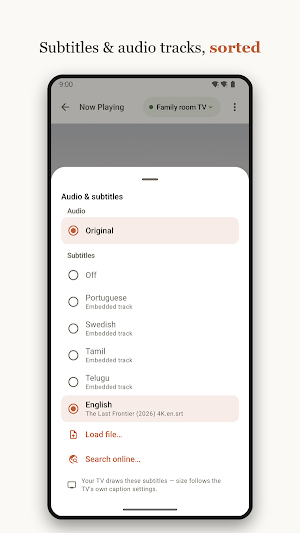
• Reads subtitle tracks embedded inside MKV files and shows them on the TV.
• External SRT, VTT and ASS files supported, with a size slider and live preview.
• Blu-ray (PGS) and DVD image subtitles are blended into the picture.
• Optional OpenSubtitles search when a video has no subtitle track of its own.
Plays the formats your TV can't
• HEVC, x265 and HDR videos are converted on the phone in real time and start playing in seconds. HDR is tone-mapped. No PC or media server needed.
• Movies with DTS or TrueHD sound are detected and the audio converted, so a film never plays silent.
• Multi-language files show an audio-track selector (language, codec, channels). Switch tracks while playing.
• DLNA smart TVs receive the original file and decode it natively — 4K, HEVC and HDR stay untouched.
• Automatic recovery: rejected files, silent failures and stuck buffering fall back to a working path by themselves.
Casts to the screens you already own
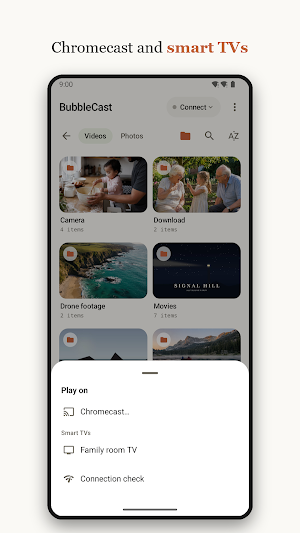
• Chromecast and Google TV, including Chromecast built-in TVs.
• DLNA and UPnP smart TVs: Samsung, LG, Sony, Philips, Panasonic, Hisense, Xiaomi.
• Cast video to TV over Wi-Fi — no cable, no PC and no media server in the middle.
• Devices are found automatically on your Wi-Fi; pick one and cast.
Cast photos to TV
• Cast any photo from your phone full-screen to the television.
• Browse your whole gallery inside the app — tap a photo to display it.
• Photos stream straight to the TV; nothing is converted and nothing leaves your network.
Comfortable to live with
• Resume where you left off, and auto-play the next video or episode.
• Seek on converted streams, with 10 and 30 second skips.
• Movie and show details fetched automatically, with posters in your library.
• A built-in connection check explains network problems in plain language.
Private by design
Your videos and photos never leave your home network — the streaming server runs inside BubbleCast itself. No account, no sign-up, no tracking, no analytics, no cloud.
Pricing
Videos that need real-time conversion play at full quality for 30 minutes per session. One single purchase unlocks unlimited conversion. No subscription, ever.
Good to know
BubbleCast casts your own local files; it does not cast websites or streaming services. Fire TV and Roku have no open casting support built in, so they are not reached out of the box, though a Fire TV running a DLNA-capable app such as Kodi will appear as a smart TV target. Requires Android 10+ and a Chromecast or DLNA receiver on the same Wi-Fi network.
Demanding files (MKV, HEVC/x265, DTS audio, embedded subtitles) just play.
Subtitles, done properly
• Reads subtitle tracks embedded inside MKV files and shows them on the TV.
• External SRT, VTT and ASS files supported, with a size slider and live preview.
• Blu-ray (PGS) and DVD image subtitles are blended into the picture.
• Optional OpenSubtitles search when a video has no subtitle track of its own.
Plays the formats your TV can't
• HEVC, x265 and HDR videos are converted on the phone in real time and start playing in seconds. HDR is tone-mapped. No PC or media server needed.
• Movies with DTS or TrueHD sound are detected and the audio converted, so a film never plays silent.
• Multi-language files show an audio-track selector (language, codec, channels). Switch tracks while playing.
• DLNA smart TVs receive the original file and decode it natively — 4K, HEVC and HDR stay untouched.
• Automatic recovery: rejected files, silent failures and stuck buffering fall back to a working path by themselves.
Casts to the screens you already own
• Chromecast and Google TV, including Chromecast built-in TVs.
• DLNA and UPnP smart TVs: Samsung, LG, Sony, Philips, Panasonic, Hisense, Xiaomi.
• Cast video to TV over Wi-Fi — no cable, no PC and no media server in the middle.
• Devices are found automatically on your Wi-Fi; pick one and cast.
Cast photos to TV
• Cast any photo from your phone full-screen to the television.
• Browse your whole gallery inside the app — tap a photo to display it.
• Photos stream straight to the TV; nothing is converted and nothing leaves your network.
Comfortable to live with
• Resume where you left off, and auto-play the next video or episode.
• Seek on converted streams, with 10 and 30 second skips.
• Movie and show details fetched automatically, with posters in your library.
• A built-in connection check explains network problems in plain language.
Private by design
Your videos and photos never leave your home network — the streaming server runs inside BubbleCast itself. No account, no sign-up, no tracking, no analytics, no cloud.
Pricing
Videos that need real-time conversion play at full quality for 30 minutes per session. One single purchase unlocks unlimited conversion. No subscription, ever.
Good to know
BubbleCast casts your own local files; it does not cast websites or streaming services. Fire TV and Roku have no open casting support built in, so they are not reached out of the box, though a Fire TV running a DLNA-capable app such as Kodi will appear as a smart TV target. Requires Android 10+ and a Chromecast or DLNA receiver on the same Wi-Fi network.
Alternatives to BubbleCast: Cast to TV & DLNA
Looking for apps like BubbleCast: Cast to TV & DLNA? Here are 6 similar Android apps on Google Play. The highest rated is ScreenStream (4.4/5), and all 6 are free to download.
-
Remote Mouse 4.2
-
ScreenStream 4.4
-
Universal Remote for Smart TV 2.7
-
IZZY TV 4.2
-
Android System WebView Canary 4.0
-
NOVA Video Player 4.1
| App | Rating | Price | Installs | Last updated | Compare |
|---|---|---|---|---|---|
| BubbleCast: Cast to TV & DLNA | – | Free | 50+ | Oct 16, 2026 | |
| Remote Mouse | 4.2 / 5 | Free | 10,000,000+ | Oct 31, 2026 | Compare |
| ScreenStream | 4.4 / 5 | Free | 5,000,000+ | Jul 13, 2026 | Compare |
| Universal Remote for Smart TV | 2.7 / 5 | Free | 1,000,000+ | Aug 10, 2026 | Compare |
| IZZY TV | 4.2 / 5 | Free | 100,000+ | Sep 8, 2026 | Compare |
| Android System WebView Canary | 4.0 / 5 | Free | 1,000,000+ | Oct 30, 2026 | Compare |
| NOVA Video Player | 4.1 / 5 | Free | 1,000,000+ | Sep 24, 2026 | Compare |
Similar apps on Google Play
- Remote Mouse
- ScreenStream
- Universal Remote for Smart TV
- IZZY TV
- Android System WebView Canary
- NOVA Video Player
- Kodi
- iLink
- Samsung TV Plus - TV & Movies
- USB Audio Player PRO
- Savant
- VIDAA Smart TV
- Roku Smart Home
- CloudEdge
- The Criterion Channel
- Smart Connect
- Castro Premium - system info
- Elgato Stream Deck Mobile
- Plume Home
- Loom – Screen and Cam Recorder
- Home V
- Yubii Home
- Video Converter Pro
- TiviMate IPTV Player
- ZUMIMALL
- Nest
- ecobee
- GranPlayer
- Skit Premium - apps manager
- IFSTA Instructor 9
- Nixplay App
- Pavlok
- LG ThinQ
- Aqara Home
- Home Assistant
- AirMirror: Remote control