

AirTouch: Gesture Control
Productivity In-app purchases Contains ads
Control your phone without touching the screen using hand gestures and camera.
- Rating
- 2.2
- 458 ratings
- Downloads
- 517K+
- on Google Play
- Price
- Free
- In-app purchases
- Updated
- Oct 11
- 2026 · v1.3.3
Screenshots


About AirTouch: Gesture Control
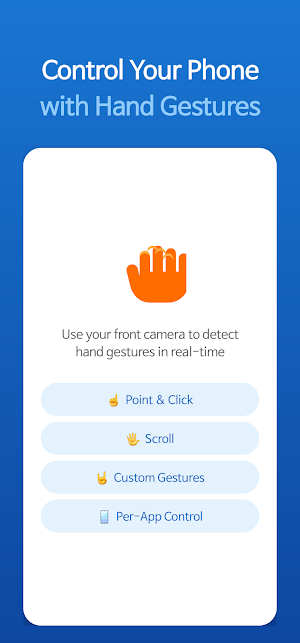
AirTouch: Touchless Control lets you control your Android device entirely with hand gestures — no screen contact needed. Using your front camera and advanced hand tracking technology, AirTouch detects your hand movements in real-time and translates them into actions.
▶ HOW IT WORKS
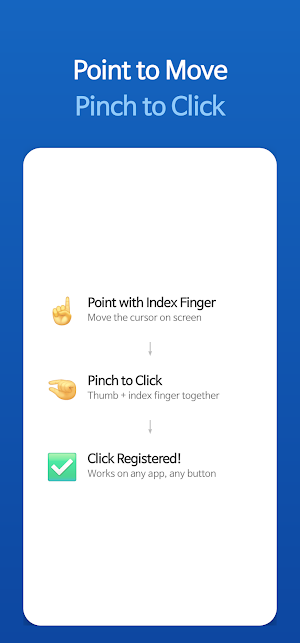
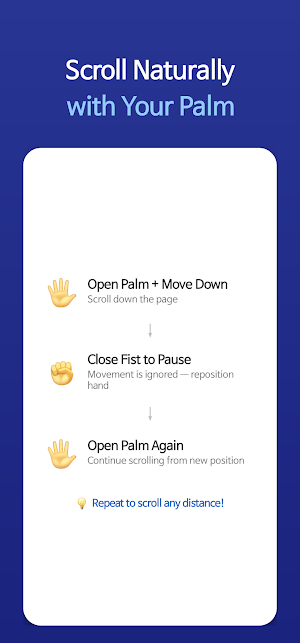
Point your index finger to move a cursor on screen. Pinch your fingers together to click. Swipe your hand to scroll. Hold a pose and move your hand to trigger custom actions. It's that simple.
▶ KEY FEATURES
• Pointer Control
Point your index finger to display a cursor on screen. Pinch to click, just like tapping. Adjust pointer speed, color, and calibration to your preference.
• Gesture Actions
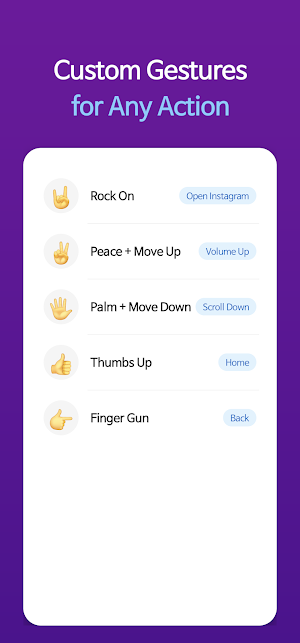
Assign actions to hand poses like Peace, Palm, Three Fingers, and more. Combine a pose with directional movement to trigger scrolling, navigation, media control, and other system actions.
• Static Pose Detection
Hold a pose such as Rock On, Finger Gun, or Pinky Up for a moment to trigger an assigned action — no movement required.
• App-Specific Gestures
Customize gesture behaviors for individual apps. Set different actions for YouTube, Netflix, browsers, and any other app on your device.
• Fully Customizable
Choose from over 25 available actions including scroll, back, home, recent apps, play/pause, volume control, screenshot, lock screen, and app launching. Map any gesture to any action.
• System Integration
AirTouch works as an accessibility service, enabling it to perform taps, scrolls, and system-level actions across all apps.
▶ AVAILABLE ACTIONS
Navigation: Scroll Up/Down/Left/Right
System: Back, Home, Recent Apps, Notifications, Quick Settings, Screenshot, Lock Screen
Media: Play/Pause, Next/Previous Track, Stop
Volume: Up, Down, Mute
App: Launch any installed app
▶ SETTINGS & CALIBRATION
• Adjustable pointer sensitivity and click threshold
• Horizontal and vertical calibration
• Multiple pointer colors
• Performance modes (High Performance / Balanced / Power Saver)
• Haptic feedback toggle
• Debug overlay for developers
▶ PERMISSIONS
AirTouch requires the following permissions to function:
- Camera: For hand gesture recognition via front camera
- Accessibility Service: To perform taps, scrolls, and system actions
- Display Over Apps: To show the pointer overlay
- Usage Access: To detect the current app for app-specific gestures
▶ NOTES
• Works best in well-lit environments
• Uses the front-facing camera
• Battery usage varies by performance mode
• All processing is done on-device — no data is sent to external servers
Control your phone from a distance. Cook, exercise, or present while keeping full control of your device — all without touching the screen.
Discord: https://discord.gg/YNeFhHPV4A
▶ HOW IT WORKS
Point your index finger to move a cursor on screen. Pinch your fingers together to click. Swipe your hand to scroll. Hold a pose and move your hand to trigger custom actions. It's that simple.
▶ KEY FEATURES
• Pointer Control
Point your index finger to display a cursor on screen. Pinch to click, just like tapping. Adjust pointer speed, color, and calibration to your preference.
• Gesture Actions
Assign actions to hand poses like Peace, Palm, Three Fingers, and more. Combine a pose with directional movement to trigger scrolling, navigation, media control, and other system actions.
• Static Pose Detection
Hold a pose such as Rock On, Finger Gun, or Pinky Up for a moment to trigger an assigned action — no movement required.
• App-Specific Gestures
Customize gesture behaviors for individual apps. Set different actions for YouTube, Netflix, browsers, and any other app on your device.
• Fully Customizable
Choose from over 25 available actions including scroll, back, home, recent apps, play/pause, volume control, screenshot, lock screen, and app launching. Map any gesture to any action.
• System Integration
AirTouch works as an accessibility service, enabling it to perform taps, scrolls, and system-level actions across all apps.
▶ AVAILABLE ACTIONS
Navigation: Scroll Up/Down/Left/Right
System: Back, Home, Recent Apps, Notifications, Quick Settings, Screenshot, Lock Screen
Media: Play/Pause, Next/Previous Track, Stop
Volume: Up, Down, Mute
App: Launch any installed app
▶ SETTINGS & CALIBRATION
• Adjustable pointer sensitivity and click threshold
• Horizontal and vertical calibration
• Multiple pointer colors
• Performance modes (High Performance / Balanced / Power Saver)
• Haptic feedback toggle
• Debug overlay for developers
▶ PERMISSIONS
AirTouch requires the following permissions to function:
- Camera: For hand gesture recognition via front camera
- Accessibility Service: To perform taps, scrolls, and system actions
- Display Over Apps: To show the pointer overlay
- Usage Access: To detect the current app for app-specific gestures
▶ NOTES
• Works best in well-lit environments
• Uses the front-facing camera
• Battery usage varies by performance mode
• All processing is done on-device — no data is sent to external servers
Control your phone from a distance. Cook, exercise, or present while keeping full control of your device — all without touching the screen.
Discord: https://discord.gg/YNeFhHPV4A
What’s new
Version 1.3.3 · Updated October 11, 2026
Added Dutch and Ukrainian and expanded translations across supported languages. Added per-app language selection in Android 13+ settings. Improved right-to-left text, plural forms, and layouts for longer text and larger fonts.
User reviews

is it good
Alternatives to AirTouch: Gesture Control
Looking for apps like AirTouch: Gesture Control? Here are 4 similar Android apps on Google Play. All of them are free to download.



| App | Rating | Price | Installs | Last updated | Compare |
|---|---|---|---|---|---|
| AirTouch: Gesture Control | 2.2 / 5 | Free | 500,000+ | Oct 11, 2026 | |
| Roomdoku: Sudoku Whodunit | – | Free | 10,000+ | Oct 6, 2026 | Compare |
| BabyGuard - Pregnancy Guide | – | Free | 10+ | May 19, 2026 | Compare |
| TypoPet - Screen Pet Friends | – | Free | 10,000+ | Oct 18, 2026 | Compare |
| AI 20 Questions | – | Free | 500+ | Jan 16, 2026 | Compare |