
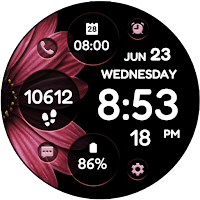
Daisy Bloom 2
Personalization
Stylish Digital Watch Face
- Downloads
- 427+
- on Google Play
- Price
- $1.49
- No in-app purchases
- Updated
- Oct 2
- 2022
Screenshots
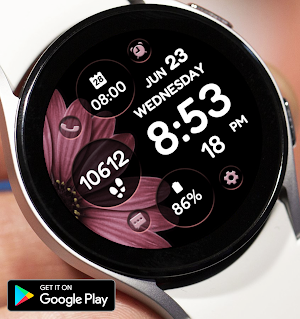
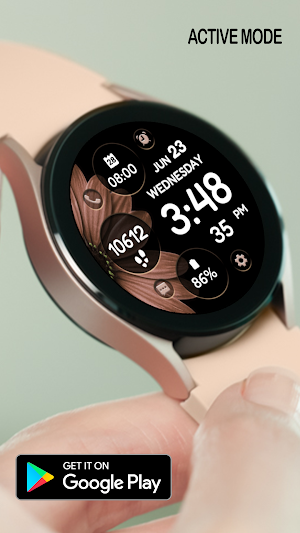


About Daisy Bloom 2
Flower Themed Watch Face for WEAR OS
INSTALLATION NOTES!
* Make sure the watch is properly connected to the phone. Wait for a few minutes for the watch face to be transferred on watch, open the Playstore app on your watch and search for the watch face then install.
* If you are having synchronization problems between your phone and Play Store, install the app directly from watch: search "DaisyBloomComplex" from Play Store ON WATCH and hit on install button.
* For device incompatibility / "This app is not available for your device", use Play Store on a WEB browser (CHROME) from PC or Laptop instead of using the Playstore app on phone.
Copy and paste the watch face link on a WEB browser (CHROME) and install.
* Enable all permissions from settings -> applications -> permissions.
* This watch face was developed with Samsung's "Watch Face Studio" tool for devices based on the new Wear OS Google / One UI Samsung operating system like Samsung Galaxy Watch 4.
Features:
-12/24hr digital time (auto-sync, based on phone settings)
-Date (Multi-language)
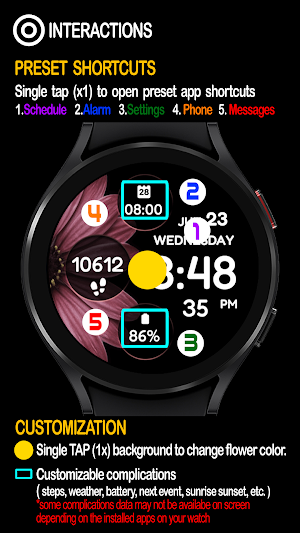
-5 Preset App Shortcuts (Single tap to open)
Settings, Alarm, Calendar Messages & Phone
-2 customizable shortcuts (changeable)
Different complications to choose from; weather, steps, time zone, unread notification sound, sunset/sunrise, barometer, next appointment and more.
(Touch and hold display. Tap on customize option and change preferred display)
***Some complications data may not appear immediately on screen. The display depends on the installed apps on your watch.
-Always-On (AOD)
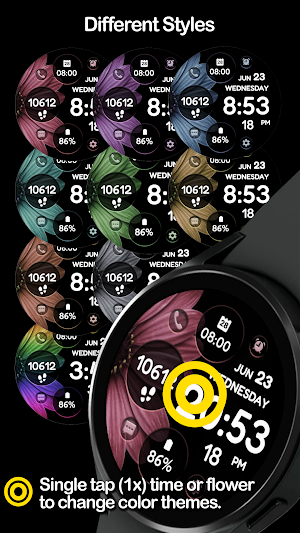
-Changeable LCD - Single tap (1x) to change flower colors
*some features may not be available on some watches.
Full Collection: https://play.google.com/store/apps/developer?id=Bloomfield+Watchfaces
Contact us at: [email protected]
Facebook Page: https://www.facebook.com/bloomfieldwatchfaces
Galaxy Store: https://galaxy.store/ALwatches
INSTALLATION NOTES!
* Make sure the watch is properly connected to the phone. Wait for a few minutes for the watch face to be transferred on watch, open the Playstore app on your watch and search for the watch face then install.
* If you are having synchronization problems between your phone and Play Store, install the app directly from watch: search "DaisyBloomComplex" from Play Store ON WATCH and hit on install button.
* For device incompatibility / "This app is not available for your device", use Play Store on a WEB browser (CHROME) from PC or Laptop instead of using the Playstore app on phone.
Copy and paste the watch face link on a WEB browser (CHROME) and install.
* Enable all permissions from settings -> applications -> permissions.
* This watch face was developed with Samsung's "Watch Face Studio" tool for devices based on the new Wear OS Google / One UI Samsung operating system like Samsung Galaxy Watch 4.
Features:
-12/24hr digital time (auto-sync, based on phone settings)
-Date (Multi-language)
-5 Preset App Shortcuts (Single tap to open)
Settings, Alarm, Calendar Messages & Phone
-2 customizable shortcuts (changeable)
Different complications to choose from; weather, steps, time zone, unread notification sound, sunset/sunrise, barometer, next appointment and more.
(Touch and hold display. Tap on customize option and change preferred display)
***Some complications data may not appear immediately on screen. The display depends on the installed apps on your watch.
-Always-On (AOD)
-Changeable LCD - Single tap (1x) to change flower colors
*some features may not be available on some watches.
Full Collection: https://play.google.com/store/apps/developer?id=Bloomfield+Watchfaces
Contact us at: [email protected]
Facebook Page: https://www.facebook.com/bloomfieldwatchfaces
Galaxy Store: https://galaxy.store/ALwatches
User reviews

Love it!!! Such pretty colors and so many short cuts makes this watch face feminine and informative. Thank you again.

It's pretty and everything works perfectly. It's one of my favorite watch faces!
Alternatives to Daisy Bloom 2
Looking for apps like Daisy Bloom 2? Here are 5 similar Android apps on Google Play. The highest rated is StrAIberry (5.0/5), and 4 of the 5 are free to download.




| App | Rating | Price | Installs | Last updated | Compare |
|---|---|---|---|---|---|
| Daisy Bloom 2 | – | $1.49 | 100+ | Oct 2, 2022 | |
| NXV84 Flora Elegant Watch Face | 3.2 / 5 | 1.49 USD | 10,000+ | Sep 20, 2025 | Compare |
| Aroma Flowers UAE | – | Free | 100,000+ | Sep 20, 2026 | Compare |
| Studio Bloom | 4.7 / 5 | Free | 50,000+ | Sep 9, 2026 | Compare |
| QVC Petshop | – | Free | 100+ | – | Compare |
| StrAIberry | 5.0 / 5 | Free | 500+ | Feb 15, 2022 | Compare |
Compare Daisy Bloom 2 with the top alternatives: ratings, updates, ASO score and keyword gaps →