
Control Center OS 18
Personalization Contains ads
Fast, smart, and effortless control at your fingertips - everything in one swipe
- Rating
- 4.0
- 775 ratings
- Downloads
- 100K+
- on Google Play
- Price
- Free
- No in-app purchases
- Updated
- Sep 3
- 2025 · v2.3
Screenshots


About Control Center OS 18
Control Center OS 18 is the all-in-one solution, allowing you to quickly access essential settings with just a swipe! With its modern, intuitive design and flexible customization options, this app makes device control easier than ever!
🔥 Key Features of Control Center OS 18:
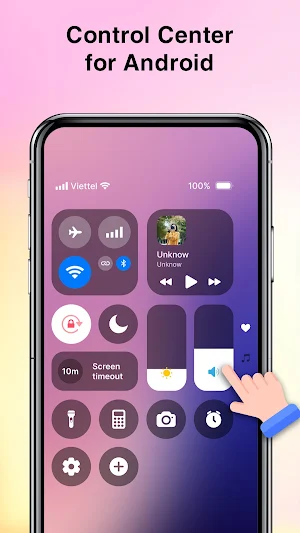
🎚 Sound & Brightness Control: Adjust screen brightness and volume with a simple slider. Optimize brightness for any environment, from outdoor daylight to dim indoor lighting.
📶 Wi-Fi & Mobile Data Control: Turn Wi-Fi on/off instantly without opening settings. Quickly check available networks and connect with just one tap. Enable/disable mobile data in a second.
🔵 Bluetooth Control: Quickly connect to headphones, speakers, smartwatches, and other Bluetooth devices. Easily turn Bluetooth on/off when not in use to save battery.
🔕 Do Not Disturb Mode: Block notifications and calls when you need to focus on work or rest peacefully. Set up automatic schedules to activate Do Not Disturb at specific times.
💡 Flashlight Control: Turn the flashlight on/off instantly when you need extra light. Adjust flashlight brightness, making it useful for different situations.
🔄 Screen Rotation Lock: Lock screen orientation to prevent unwanted rotation. Enjoy a stable and comfortable viewing experience.
✈️ Airplane Mode: Quickly disable all wireless connections when boarding a flight or needing complete focus.
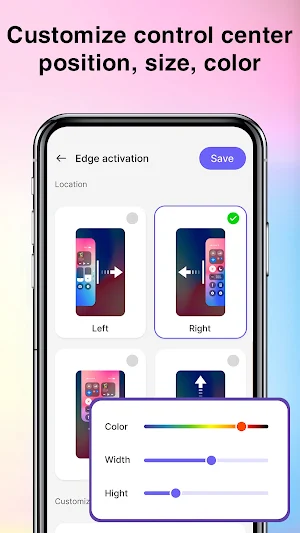
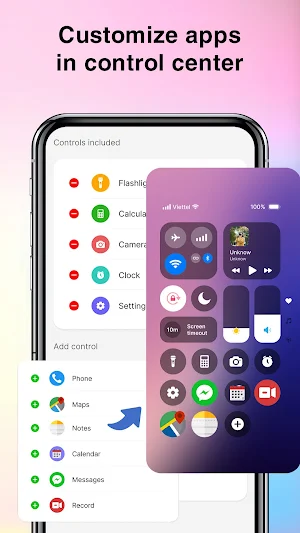
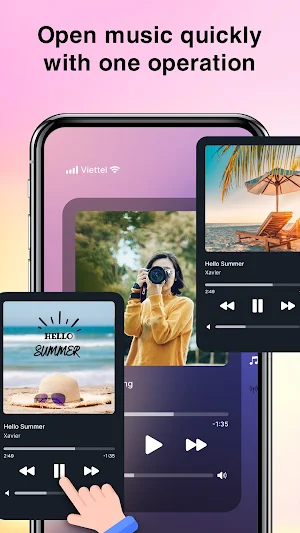
🎨 Customize Your Control Center: Modify colors, position, and size of the control panel to match your preferences. Add favorite apps for faster access—whether it’s messaging, music, or productivity tools.
🎯 Why Choose Control Center OS 18?
🔹 Faster & More Convenient – No need to navigate through settings; turn essential functions on/off instantly.
🔹 User-Friendly Interface – A clean, intuitive design ensures smooth and professional operation.
🔹 Highly Customizable – Modify colors, size, position, and add favorite apps to the control panel.
🔹 Time-Saving – With just one tap, you can access the settings you need.
🌈 Smooth & Effortless Navigation
With Control Center OS 18, simply swipe from the edge of the screen to open the control panel. Every action is fluid and fast, enhancing your overall smartphone experience!
- ACCESSIBILITY PERMISSION: To enable Control Center, please allow Accessibility services. The service is only used to allow this app to draw on the phone's home screen and status bar. We commits not to collect or share any user information about this accessibility right.
Watch video to setting permission: https://youtube.com/shorts/K_9gjiA-2CA
🔥 Key Features of Control Center OS 18:
🎚 Sound & Brightness Control: Adjust screen brightness and volume with a simple slider. Optimize brightness for any environment, from outdoor daylight to dim indoor lighting.
📶 Wi-Fi & Mobile Data Control: Turn Wi-Fi on/off instantly without opening settings. Quickly check available networks and connect with just one tap. Enable/disable mobile data in a second.
🔵 Bluetooth Control: Quickly connect to headphones, speakers, smartwatches, and other Bluetooth devices. Easily turn Bluetooth on/off when not in use to save battery.
🔕 Do Not Disturb Mode: Block notifications and calls when you need to focus on work or rest peacefully. Set up automatic schedules to activate Do Not Disturb at specific times.
💡 Flashlight Control: Turn the flashlight on/off instantly when you need extra light. Adjust flashlight brightness, making it useful for different situations.
🔄 Screen Rotation Lock: Lock screen orientation to prevent unwanted rotation. Enjoy a stable and comfortable viewing experience.
✈️ Airplane Mode: Quickly disable all wireless connections when boarding a flight or needing complete focus.
🎨 Customize Your Control Center: Modify colors, position, and size of the control panel to match your preferences. Add favorite apps for faster access—whether it’s messaging, music, or productivity tools.
🎯 Why Choose Control Center OS 18?
🔹 Faster & More Convenient – No need to navigate through settings; turn essential functions on/off instantly.
🔹 User-Friendly Interface – A clean, intuitive design ensures smooth and professional operation.
🔹 Highly Customizable – Modify colors, size, position, and add favorite apps to the control panel.
🔹 Time-Saving – With just one tap, you can access the settings you need.
🌈 Smooth & Effortless Navigation
With Control Center OS 18, simply swipe from the edge of the screen to open the control panel. Every action is fluid and fast, enhancing your overall smartphone experience!
- ACCESSIBILITY PERMISSION: To enable Control Center, please allow Accessibility services. The service is only used to allow this app to draw on the phone's home screen and status bar. We commits not to collect or share any user information about this accessibility right.
Watch video to setting permission: https://youtube.com/shorts/K_9gjiA-2CA
What’s new
Version 2.3 · Updated September 3, 2025
- Fix some bugs
User reviews

I like it

this actully pretty good but i want to put my own bacground for it i love it when its upstairs and not left right and down like the other apps but please let me put my own background but ill give it five stars its really good

good app

Good app
Alternatives to Control Center OS 18
Looking for apps like Control Center OS 18? Here are 6 similar Android apps on Google Play. The highest rated is Music Video Maker (4.5/5), and all 6 are free to download.
-
Pet On Screen - Desktop Pet 3.4
-
Find Phone by Clap, Whistle 4.2
-
Face Scanner - Face Analysis 3.9
-
Music Video Maker 4.5
-
Face Mashup: Funny Face Puzzle
-
Drawing Together - Couple Draw
| App | Rating | Price | Installs | Last updated | Compare |
|---|---|---|---|---|---|
| Control Center OS 18 | 4.0 / 5 | Free | 100,000+ | Sep 3, 2025 | |
| Pet On Screen - Desktop Pet | 3.4 / 5 | Free | 100,000+ | Sep 5, 2026 | Compare |
| Find Phone by Clap, Whistle | 4.2 / 5 | Free | 1,000,000+ | Aug 3, 2026 | Compare |
| Face Scanner - Face Analysis | 3.9 / 5 | Free | 50,000+ | Oct 28, 2025 | Compare |
| Music Video Maker | 4.5 / 5 | Free | 5,000,000+ | Oct 23, 2024 | Compare |
| Face Mashup: Funny Face Puzzle | – | Free | 1,000+ | Apr 11, 2025 | Compare |
| Drawing Together - Couple Draw | – | Free | 1,000+ | Dec 31, 2024 | Compare |