
QRWorks
Productivity
QRWorks — QR Code Scanner & Generator with a twist
- Downloads
- 68+
- on Google Play
- Price
- Free
- No in-app purchases
- Updated
- Aug 27
- 2026 · v1.4
Screenshots
About QRWorks
QRWorks — QR Code Scanner & Generator
The fastest, cleanest way to scan and create QR codes on Android. No ads, no accounts, no internet required.
── SCAN ──────────────────────────────
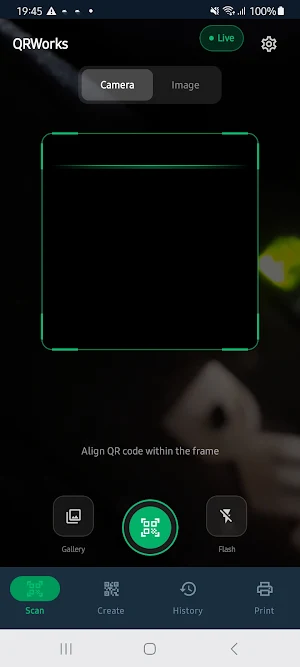
Point your camera at any QR code or barcode and QRWorks reads it instantly. The animated dark-theme viewfinder makes scanning comfortable indoors and outdoors.
- Live camera scanning with real-time ML detection
- Scan from an image in your gallery — no camera needed
- Supports QR codes, barcodes (EAN, UPC, Code 128, Code 39), Aztec, Data Matrix, PDF417
- Instant result actions: open links, dial numbers, connect to Wi-Fi, save contacts, open maps
- Copy, share, or save any result to history in one tap
- Flashlight toggle for low-light scanning
- Haptic feedback on successful scan
── CREATE ────────────────────────────
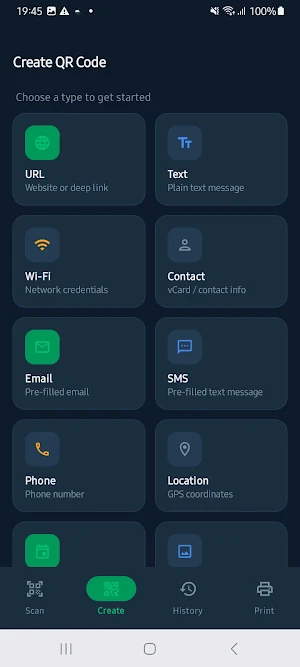
Generate professional QR codes for anything in seconds.
- URL / website links
- Plain text messages
- Wi-Fi network credentials (share your password with a scan)
- Contact cards (vCard)
- Email with pre-filled subject and body
- SMS with pre-filled message
- Phone numbers
- GPS coordinates / location
- Calendar events
Customise with 8 colour themes, then save directly to your Photos gallery (Pictures/QRWorks/) or share instantly.
── HISTORY ───────────────────────────
Everything you scan or create is saved locally on your device.
- Separate tabs for scanned, created, and favourite codes
- Full-text search across all history
- Star favourites for quick access
- Delete individual entries or clear all
── PRINT & EXPORT ────────────────────
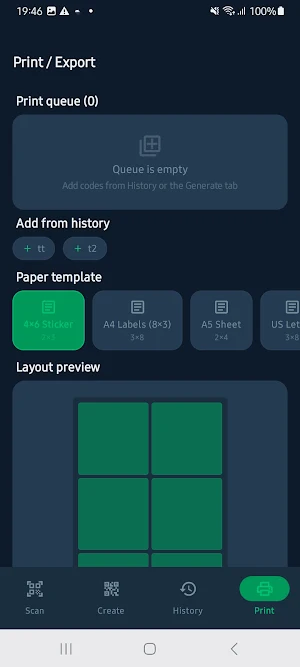
Turn your QR codes into printable sticker sheets.
- Multiple paper templates: A4, A5, 4×6 sticker, US Letter, single large
- Export as PDF and open in any PDF viewer or printer app
- Customisable label text below each code
- Live page preview before export
- Add codes to the print queue from History or directly after generating
── PRIVACY ───────────────────────────
QRWorks works entirely offline. No data leaves your device, no account required, no analytics, no ads.
- All history stored locally in an encrypted on-device database
- Camera is only used while the app is open
- Gallery saves go directly to your Photos — no cloud upload
Compatible with Android 7.0 and above
The fastest, cleanest way to scan and create QR codes on Android. No ads, no accounts, no internet required.
── SCAN ──────────────────────────────
Point your camera at any QR code or barcode and QRWorks reads it instantly. The animated dark-theme viewfinder makes scanning comfortable indoors and outdoors.
- Live camera scanning with real-time ML detection
- Scan from an image in your gallery — no camera needed
- Supports QR codes, barcodes (EAN, UPC, Code 128, Code 39), Aztec, Data Matrix, PDF417
- Instant result actions: open links, dial numbers, connect to Wi-Fi, save contacts, open maps
- Copy, share, or save any result to history in one tap
- Flashlight toggle for low-light scanning
- Haptic feedback on successful scan
── CREATE ────────────────────────────
Generate professional QR codes for anything in seconds.
- URL / website links
- Plain text messages
- Wi-Fi network credentials (share your password with a scan)
- Contact cards (vCard)
- Email with pre-filled subject and body
- SMS with pre-filled message
- Phone numbers
- GPS coordinates / location
- Calendar events
Customise with 8 colour themes, then save directly to your Photos gallery (Pictures/QRWorks/) or share instantly.
── HISTORY ───────────────────────────
Everything you scan or create is saved locally on your device.
- Separate tabs for scanned, created, and favourite codes
- Full-text search across all history
- Star favourites for quick access
- Delete individual entries or clear all
── PRINT & EXPORT ────────────────────
Turn your QR codes into printable sticker sheets.
- Multiple paper templates: A4, A5, 4×6 sticker, US Letter, single large
- Export as PDF and open in any PDF viewer or printer app
- Customisable label text below each code
- Live page preview before export
- Add codes to the print queue from History or directly after generating
── PRIVACY ───────────────────────────
QRWorks works entirely offline. No data leaves your device, no account required, no analytics, no ads.
- All history stored locally in an encrypted on-device database
- Camera is only used while the app is open
- Gallery saves go directly to your Photos — no cloud upload
Compatible with Android 7.0 and above
Alternatives to QRWorks
Looking for apps like QRWorks? Here are 6 similar Android apps on Google Play. All of them are free to download.
| App | Rating | Price | Installs | Last updated | Compare |
|---|---|---|---|---|---|
| QRWorks | – | Free | 50+ | Aug 27, 2026 | |
| BRIKORA | – | Free | 10+ | – | Compare |
| SafeViewer | – | Free | 10+ | – | Compare |
| MonDesk | – | Free | 10+ | – | Compare |
| DriveDesk | – | Free | 10+ | Oct 21, 2026 | Compare |
| HostDesk | – | Free | 10+ | – | Compare |
| MemoDesk | – | Free | 10+ | Oct 16, 2026 | Compare |
Compare QRWorks with the top alternatives: ratings, updates, ASO score and keyword gaps →