

Automatic Tap: Auto Clicker
Tools Contains ads
Auto click, tap, and swipe automatically for games and repeated screen tasks
- Downloads
- 1K+
- on Google Play
- Price
- Free
- No in-app purchases
- Updated
- Sep 26
- 2026 · v1.0.1
Screenshots


About Automatic Tap: Auto Clicker
Automatic Tap: Auto Clicker is a practical automation tool that helps you perform repeated screen actions with ease. It allows you to create automatic taps, multiple click points, and swipe gestures to reduce manual operations and save time when handling repetitive tasks.
Key Features:
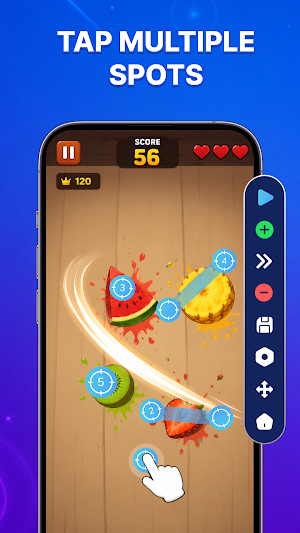
✨ Auto Tap and Multiple Click Points: Create single or multiple tap locations on your screen and run automatic clicks based on your needs. This is useful for repeated touches, gaming actions, and everyday tasks.
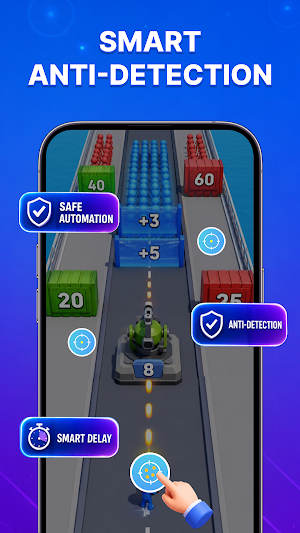
✨ Custom Tap Interval Settings: Control the speed between each tap and adjust the timing to fit different situations. Set up your automation process with more accurate control.
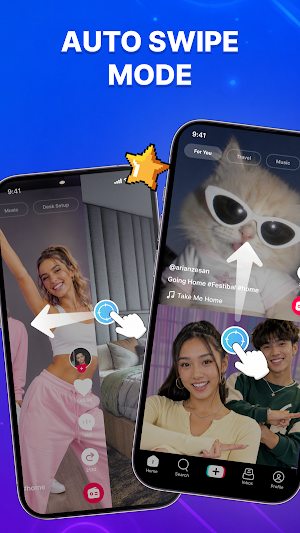
✨ Automatic Swipe Actions: Perform repeated swipe gestures with customizable points and directions. Handle complex screen movements without manually repeating the same actions.
✨ Easy Automation Setup: Add tap points quickly and manage your automation settings through a simple and clear interface. Start creating your own tap sequences without complicated steps.
Why Use Automatic Tap: Auto Clicker?
💡 Reduce repetitive screen interactions and manual tapping.
💡 Save time when performing repeated actions.
💡 Create customized tap and swipe automation.
💡 Improve efficiency for gaming, testing, and daily tasks.
💡 Manage touch actions with simple and flexible controls.
Designed for Various Uses
✅ Automate repeated actions in mobile games.
✅ Assist with app testing and user interface checks.
✅ Handle frequent tapping and swiping tasks.
✅ Support daily activities that require repeated screen interactions.
Why does the app use Accessibility Service?
🎯Enable automatic taps, clicks, and swipe actions.
🎯Perform touch automation based on your custom settings.
🎯Support repeated screen interactions and routine tasks.
🎯Provide essential functions required for auto click automation.
We only use Accessibility Service to operate app features and do not collect, store, or share personal or sensitive data.
Automatic Tap: Auto Clicker helps you simplify repetitive touch actions with reliable automation tools and customizable settings. Create your own tap patterns, control your actions, and make everyday screen interactions more convenient.
Key Features:
✨ Auto Tap and Multiple Click Points: Create single or multiple tap locations on your screen and run automatic clicks based on your needs. This is useful for repeated touches, gaming actions, and everyday tasks.
✨ Custom Tap Interval Settings: Control the speed between each tap and adjust the timing to fit different situations. Set up your automation process with more accurate control.
✨ Automatic Swipe Actions: Perform repeated swipe gestures with customizable points and directions. Handle complex screen movements without manually repeating the same actions.
✨ Easy Automation Setup: Add tap points quickly and manage your automation settings through a simple and clear interface. Start creating your own tap sequences without complicated steps.
Why Use Automatic Tap: Auto Clicker?
💡 Reduce repetitive screen interactions and manual tapping.
💡 Save time when performing repeated actions.
💡 Create customized tap and swipe automation.
💡 Improve efficiency for gaming, testing, and daily tasks.
💡 Manage touch actions with simple and flexible controls.
Designed for Various Uses
✅ Automate repeated actions in mobile games.
✅ Assist with app testing and user interface checks.
✅ Handle frequent tapping and swiping tasks.
✅ Support daily activities that require repeated screen interactions.
Why does the app use Accessibility Service?
🎯Enable automatic taps, clicks, and swipe actions.
🎯Perform touch automation based on your custom settings.
🎯Support repeated screen interactions and routine tasks.
🎯Provide essential functions required for auto click automation.
We only use Accessibility Service to operate app features and do not collect, store, or share personal or sensitive data.
Automatic Tap: Auto Clicker helps you simplify repetitive touch actions with reliable automation tools and customizable settings. Create your own tap patterns, control your actions, and make everyday screen interactions more convenient.
Alternatives to Automatic Tap: Auto Clicker
Looking for apps like Automatic Tap: Auto Clicker? Here are 6 similar Android apps on Google Play. The highest rated is All Document Reader: PDF, Word (4.6/5), and all 6 are free to download.
-
Health Answers by Pfizer 4.1
-
Automatic Scroll 3.9
-
Macrorify - Image Auto Clicker 4.5
-
Touch Screen Test 4.5
-
All Document Reader: PDF, Word 4.6
-
Color Notes, Notebook, Notepad 4.4
| App | Rating | Price | Installs | Last updated | Compare |
|---|---|---|---|---|---|
| Automatic Tap: Auto Clicker | – | Free | 1,000+ | Sep 26, 2026 | |
| Health Answers by Pfizer | 4.1 / 5 | Free | 50,000+ | Sep 23, 2026 | Compare |
| Automatic Scroll | 3.9 / 5 | Free | 5,000,000+ | Jul 25, 2025 | Compare |
| Macrorify - Image Auto Clicker | 4.5 / 5 | Free | 1,000,000+ | Jan 7, 2025 | Compare |
| Touch Screen Test | 4.5 / 5 | Free | 1,000,000+ | Jun 26, 2026 | Compare |
| All Document Reader: PDF, Word | 4.6 / 5 | Free | 10,000,000+ | – | Compare |
| Color Notes, Notebook, Notepad | 4.4 / 5 | Free | 1,000,000+ | Oct 23, 2025 | Compare |
Similar apps on Google Play
- Health Answers by Pfizer
- Automatic Scroll
- Macrorify - Image Auto Clicker
- Touch Screen Test
- All Document Reader: PDF, Word
- Color Notes, Notebook, Notepad
- Champ Scientific Calculator
- AVG Cleaner – Storage Cleaner
- ZUMIMALL
- Explorer
- Falcon PDF - Editor & Tools
- ISO Today
- Mobile Scanner App - Scan PDF
- PDF Scanner Plus - Doc Scanner
- pdfFiller Edit, fill, sign PDF
- Ridesum
- Photo to PDF Maker & Converter
- Total Drive - Cloud Storage
- Nested Folder Notes - Folino
- Rocketbook
- Simple Gallery Pro
- PDFelement-PDF Editor & Reader
- Zoho Projects
- LockMyPix Photo Vault PREMIUM
- Kizeo Forms, Mobile forms
- Zoho Solo - To do, CRM, bills