

AutoFrete - Clicador
Auto Frete Productivity
Auto-click with visual position selection. Simple and fast!
- Downloads
- 51+
- on Google Play
- Price
- Free
- No in-app purchases
- Updated
- Jul 28
- 2026 · v1.1
Screenshots
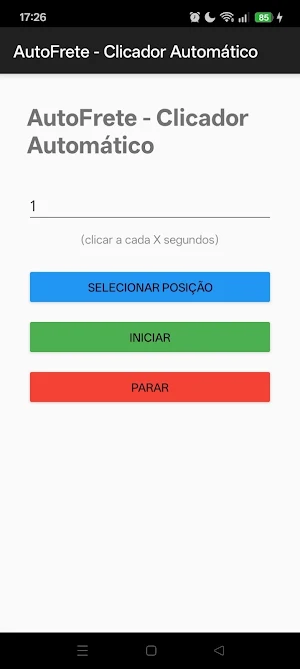

About AutoFrete - Clicador
# AutoFrete - Automatic Clicker
**Automate screen taps with precision and ease!**
AutoFrete is an auto-clicker application that allows you to simulate taps anywhere on your Android device's screen. Perfect for automating repetitive tasks in games, applications, or interface testing.
---
## How does it work?
1. **Select the position**: drag the floating circle to the location where you want to click
2. **Set the interval**: choose how many seconds apart the click should be repeated
3. **Start auto-click**: the app minimizes and starts clicking automatically
4. **Stop at any time**: use the floating "Stop" button to stop immediately
---
## Features
✔ **Visual position selection** – drag the circle on the screen and release to mark the click point
✔ **Customizable interval** – set the time between clicks (in seconds)
✔ **Floating "Stop" button** – quickly stop the auto-click without having to open the app
✔ **Works in any application** – simulates taps in games, browsers, social networks and more
✔ **Easy and intuitive** – simple interface, focus on usability
✔ **Lightweight and fast** – does not consume unnecessary resources Device
---
## Privacy and Security
**No personal data is collected, stored, or shared.**
The app only uses essential permissions:
- **Accessibility Service** – to simulate screen touches
- **Overlay** – to display the floating circle and the "Stop" button
All functionalities occur **locally on your device**. The app **does not have internet access** and does not send information anywhere.
---
## ⚠️ How to activate the Accessibility Service
1. Open your Android **Settings**
2. Access **Accessibility**
3. Find **AutoFrete** and activate the service
4. Return to the app and you're done!
---
## Who is this app for?
- Users who play games and need to repeat actions
- Developers testing interfaces
- Anyone who wants to automate repetitive clicks
---
## Install now and simplify your routine!
If you have any questions or suggestions, please contact us.
**AutoFrete – Your intelligent automatic clicker!**
---
**Note:** This application has no affiliation with any third-party games or applications. Use responsibly and respect the terms of service of each app.
**Compatible with:** Android 7.0 (Nougat) or higher.
**Automate screen taps with precision and ease!**
AutoFrete is an auto-clicker application that allows you to simulate taps anywhere on your Android device's screen. Perfect for automating repetitive tasks in games, applications, or interface testing.
---
## How does it work?
1. **Select the position**: drag the floating circle to the location where you want to click
2. **Set the interval**: choose how many seconds apart the click should be repeated
3. **Start auto-click**: the app minimizes and starts clicking automatically
4. **Stop at any time**: use the floating "Stop" button to stop immediately
---
## Features
✔ **Visual position selection** – drag the circle on the screen and release to mark the click point
✔ **Customizable interval** – set the time between clicks (in seconds)
✔ **Floating "Stop" button** – quickly stop the auto-click without having to open the app
✔ **Works in any application** – simulates taps in games, browsers, social networks and more
✔ **Easy and intuitive** – simple interface, focus on usability
✔ **Lightweight and fast** – does not consume unnecessary resources Device
---
## Privacy and Security
**No personal data is collected, stored, or shared.**
The app only uses essential permissions:
- **Accessibility Service** – to simulate screen touches
- **Overlay** – to display the floating circle and the "Stop" button
All functionalities occur **locally on your device**. The app **does not have internet access** and does not send information anywhere.
---
## ⚠️ How to activate the Accessibility Service
1. Open your Android **Settings**
2. Access **Accessibility**
3. Find **AutoFrete** and activate the service
4. Return to the app and you're done!
---
## Who is this app for?
- Users who play games and need to repeat actions
- Developers testing interfaces
- Anyone who wants to automate repetitive clicks
---
## Install now and simplify your routine!
If you have any questions or suggestions, please contact us.
**AutoFrete – Your intelligent automatic clicker!**
---
**Note:** This application has no affiliation with any third-party games or applications. Use responsibly and respect the terms of service of each app.
**Compatible with:** Android 7.0 (Nougat) or higher.
Alternatives to AutoFrete - Clicador
Looking for apps like AutoFrete - Clicador? Here are 6 similar Android apps on Google Play. All of them are free to download.
-
KVISITOR
-
ForsaCoop
-
AquaHelper - Aquarium Helfer
-
ck222
-
PopThought - Idea Tracker
-
Simple Tasks - To Do List
| App | Rating | Price | Installs | Last updated | Compare |
|---|---|---|---|---|---|
| AutoFrete - Clicador | – | Free | 50+ | Jul 28, 2026 | |
| KVISITOR | – | Free | 100+ | Aug 11, 2026 | Compare |
| ForsaCoop | – | Free | 100+ | Nov 4, 2026 | Compare |
| AquaHelper - Aquarium Helfer | – | Free | 5,000+ | – | Compare |
| ck222 | – | Free | 0+ | Sep 11, 2026 | Compare |
| PopThought - Idea Tracker | – | Free | 10+ | Jun 9, 2026 | Compare |
| Simple Tasks - To Do List | – | Free | 10+ | Oct 8, 2026 | Compare |
Similar apps on Google Play
- KVISITOR
- ForsaCoop
- AquaHelper - Aquarium Helfer
- ck222
- PopThought - Idea Tracker
- Simple Tasks - To Do List
- Seeker : Watch Movies,TV drama
- Work Hours Tracker & Timesheet
- Studiory
- mazdek - Kurdish AI
- Catholic AI - Faith Companion
- MilkMix
- Ripple
- StudiFocus-Smart Study Tracker
- MyRepertoire
- Op Retail
- OnlySeek—No Feeds, Just Search
- مداني - الأعضاء
- XformChat-Local RAG
- ExecPrompt
- GlanceHQ
- iRems ID (Admin)
- Name Craft - AI Name Generator
- Bindle
- ACPD Fiscal